Advanced navigation app

In this example, we are going to create an App that allows users to long press on the map to add a destination to request routes and display the routes on the map, this app also enables route selection from alternative routes, lastly, users can start navigation by tapping the “Start” button, then the app will present the NavigationViewController to begin turn-by-turn navigation.
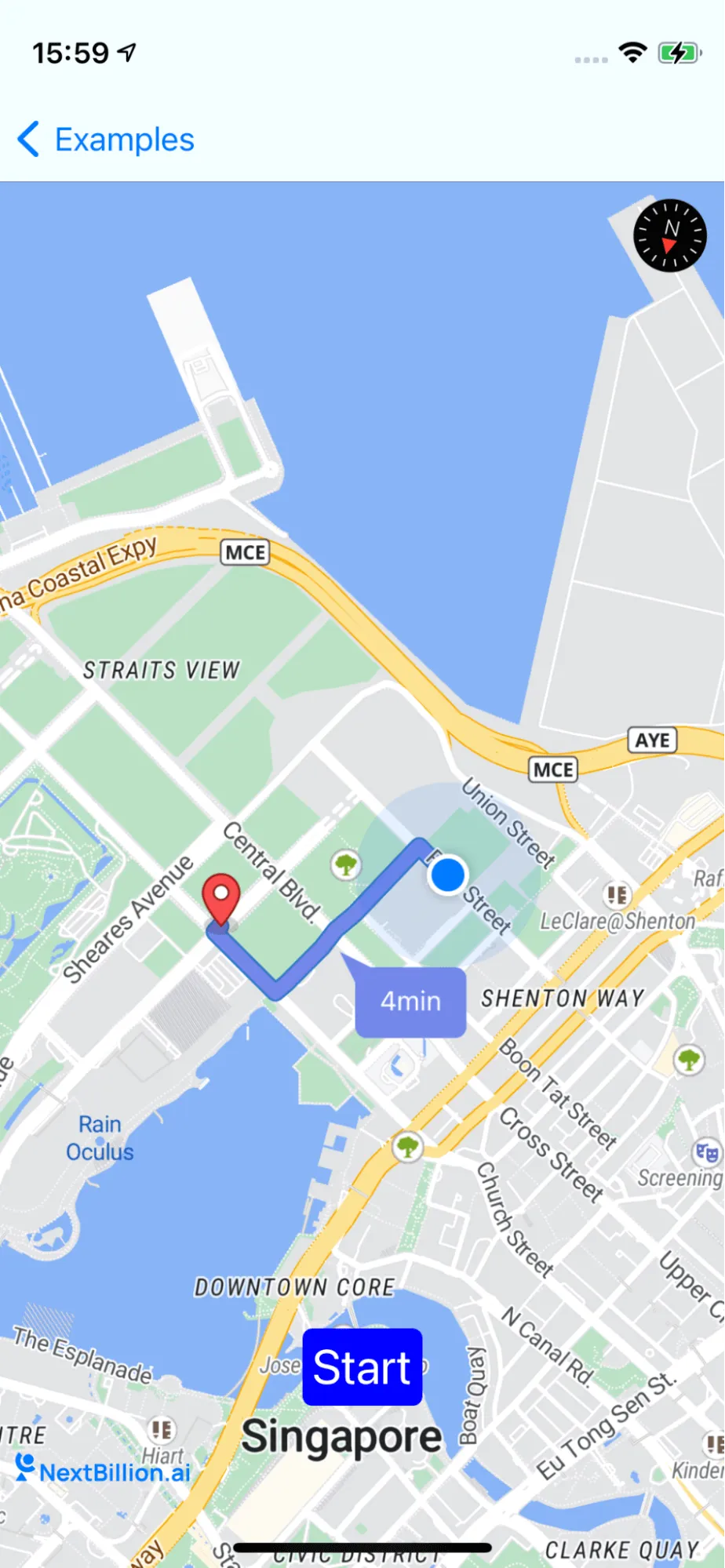
documentation image

For all code examples, refer to Navigation Code Examples

AdvancedNavigationViewController view code

1
import UIKit
2
import NbmapNavigation
3
import NbmapCoreNavigation
4
import Nbmap
5
6
class AdvancedNavigationViewController: UIViewController, NGLMapViewDelegate {
7
8
var navigationMapView: NavigationMapView? {
9
didSet {
10
oldValue?.removeFromSuperview()
11
if let navigationMapView = navigationMapView {
12
view.insertSubview(navigationMapView, at: 0)
13
}
14
}
15
}
16
17
var routes : [Route]? {
18
didSet {
19
guard routes != nil else{
20
startButton.isEnabled = false
21
return
22
}
23
startButton.isEnabled = true
24
25
guard let routes = routes,
26
let current = routes.first else { navigationMapView?.removeRoutes(); return }
27
28
navigationMapView?.showRoutes(routes)
29
navigationMapView?.showWaypoints(current)
30
navigationMapView?.showRouteDurationSymbol(routes)
31
}
32
}
33
34
var startButton = UIButton()
35
36
override func viewDidLoad() {
37
super.viewDidLoad()
38
39
self.navigationMapView = NavigationMapView(frame: view.bounds)
40
41
navigationMapView?.userTrackingMode = .followWithHeading
42
43
let singleTap = UILongPressGestureRecognizer(target: self, action: #selector(didLongPress(tap:)))
44
navigationMapView?.gestureRecognizers?.filter({ $0 is UILongPressGestureRecognizer }).forEach(singleTap.require(toFail:))
45
navigationMapView?.addGestureRecognizer(singleTap)
46
navigationMapView?.delegate = self
47
navigationMapView?.navigationMapDelegate = self
48
49
setupStartButton()
50
51
self.view.setNeedsLayout()
52
53
}
54
55
func setupStartButton() {
56
startButton.setTitle("Start", for: .normal)
57
startButton.layer.cornerRadius = 5
58
startButton.contentEdgeInsets = UIEdgeInsets(top: 5, left: 5, bottom: 5, right: 5)
59
startButton.backgroundColor = .blue
60
61
startButton.addTarget(self, action: #selector(tappedButton), for: .touchUpInside)
62
view.addSubview(startButton)
63
startButton.translatesAutoresizingMaskIntoConstraints = false
64
startButton.bottomAnchor.constraint(equalTo: view.safeAreaLayoutGuide.bottomAnchor, constant: -50).isActive = true
65
startButton.centerXAnchor.constraint(equalTo: view.safeAreaLayoutGuide.centerXAnchor).isActive = true
66
startButton.titleLabel?.font = UIFont.systemFont(ofSize: 25)
67
}
68
69
@objc func tappedButton(sender: UIButton) {
70
guard let routes = self.routes else {
71
return
72
}
73
let navigationService = NBNavigationService(routes: routes, routeIndex: 0)
74
75
let navigationOptions = NavigationOptions(navigationService: navigationService)
76
let navigationViewController = NavigationViewController(for: routes,navigationOptions: navigationOptions)
77
78
// Set the delegate of navigationViewController to subscribe for NavigationView's events, This is optional
79
// navigationViewController.delegate = weakSelf
80
navigationViewController.modalPresentationStyle = .fullScreen
81
82
present(navigationViewController, animated: true, completion: nil)
83
}
84
85
@objc func didLongPress(tap: UILongPressGestureRecognizer) {
86
guard let navigationMapView = navigationMapView, tap.state == .began else {
87
return
88
}
89
let coordinates = navigationMapView.convert(tap.location(in: navigationMapView), toCoordinateFrom: navigationMapView)
90
let destination = Waypoint(coordinate: coordinates, name: "\(coordinates.latitude),\(coordinates.longitude)")
91
addNewDestinationIcon(coordinates: coordinates)
92
93
guard let currentLocation = navigationMapView.userLocation?.coordinate else { return}
94
let currentWayPoint = Waypoint.init(coordinate: currentLocation, name: "My Location")
95
96
requestRoutes(origin: currentWayPoint, destination: destination)
97
}
98
99
100
func addNewDestinationIcon(coordinates: CLLocationCoordinate2D){
101
guard let mapView = navigationMapView else {
102
return
103
}
104
105
if let annotation = mapView.annotations?.last {
106
mapView.removeAnnotation(annotation)
107
}
108
109
let annotation = NGLPointAnnotation()
110
annotation.coordinate = coordinates
111
mapView.addAnnotation(annotation)
112
}
113
114
func requestRoutes(origin: Waypoint, destination: Waypoint){
115
116
let options = NavigationRouteOptions(origin: origin, destination: destination)
117
/**
118
Sets whether the route contains an alternate route
119
By default, it set to `false`
120
*/
121
options.includesAlternativeRoutes = true
122
/**
123
The route classes that the calculated routes will avoid.
124
We can set an array road class to avoid. This property can be set to `.toll`,`.ferry`,`.highway`
125
By default , this property is set to empty
126
*/
127
options.roadClassesToAvoid = [.toll,.ferry,.highway]
128
/**
129
Set up the navigation measurement unit
130
This property should be set to `.metric` or `.imperial`
131
By default, this property is set to the unit following with the current system locale.
132
*/
133
options.distanceMeasurementSystem = .imperial
134
135
/**
136
Set specifying the primary mode of transportation for the routes.
137
This property should be set to `NBNavigationModeCar`, `NBNavigationModeAuto`, `NBNavigationModeBike`, `NBNavigationMode4W`,`NBNavigationMode2W`,`NBNavigationMode6W`, or `NBNavigationModeEscooter`. The default value of this property is `NBNavigationMode4W`, which specifies driving directions.
138
*/
139
options.profileIdentifier = NBNavigationMode.mode4W
140
/**
141
Set the departureTime of the route, By default, it sets the current timestamp since 1970
142
*/
143
options.departureTime = Int(Date().timeIntervalSince1970)
144
145
/**
146
Set up the locale in which the route's instructions are written.
147
If you use NbmapDirections.swift with the Nbmap Directions API, this property affects the sentence contained within the `RouteStep.instructions` property, but it does not affect any road names contained in that property or other properties such as `RouteStep.name`.
148
The Navigation API can provide instructions in [a number of languages]. Set this property to `Bundle.main.preferredLocalizations.first` or `Locale.autoupdatingCurrent` to match the application's language or the system language, respectively.
149
By default, this property is set to the current system locale.
150
*/
151
options.locale = Locale.autoupdatingCurrent
152
153
/**
154
Set map options, This property may make the ETA more accurate. If set to `NBMapOption.valhala`, shapeFormat needs to be set to `polyline`.
155
By default, the value of this property is `NBMapOption.none`
156
*/
157
options.mapOption = NBMapOption.none
158
/**
159
Format of the data from which the shapes of the returned route and its steps are derived.
160
161
This property has no effect on the returned shape objects, although the choice of format can significantly affect the size of the underlying HTTP response.
162
163
The default value of this property is `polyline6`.
164
*/
165
options.shapeFormat = .polyline6
166
167
Directions.shared.calculate(options) { [weak self] routes, error in
168
guard let weakSelf = self else {
169
return
170
}
171
guard error == nil else {
172
print(error!)
173
return
174
}
175
176
guard let routes = routes else { return }
177
178
179
// Process or display routes information.For example, display the routes, waypoints and duration symbol on the map
180
weakSelf.navigationMapView?.showRoutes(routes)
181
weakSelf.navigationMapView?.showRouteDurationSymbol(routes)
182
183
guard let current = routes.first else { return }
184
weakSelf.navigationMapView?.showWaypoints(current)
185
weakSelf.routes = routes
186
}
187
}
188
}
189
190
extension AdvancedNavigationViewController: NavigationMapViewDelegate {
191
// Delegate method called when the user selects a route
192
func navigationMapView(_ mapView: NavigationMapView, didSelect route: Route) {
193
guard let routes = routes else { return }
194
guard let index = routes.firstIndex(where: { $0 == route }) else { return }
195
self.routes!.remove(at: index)
196
self.routes!.insert(route, at: 0)
197
}
198
}

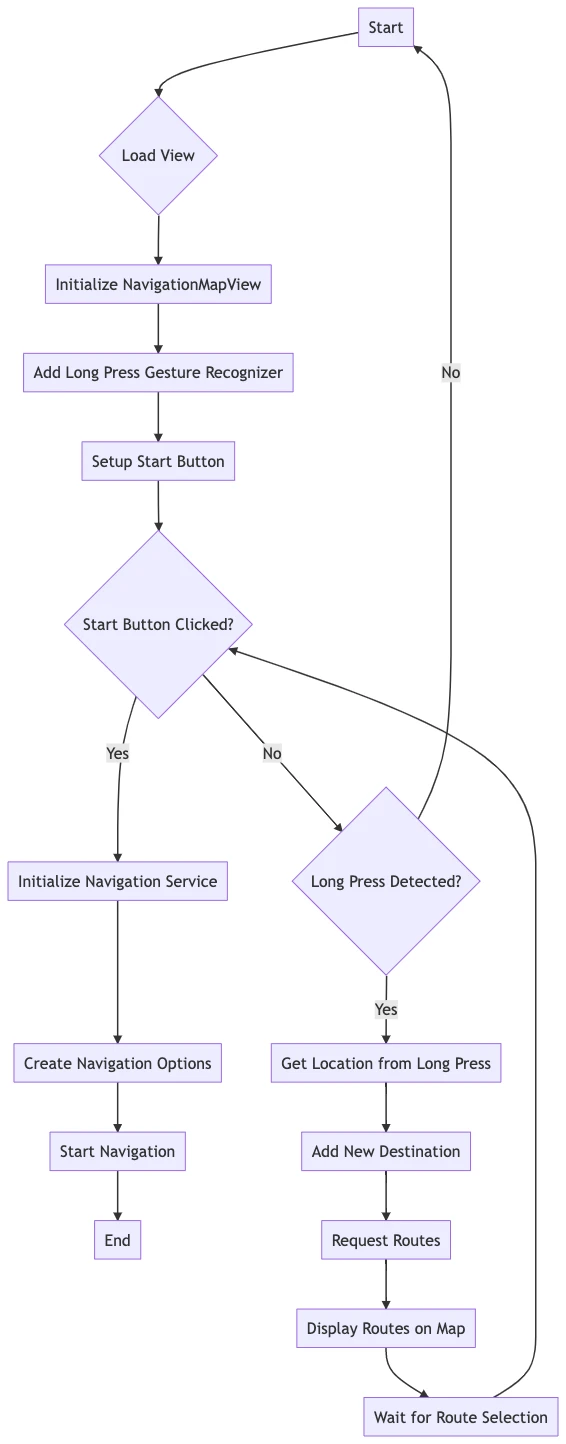
The code defines a custom view controller called AdvancedNavigationViewController that inherits from UIViewController and conforms to the NGLMapViewDelegate protocol. The purpose of this custom view controller is to implement an advanced navigation experience using NbmapNavigation, NbmapCoreNavigation, NbmapDirections, and Nbmap libraries.

  • Import statements: The necessary frameworks are imported at the beginning of the file.

  • navigationMapView: A property for the NavigationMapView instance. When its value is set, the old instance is removed from the view hierarchy, and the new one is inserted as a subview.

  • routes: An array of Route objects. When its value is set, the start button's state is updated accordingly, and the route, waypoints, and route duration symbols are shown on the navigation map view.

  • startButton: A UIButton that initiates navigation when tapped.

  • viewDidLoad(): This method sets up the view controller after the view is loaded. It creates a NavigationMapView, adds a long press gesture recognizer, sets up the start button, and calls view.setNeedsLayout() to invalidate the current layout of the receiver and trigger a layout update during the next update cycle.

  • setupStartButton(): This method configures the start button's appearance and adds a target to handle the button tap.

  • tappedButton(sender:): The action method for the start button tap. It initializes a NBNavigationService, sets up navigation options and a NavigationViewController, and then presents the navigation view controller.

  • didLongPress(tap:): The method that handles the long press gesture. It converts the tap location to coordinates and then adds a new destination based on the coordinates. It also makes a request for routes between the user's current location and the destination.

  • addNewDestinationIcon(coordinates:): This method adds a new destination annotation to the navigation map view.

  • requestRoutes(origin:destination:): This method requests routes between the given origin and destination using the specified options.

  • An extension of AdvancedNavigationViewController that conforms to the NavigationMapViewDelegate protocol. It contains the navigationMapView(_:didSelect:) delegate method to handle when the user selects a route from the displayed routes.
ios-sdk-7