Custom Waypoint Styling

Easily tailor the waypoint styling to suit your preferences and create a visually appealing and intuitive navigation experience.

This example shows:

  • How to customize the UI of waypoints displayed in a route

  • The waypoint styling is customized in CustomWaypointStylingViewController
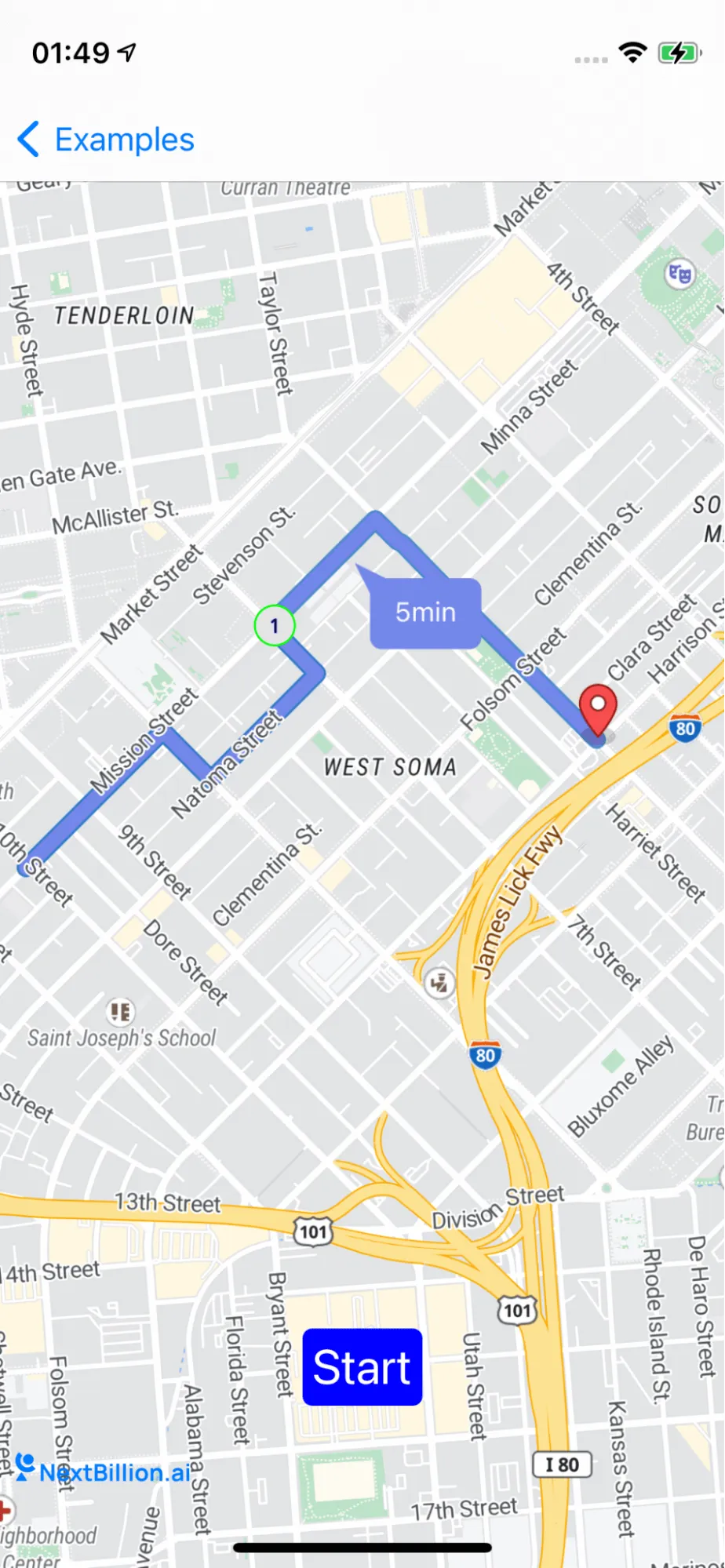
documentation image

For all code examples, refer to Navigation Code Examples

CustomWaypointStylingViewController view source

1
import UIKit
2
import NbmapNavigation
3
import NbmapCoreNavigation
4
import Nbmap
5
6
class CustomWaypointStylingViewController: UIViewController {
7
8
var navigationMapView: NavigationMapView? {
9
didSet {
10
oldValue?.removeFromSuperview()
11
if let navigationMapView = navigationMapView {
12
view.insertSubview(navigationMapView, at: 0)
13
}
14
}
15
}
16
17
var routes : [Route]? {
18
didSet {
19
if oldValue != nil || routes == nil || routes?.first == nil {
20
navigationMapView?.removeRoutes()
21
navigationMapView?.removeRouteDurationSymbol()
22
if let annotation = navigationMapView?.annotations?.last {
23
navigationMapView?.removeAnnotation(annotation)
24
}
25
return
26
}
27
28
guard let routes = routes,
29
let current = routes.first
30
else {
31
return
32
}
33
34
navigationMapView?.showRoutes(routes)
35
navigationMapView?.showWaypoints(current)
36
navigationMapView?.showRouteDurationSymbol(routes)
37
}
38
}
39
40
private let startButton = UIButton()
41
42
override func viewDidLoad() {
43
super.viewDidLoad()
44
45
self.navigationMapView = NavigationMapView(frame: view.bounds)
46
47
navigationMapView?.userTrackingMode = .follow
48
navigationMapView?.navigationMapDelegate = self
49
setupStartButton()
50
requestRoutes()
51
52
}
53
54
func setupStartButton() {
55
startButton.setTitle("Start", for: .normal)
56
startButton.layer.cornerRadius = 5
57
startButton.contentEdgeInsets = UIEdgeInsets(top: 5, left: 5, bottom: 5, right: 5)
58
startButton.backgroundColor = .blue
59
60
startButton.addTarget(self, action: #selector(performAction), for: .touchUpInside)
61
view.addSubview(startButton)
62
startButton.translatesAutoresizingMaskIntoConstraints = false
63
startButton.bottomAnchor.constraint(equalTo: view.safeAreaLayoutGuide.bottomAnchor, constant: -50).isActive = true
64
startButton.centerXAnchor.constraint(equalTo: view.safeAreaLayoutGuide.centerXAnchor).isActive = true
65
startButton.titleLabel?.font = UIFont.systemFont(ofSize: 25)
66
}
67
68
@objc func performAction(_ sender: Any) {
69
guard let routes = self.routes else {
70
return
71
}
72
let navigationService = NBNavigationService(routes: routes, routeIndex: 0)
73
let styles = [DayStyle(), NightStyle()]
74
let navigationOptions = NavigationOptions(styles:styles,navigationService: navigationService)
75
76
let navigationViewController = NavigationViewController(for: routes,navigationOptions: navigationOptions)
77
navigationViewController.modalPresentationStyle = .fullScreen
78
79
navigationViewController.delegate = self
80
81
present(navigationViewController, animated: true, completion: nil)
82
}
83
84
func requestRoutes(){
85
let origin = CLLocation(latitude: 37.775252, longitude: -122.416082)
86
let firstWaypoint = CLLocation(latitude: 37.779196, longitude: -122.410833)
87
let secondWaypoint = CLLocation(latitude: 37.777342, longitude: -122.404094)
88
89
let options = NavigationRouteOptions(locations: [origin,firstWaypoint,secondWaypoint])
90
Directions.shared.calculate(options) { [weak self] routes, error in
91
guard let weakSelf = self else {
92
return
93
}
94
guard error == nil else {
95
print(error!)
96
return
97
}
98
99
guard let routes = routes else { return }
100
weakSelf.routes = routes
101
}
102
}
103
104
105
func customShape(for waypoints: [Waypoint], legIndex: Int) -> NGLShape? {
106
var features = [NGLPointFeature]()
107
108
for (waypointIndex, waypoint) in waypoints.enumerated() {
109
let feature = NGLPointFeature()
110
feature.coordinate = waypoint.coordinate
111
feature.attributes = [
112
"waypointCompleted": waypointIndex < legIndex,
113
"name": waypointIndex + 1
114
]
115
features.append(feature)
116
}
117
118
return NGLShapeCollectionFeature(shapes: features)
119
}
120
121
func customWaypointCircleStyleLayer(identifier: String, source: NGLSource) -> NGLStyleLayer {
122
let circles = NGLCircleStyleLayer(identifier: identifier, source: source)
123
let opacity = NSExpression(forConditional: NSPredicate(format: "waypointCompleted == true"), trueExpression: NSExpression(forConstantValue: 0.5), falseExpression: NSExpression(forConstantValue: 1))
124
125
circles.circleColor = NSExpression(forConstantValue: UIColor(red:0.9, green:0.9, blue:0.9, alpha:1.0))
126
circles.circleOpacity = opacity
127
circles.circleRadius = NSExpression(forConstantValue: 10)
128
circles.circleStrokeColor = NSExpression(forConstantValue: UIColor.green)
129
circles.circleStrokeWidth = NSExpression(forConstantValue: 1)
130
circles.circleStrokeOpacity = opacity
131
132
return circles
133
}
134
135
func customWaypointSymbolStyleLayer(identifier: String, source: NGLSource) -> NGLStyleLayer {
136
let symbol = NGLSymbolStyleLayer(identifier: identifier, source: source)
137
138
symbol.text = NSExpression(format: "CAST(name, 'NSString')")
139
symbol.textOpacity = NSExpression(forConditional: NSPredicate(format: "waypointCompleted == true"), trueExpression: NSExpression(forConstantValue: 0.5), falseExpression: NSExpression(forConstantValue: 1))
140
symbol.textFontSize = NSExpression(forConstantValue: 10)
141
symbol.textHaloWidth = NSExpression(forConstantValue: 0.25)
142
symbol.textHaloColor = NSExpression(forConstantValue: UIColor.blue)
143
144
return symbol
145
}
146
147
}
148
149
extension CustomWaypointStylingViewController: NavigationMapViewDelegate {
150
151
func navigationMapView(_ mapView: NavigationMapView, waypointStyleLayerWithIdentifier identifier: String, source: NGLSource) -> NGLStyleLayer? {
152
return customWaypointCircleStyleLayer(identifier: identifier, source: source)
153
}
154
155
func navigationMapView(_ mapView: NavigationMapView, waypointSymbolStyleLayerWithIdentifier identifier: String, source: NGLSource) -> NGLStyleLayer? {
156
return customWaypointSymbolStyleLayer(identifier: identifier, source: source)
157
}
158
159
func navigationMapView(_ mapView: NavigationMapView, shapeFor waypoints: [Waypoint], legIndex: Int) -> NGLShape? {
160
return customShape(for: waypoints, legIndex: legIndex)
161
}
162
}
163
164
extension CustomWaypointStylingViewController: NavigationViewControllerDelegate {
165
func navigationViewController(_ navigationViewController: NavigationViewController, waypointStyleLayerWithIdentifier identifier: String, source: NGLSource) -> NGLStyleLayer? {
166
return customWaypointCircleStyleLayer(identifier: identifier, source: source)
167
}
168
169
func navigationViewController(_ navigationViewController: NavigationViewController, waypointSymbolStyleLayerWithIdentifier identifier: String, source: NGLSource) -> NGLStyleLayer? {
170
return customWaypointSymbolStyleLayer(identifier: identifier, source: source)
171
}
172
173
func navigationViewController(_ navigationViewController: NavigationViewController, shapeFor waypoints: [Waypoint], legIndex: Int) -> NGLShape? {
174
return customShape(for: waypoints, legIndex: legIndex)
175
}
176
177
}

The code example is for a CustomWaypointStylingViewController class. This class is used to customize the UI of waypoints displayed in a route. The class does this by overriding the navigationMapView(_:waypointStyleLayerWithIdentifier:source:), navigationMapView**(:waypointSymbolStyleLayerWithIdentifier:source:)**, and **navigationMapView(:shapeFor:legIndex:)** methods. The navigationMapView(_:waypointStyleLayerWithIdentifier:source:) method is used to customize the style of the waypoint circle. The method takes three parameters:

  • mapView: The NavigationMapView instance that is displaying the route.
  • identifier: The identifier of the style layer.
  • source: The source of the style layer.

The method returns a NGLStyleLayer instance that represents the custom style of the waypoint circle. The NGLStyleLayer instance can be used to specify the color, opacity, radius, and stroke of the waypoint circle.

The navigationMapView(_:waypointSymbolStyleLayerWithIdentifier:source:) method is used to customize the style of the waypoint symbol. The method takes three parameters:

  • mapView: The NavigationMapView instance that is displaying the route.

  • identifier: The identifier of the style layer.

  • source: The source of the style layer.

The method returns a NGLStyleLayer instance that represents the custom style of the waypoint symbol. The NGLStyleLayer instance can be used to specify the text, opacity, font size, halo width, and halo color of the waypoint symbol.

The navigationMapView(_:shapeFor:legIndex:) method is used to customize the shape of the waypoints. The method takes three parameters:

  • mapView: The NavigationMapView instance that is displaying the route.

  • waypoints: The waypoints that are being displayed.

  • egIndex: The index of the current leg.

The method returns a NGLShape instance that represents the custom shape of the waypoints. The NGLShape instance can be used to specify the coordinates of the waypoints.

By overriding these methods, you can customize the UI of waypoints displayed in a route. Here are some examples of how you can use the CustomWaypointStylingViewController class to customize the UI of waypoints:

  • You can change the color of the waypoint circle.

  • You can change the opacity of the waypoint circle.

  • You can change the radius of the waypoint circle.

  • You can change the stroke of the waypoint circle.

  • You can change the text of the waypoint symbol.

  • You can change the opacity of the waypoint symbol.

  • You can change the font size of the waypoint symbol.

  • You can change the halo width of the waypoint symbol.

  • You can change the halo color of the waypoint symbol.

  • You can change the coordinates of the waypoints.