Custom Waypoint arrival screen

Customize the arrival experience to enhance user engagement and control during their navigation journey.

This example shows:

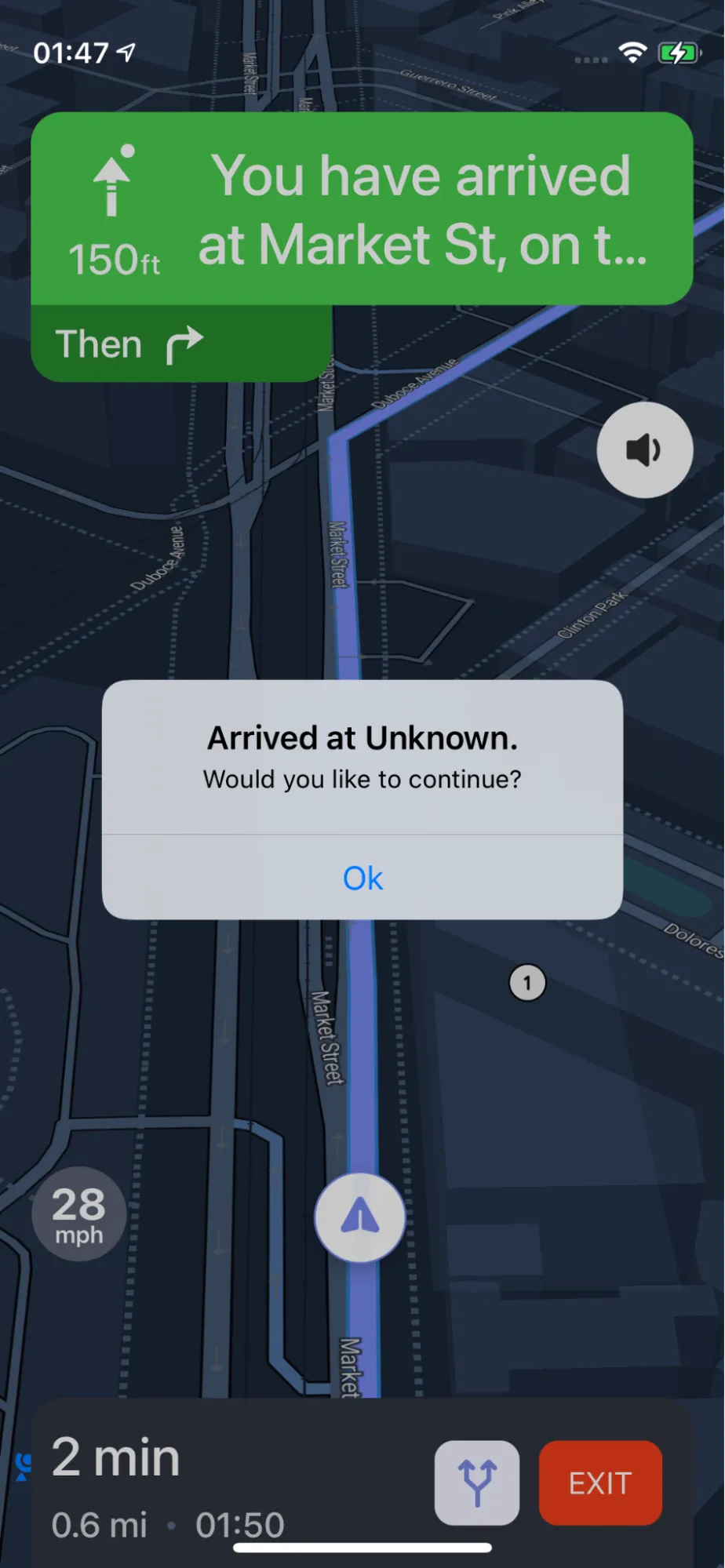
  • How to customize the arrival screen when arriving at a waypoint of the route

  • In the example code, arrival screen will show the waypoint name and user could choose to continue navigating to next waypoint
documentation image

For all code examples, refer to Navigation Code Examples

CustomWaypointScreenController view source

1
import UIKit
2
import NbmapNavigation
3
import NbmapCoreNavigation
4
5
class CustomWaypointScreenController: UIViewController {
6
7
override func viewDidLoad() {
8
super.viewDidLoad()
9
10
let origin = CLLocation(latitude: 37.77440680146262, longitude: -122.43539772352648)
11
let waypoint = CLLocation(latitude: 37.76856957793795, longitude: -122.42709811526268)
12
let destination = CLLocation(latitude: 37.76556957793795, longitude: -122.42409811526268)
13
let options = NavigationRouteOptions(locations: [origin,waypoint,destination])
14
Directions.shared.calculate(options) { [weak self] routes, error in
15
guard let strongSelf = self else {
16
return
17
}
18
guard error == nil else {
19
print(error!)
20
return
21
}
22
23
guard let routes = routes else { return }
24
25
let navigationService = NBNavigationService(routes: routes, routeIndex: 0, simulating : simulationIsEnabled ? SimulationMode.always : SimulationMode.onPoorGPS)
26
27
let navigationOptions = NavigationOptions(navigationService: navigationService)
28
29
let navigationViewController = NavigationViewController(for: routes,navigationOptions: navigationOptions)
30
navigationViewController.modalPresentationStyle = .fullScreen
31
navigationViewController.delegate = self
32
33
// Start navigation
34
strongSelf.present(navigationViewController, animated: true, completion: nil)
35
}
36
}
37
}
38
39
extension CustomWaypointScreenController : NavigationViewControllerDelegate {
40
func navigationViewController(_ navigationViewController: NavigationViewController, didArriveAt waypoint: Waypoint) -> Bool {
41
let isFinalLeg = navigationViewController.navigationService.routeProgress.isFinalLeg
42
if isFinalLeg {
43
return true
44
}
45
46
let alert = UIAlertController(title: "Arrived at \(waypoint.name ?? "Unknown").", message: "Would you like to continue?", preferredStyle: .alert)
47
alert.addAction(UIAlertAction(title: "Ok", style: .default, handler: { _ in
48
// Begin the next leg once the driver confirms
49
guard !isFinalLeg else { return }
50
navigationViewController.navigationService.router.routeProgress.legIndex += 1
51
navigationViewController.navigationService.start()
52
}))
53
navigationViewController.present(alert, animated: true, completion: nil)
54
55
return false
56
}
57
}

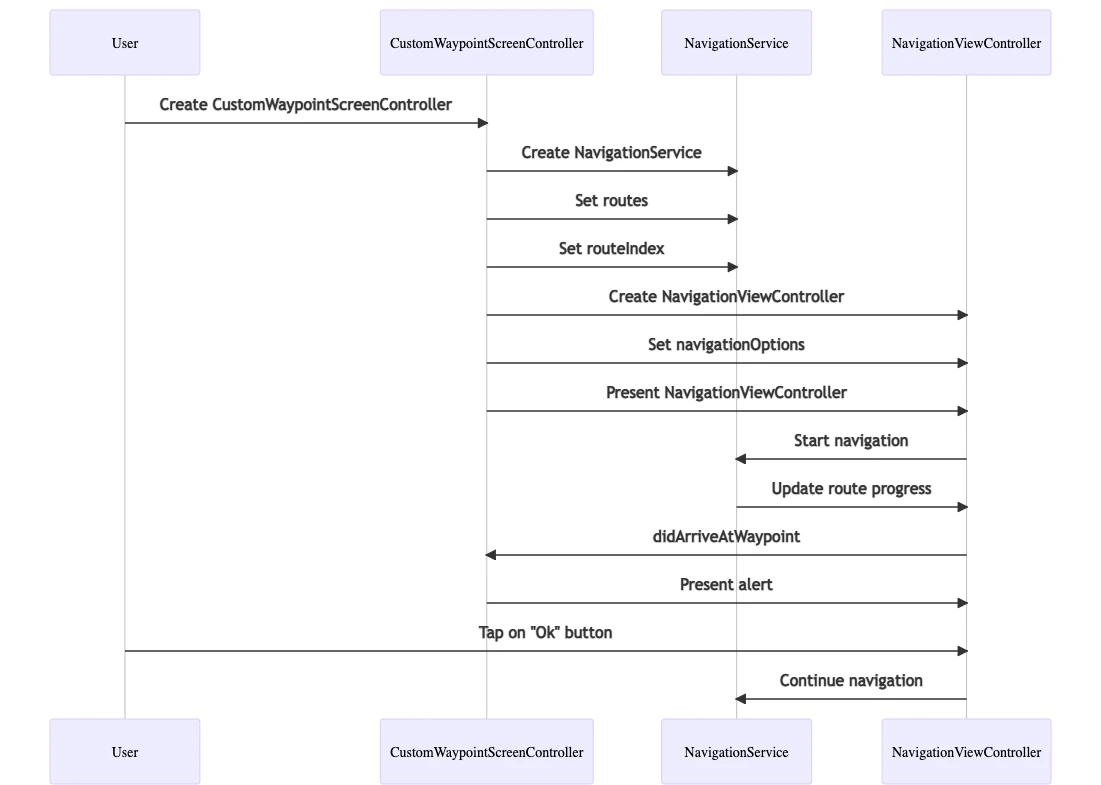
This class is a view controller that allows users to navigate to a destination with waypoints. The class has the following properties:

  • origin: The origin location of the navigation.

  • waypoint: The waypoint location of the navigation.

  • destination: The destination location of the navigation.

  • routes: An array of Route objects that represent the routes between the origin, waypoint, and destination.

  • navigationService: A NBNavigationService object that is used to control the navigation.

  • navigationViewController: A NavigationViewController object that is used to display the navigation.

The class has the following methods:

  • viewDidLoad(): This method is called when the view controller is loaded. In this method, the navigation service is created and configured.

  • didArriveAtWaypoint(): This method is called when the navigation service arrives at a waypoint. In this method, an alert is presented to the user asking if they would like to continue to the next waypoint.

The code you provided also has an extension:

  • CustomWaypointScreenController: NavigationViewControllerDelegate

This extension conforms the CustomWaypointScreenController class to the NavigationViewControllerDelegate protocol. This protocol allows the CustomWaypointScreenController class to respond to events from the navigation controller.
ios-sdk-7