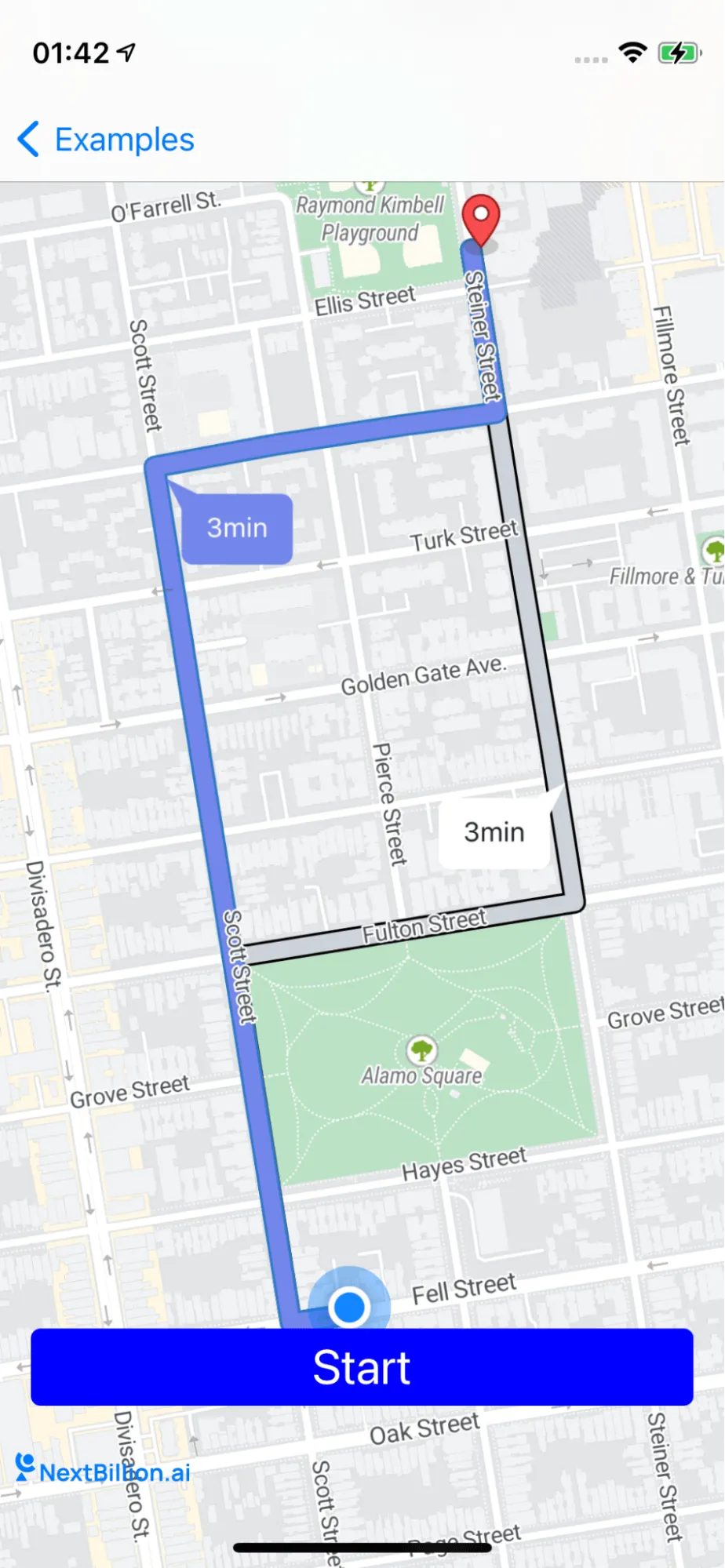
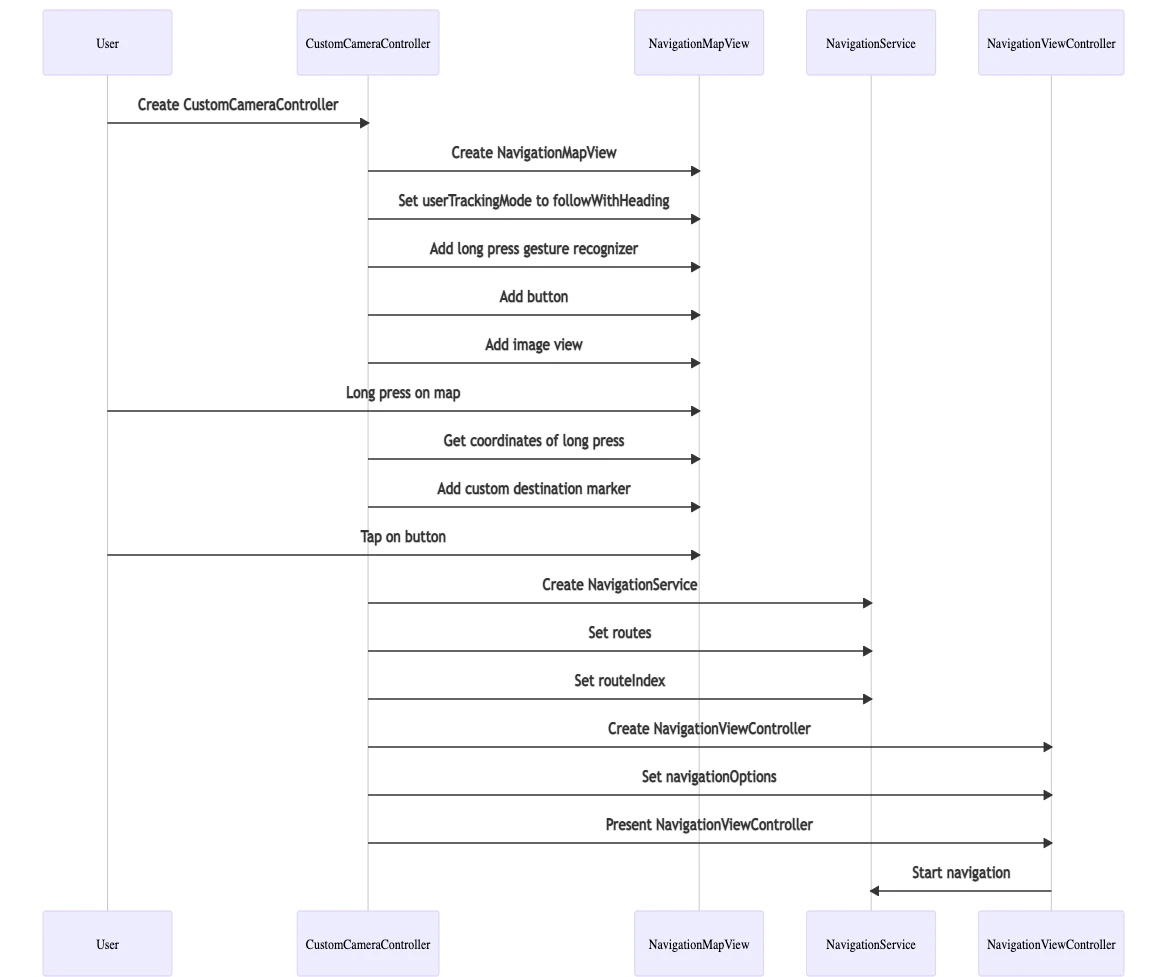
3
import NbmapCoreNavigation
6
class CustomCameraController: UIViewController, NGLMapViewDelegate, NavigationViewControllerDelegate {
8
var mapView: NavigationMapView? {
10
oldValue?.removeFromSuperview()
11
if let mapView = mapView {
12
view.insertSubview(mapView, at: 0)
17
var routes : [Route]? {
19
guard let routes = routes,
20
let current = routes.first
22
mapView?.removeRoutes()
23
mapView?.removeRouteDurationSymbol()
24
if let annotation = mapView?.annotations?.last {
25
mapView?.removeAnnotation(annotation)
31
mapView?.showRoutes(routes)
32
mapView?.showWaypoints(current)
33
mapView?.showRouteDurationSymbol(routes)
35
fitCameraWithRoutes(routes: routes)
39
var startButton = UIButton()
41
var trackingImage = UIImageView()
43
override func viewDidLoad() {
46
self.mapView = NavigationMapView(frame: view.bounds)
48
mapView?.userTrackingMode = .followWithHeading
50
let singleTap = UILongPressGestureRecognizer(target: self, action: #selector(didLongPress(tap:)))
51
mapView?.gestureRecognizers?.filter({ $0 is UILongPressGestureRecognizer }).forEach(singleTap.require(toFail:))
52
mapView?.addGestureRecognizer(singleTap)
53
mapView?.delegate = self
56
setupLocationTrackingButton()
59
func setupStartButton() {
60
startButton.setTitle("Start", for: .normal)
61
startButton.layer.cornerRadius = 5
62
startButton.contentEdgeInsets = UIEdgeInsets(top: 5, left: 5, bottom: 5, right: 5)
63
startButton.backgroundColor = .blue
65
startButton.addTarget(self, action: #selector(tappedButton), for: .touchUpInside)
66
view.addSubview(startButton)
67
startButton.translatesAutoresizingMaskIntoConstraints = false
68
startButton.bottomAnchor.constraint(equalTo: view.safeAreaLayoutGuide.bottomAnchor, constant: -50).isActive = true
69
startButton.centerXAnchor.constraint(equalTo: view.safeAreaLayoutGuide.centerXAnchor).isActive = true
70
startButton.titleLabel?.font = UIFont.systemFont(ofSize: 25)
73
func setupLocationTrackingButton(){
74
trackingImage.isUserInteractionEnabled = true
75
trackingImage.addGestureRecognizer(UITapGestureRecognizer(target: self, action: #selector(trackingClick)))
76
trackingImage.image = UIImage(named: "my_location")
77
view.addSubview(trackingImage)
78
startButton.translatesAutoresizingMaskIntoConstraints = false
79
startButton.bottomAnchor.constraint(equalTo: view.safeAreaLayoutGuide.bottomAnchor, constant: -50).isActive = true
80
startButton.leadingAnchor.constraint(equalTo: view.safeAreaLayoutGuide.leadingAnchor,constant: 16).isActive = true
83
@objc func didLongPress(tap: UILongPressGestureRecognizer) {
84
guard let mapView = mapView, tap.state == .began else {
87
let coordinates = mapView.convert(tap.location(in: mapView), toCoordinateFrom: mapView)
88
let destination = Waypoint(coordinate: coordinates, name: "\(coordinates.latitude),\(coordinates.longitude)")
90
guard let currentLocation = mapView.userLocation?.coordinate else { return}
91
let currentWayPoint = Waypoint.init(coordinate: currentLocation, name: "My Location")
93
requestRoutes(origin: currentWayPoint, destination: destination)
97
@objc func tappedButton(sender: UIButton) {
98
guard let routes = self.routes else {
101
var engineConfig = NavigationEngineConfig()
103
engineConfig.minNavigationCameraZoom = 16
104
engineConfig.maxNavigationCameraZoom = 18
105
let navigationService = NBNavigationService(routes: routes, routeIndex: 0,navigationEngConfig: engineConfig)
107
let navigationOptions = NavigationOptions(navigationService: navigationService)
108
let navigationViewController = NavigationViewController(for: routes,navigationOptions: navigationOptions)
109
navigationViewController.modalPresentationStyle = .fullScreen
111
navigationViewController.delegate = self
114
present(navigationViewController, animated: true, completion: nil)
117
@objc func trackingClick() {
118
guard let location = mapView?.userLocation else {
121
guard let newCamera = mapView?.camera else {
124
newCamera.centerCoordinate = location.coordinate
125
newCamera.viewingDistance = 1000
126
mapView?.setCamera(newCamera, animated: true)
129
func fitCameraWithRoutes(routes: [Route]) {
130
guard let mapView = mapView else {
134
var coordinates: [CLLocationCoordinate2D] = []
135
routes.forEach({route in
136
coordinates.append(contentsOf: route.coordinates!)
138
let polyLine = NGLPolyline(coordinates: coordinates, count: UInt(coordinates.count))
139
let camera = mapView.cameraThatFitsShape(polyLine, direction: mapView.camera.heading, edgePadding: UIEdgeInsets(top: view.safeAreaInsets.top, left: view.safeAreaInsets.left, bottom: view.safeAreaInsets.bottom, right: view.safeAreaInsets.right))
140
mapView.setCamera(camera, animated: true)
143
func requestRoutes(origin: Waypoint, destination: Waypoint){
144
let options = NavigationRouteOptions(origin: origin, destination: destination)
146
Directions.shared.calculate(options) { [weak self] routes, error in
147
guard let weakSelf = self else {
150
guard error == nil else {
155
guard let routes = routes else { return }
156
weakSelf.routes = routes