Custom destination marker

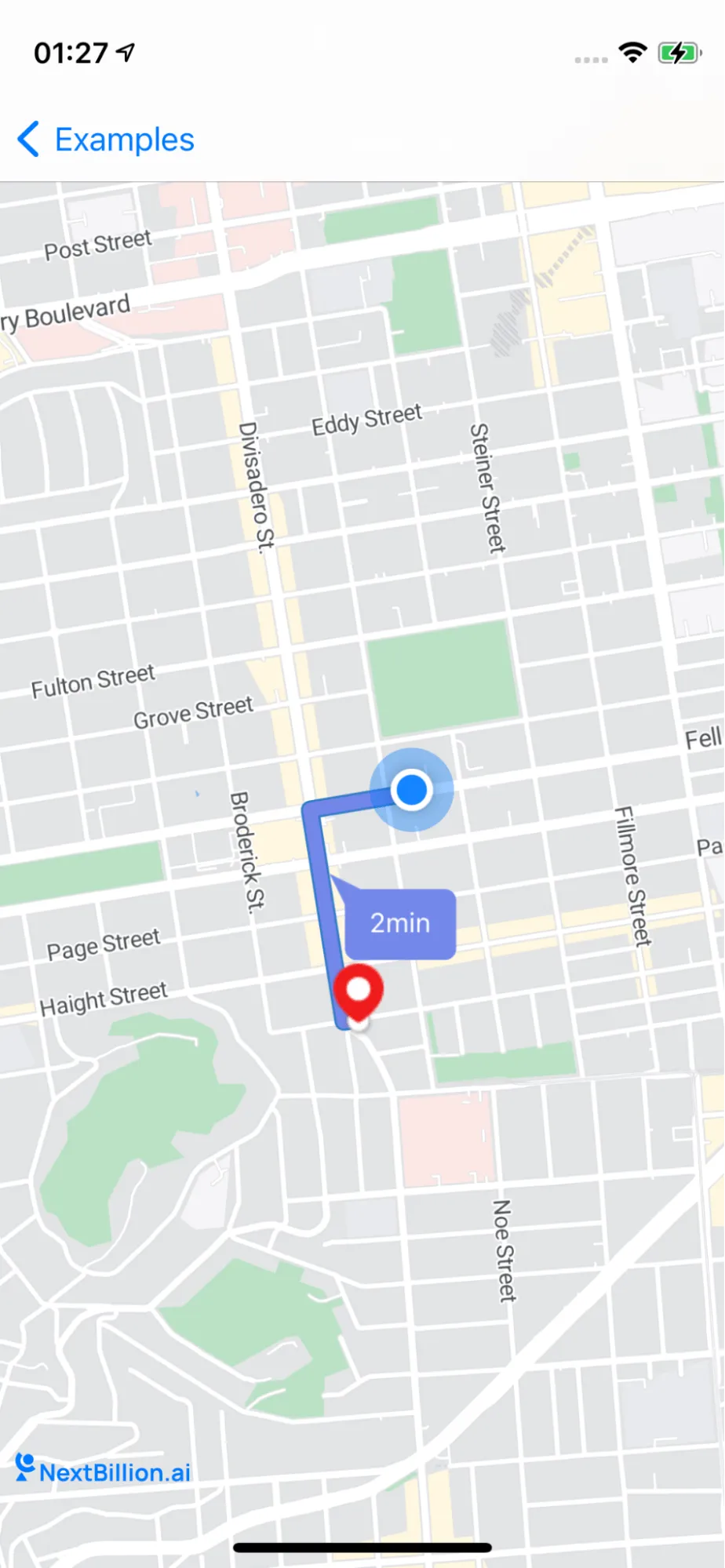
Enhance the visual representation of destination markers and provide users with real-time ETA information.

This example shows:

  • How to Custom destination marker

  • How to show route ETA on top of route line on map
documentation image

For all code examples, refer to Navigation Code Examples

CustomDestinationMarkerController view source

1
import UIKit
2
import NbmapNavigation
3
import NbmapCoreNavigation
4
import Nbmap
5
6
class CustomDestinationMarkerController: UIViewController {
7
8
var mapView: NavigationMapView? {
9
didSet {
10
oldValue?.removeFromSuperview()
11
if let mapView = mapView {
12
view.insertSubview(mapView, at: 0)
13
}
14
}
15
}
16
17
var routes : [Route]?
18
19
override func viewDidLoad() {
20
super.viewDidLoad()
21
22
self.mapView = NavigationMapView(frame: view.bounds)
23
24
mapView?.userTrackingMode = .followWithHeading
25
26
let singleTap = UILongPressGestureRecognizer(target: self, action: #selector(didLongPress(tap:)))
27
mapView?.gestureRecognizers?.filter({ $0 is UILongPressGestureRecognizer }).forEach(singleTap.require(toFail:))
28
mapView?.addGestureRecognizer(singleTap)
29
mapView?.delegate = self
30
31
}
32
33
@objc func didLongPress(tap: UILongPressGestureRecognizer) {
34
guard let mapView = mapView, tap.state == .began else {
35
return
36
}
37
let coordinates = mapView.convert(tap.location(in: mapView), toCoordinateFrom: mapView)
38
// Note: The destination name can be modified. The value is used in the top banner when arriving at a destination.
39
let destination = Waypoint(coordinate: coordinates, name: "\(coordinates.latitude),\(coordinates.longitude)")
40
addNewDestinationcon(coordinates: coordinates)
41
42
guard let currentLocation = mapView.userLocation?.coordinate else { return}
43
let currentWayPoint = Waypoint.init(coordinate: currentLocation, name: "My Location")
44
45
requestRoutes(origin: currentWayPoint, destination: destination)
46
}
47
48
@IBAction func startNavigation(_ sender: Any) {
49
guard let routes = self.routes else {
50
return
51
}
52
let navigationService = NBNavigationService(routes: routes, routeIndex: 0)
53
54
let navigationOptions = NavigationOptions(navigationService: navigationService)
55
56
let navigationViewController = NavigationViewController(for: routes,navigationOptions: navigationOptions)
57
navigationViewController.modalPresentationStyle = .fullScreen
58
59
navigationViewController.delegate = self
60
61
present(navigationViewController, animated: true, completion: nil)
62
63
}
64
65
func addNewDestinationcon(coordinates: CLLocationCoordinate2D){
66
guard let mapView = mapView else {
67
return
68
}
69
70
if let annotation = mapView.annotations?.last {
71
mapView.removeAnnotation(annotation)
72
}
73
74
let annotation = NGLPointAnnotation()
75
annotation.coordinate = coordinates
76
mapView.addAnnotation(annotation)
77
}
78
79
func requestRoutes(origin: Waypoint, destination: Waypoint){
80
81
let options = RouteOptions.init(origin: origin, destination: destination)
82
// Includes alternative routes in the response
83
options.includesAlternativeRoutes = true
84
85
// Set the measurement format system
86
options.distanceMeasurementSystem = MeasurementSystem.metric
87
88
Directions.shared.calculate(options) { [weak self] routes, error in
89
guard let weakSelf = self else {
90
return
91
}
92
guard error == nil else {
93
print(error!)
94
return
95
}
96
97
guard let routes = routes else { return }
98
99
100
// Process or display routes information.For example,display the routes,waypoints and duration symbol on the map
101
weakSelf.mapView?.showRoutes(routes)
102
weakSelf.mapView?.showRouteDurationSymbol(routes)
103
104
guard let current = routes.first else { return }
105
weakSelf.mapView?.showWaypoints(current)
106
weakSelf.routes = routes
107
}
108
}
109
110
}
111
112
extension CustomDestinationMarkerController : NGLMapViewDelegate {
113
114
func mapView(_ mapView: NGLMapView, imageFor annotation: NGLAnnotation) -> NGLAnnotationImage? {
115
let image = UIImage(named: "marker", in: .main, compatibleWith: nil)!.withRenderingMode(.alwaysOriginal)
116
return NGLAnnotationImage(image: image, reuseIdentifier: "destination_icon_identifier")
117
}
118
}
119
120
extension CustomDestinationMarkerController : NavigationViewControllerDelegate {
121
122
func navigationViewController(_ navigationViewController: NavigationViewController, imageFor annotation: NGLAnnotation) -> NGLAnnotationImage? {
123
let image = UIImage(named: "marker", in: .main, compatibleWith: nil)!.withRenderingMode(.alwaysOriginal)
124
return NGLAnnotationImage(image: image, reuseIdentifier: "destination_icon_identifier")
125
}
126
}
127

The class CustomDestinationMarkerController is a view controller that allows users to add a custom destination marker to a map. The class has the following properties:

  • mapView: A NavigationMapView object that displays the map.

  • routes: An array of Route objects that represent the routes between the user's current location and the custom destination marker.

The class has the following methods:

  • viewDidLoad(): This method is called when the view controller is loaded. In this method, the map view is created and configured.

  • didLongPress(): This method is called when the user long-presses on the map. In this method, a custom destination marker is added to the map at the location of the long press.

  • startNavigation(): This method is called when the user taps the "Start Navigation" button. In this method, a navigation controller is created and presented to the user. The navigation controller uses the routes property to display the route between the user's current location and the custom destination marker.

  • addNewDestinationcon(): This method adds a new destination annotation to the map.

  • requestRoutes(): This method requests routes between the user's current location and the custom destination marker.

  • mapView(_:imageFor:): This method is called by the map view to get an image for an annotation. In this method, a custom image is returned for the destination annotation.

  • navigationViewController(_:imageFor:): This method is called by the navigation controller to get an image for an annotation. In this method, a custom image is returned for the destination annotation.

The code also has two extensions:

  • CustomDestinationMarkerController: NGLMapViewDelegate

  • CustomDestinationMarkerController: NavigationViewControllerDelegate

These extensions conform the CustomDestinationMarkerController class to the NGLMapViewDelegate and NavigationViewControllerDelegate protocols. These protocols allow the CustomDestinationMarkerController class to respond to events from the map view and the navigation controller.