Vehicle: Max Distance & Max Travel Time
The total distance that a vehicle can drive or the total travel time that a vehicle can operate for, is an important business constraint for many logistics providers as well as fleet owners. NextBillion.ai’s Route Optimization API offers two independent parameters - max_distance and max_travel_time for each vehicle, to implement similar real-world business limitations easily. These parameters can be leveraged to optimize the usage of vehicles and prevent them against unexpected operating cost, potential breakdowns or just control the fuel consumptions.
Setup
In this example, we will complete 8 deliveries using 3 vehicles and each of the vehicles will have either one or both distance and travel time limitations. We define the locations, delivery jobs, vehicles and their constraints one by one in the following sections.
Locations
First, we define the locations object and add all the location coordinates used in the problem along with a valid id. The locations object used in this example:
Jobs
Next, we define 8 delivery jobs. For each delivery task we add:
- A unique identifier
- Location index
- Delivery quantity
- A service time to carry out the delivery
Let’s take a look at the
jobsJSON after the above properties are configured:
Vehicles
Next, we add 3 vehicles that are going to fulfill the deliveries within the defined constraints of max_travel_time and max_distance. To describe the vehicles and their properties we add:
- A unique ID for each vehicle
capacityindicating the amount of load that the vehicle can takestart_indexto denote the point from where the vehicle would start.max_distanceto limit the total distance that the vehicle can travelmax_travel_timeto limit the total drive time of the vehicle.
Once the vehicle and their properties are defined, the resulting vehicles JSON is:
Optimization POST Request
Now let’s put all these components together and create the final POST request that we will submit to the optimizer.
Optimization POST Response
Once the request is made, we get a unique ID in the API response:
Optimization GET Request
We take the ID and use the Optimization GET request to retrieve the result. Here is the GET request:
Optimization GET Response
Following is the optimized route plan:
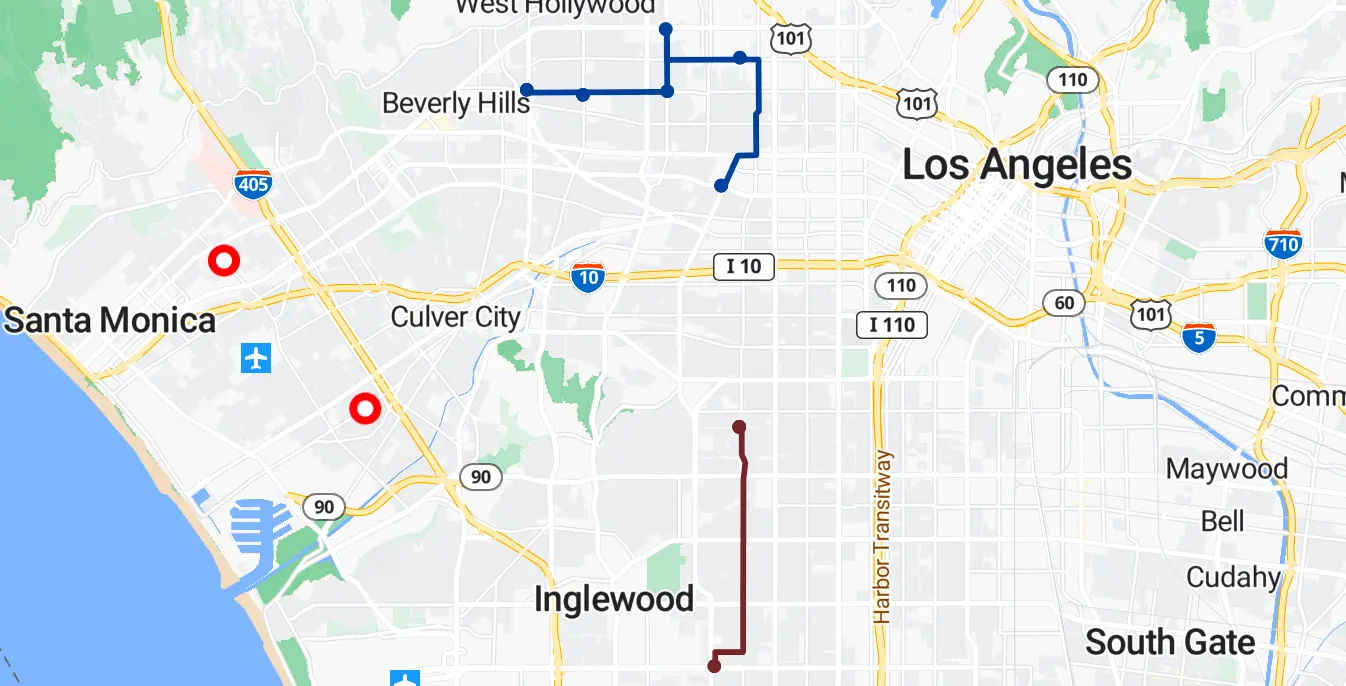
Following image shows a visual representation of the above route plan.
Analyzing the Solution
Looking at the result we can draw following insights:
- We can see that 7 deliveries were completed and 1 was left unassigned.
- All 3 vehicles were used to complete the 7 deliveries.
- Vehicle 1 covered a total of ~14 kms with a total drive time of 16 minutes. Similarly, Vehicle 2 used up ~11.2 kms and around 20 minutes, while Vehicle 3 exhausted ~12.7 kms and around 26 minutes of time. All these metrics are well under the respective distance and driving time limits specified for individual vehicles.
- The only delivery, Delivery 6, which remains unassigned due to these travel limit constraints can be found under the
unassignedattribute in the response with the respective “reason”.
Above example demonstrates how NextBillion.ai’s Route Optimization API works within the configured operational constraints of each vehicle and suggests the best solution while honoring those constraints. We encourage you to try out different configurations of vehicle or task locations, number of tasks, and different distance and travel time constraint values to explore how varying solutions are returned under different scenarios presented to Route Optimization API.
Learn more about the other powerful features and the related use cases that Route Optimization API can solve for you.