# Route Reconstruction API
## Introduction
With NextBillion.ai’s Route Reconstruction API, you can recreate the actual route taken during a completed trip by providing the waypoints or locations tracked during the trip, as input. Total distance covered during the trip and the geometry of the route taken is returned in the response. Users also have the option to indicate if a trip was a round trip or not.
Let’s take a look at the parameters available for this API.
POST
https://api.nextbillion.io/route-reconstruction?key={your_api_key}
## Request Parameters
| Name | Required | Format and Usage | Description |
|------|----------|------------------|-------------|
| `key` | Yes | Type: `string`
Format: 32 character alphanumeric string
Example: key=API_KEY | A key is a unique identifier that is required to authenticate a request to the API. |
### POST Body Schema
| Field | Type | Description |
|-------|------|-------------|
| `waypoints` | string | `waypoints` are the coordinate locations tracked along the route. Please note that this is a pipe-separated list of coordinate pairs and the maximum limit is 200 pairs in a request. |
| `mode` | string | Set which driving mode the service should use to determine a route. For example, if you use `car`, the API will return a route that a car can take. Using `truck` will return a route a truck can use, taking into account appropriate truck routing restrictions. [**Note:** Only the `car` profile is enabled by default. Please note that customized profiles (including `truck`) might not be available for all regions. Please contact your [NextBillion.ai](https://nextbillion.ai) account manager, sales representative or reach out at [support@nextbillion.ai](mailto:support@nextbillion.ai) in case you need additional profiles] |
| `timestamps` | string | Set the timestamp for each waypoint using the UNIX epoch timestamp in seconds format. Multiple timestamps should be separated by a pipe operator`\|`, and should be specified in a monotonically increasing order. Please note that either all timestamps must be provided, corresponding to each of the `waypoints`, or none of them. |
| `tolerate_outlier` | boolean | Enable to ignore location(s) not found in service boundary. When `false`, if there is a coordinate outside the service boundary, a 403 error will be thrown. |
| `round_trip` | boolean | Specify if the trip is a round trip or not. The geometry and distance field in response will be impacted by the setting of this attribute. |
| `geometry` | string | Specify the format in which the route geometry should be returned in the API response. |
## Response Schema
| Field | Type | Description |
|-------|------|-------------|
| `status` | string | A string indicating the state of the response. On successful responses, the value will be `Ok`. Indicative error messages are returned for different errors. See the [API Error Codes](#api-error-codes) section below for more information. |
| `route` | object | - |
| `route.geometry` | string | Geometry of the route formed by connecting all the `waypoints` provided in the input. Route geometry is encoded in the format specified using `geometry` attribute in input request. |
| `route.distance` | number | Distance travelled, in meters, to complete the trip connecting all the `waypoints` provided in the input. |
| `errorMessage` | string | Displays the message in case of an error. If there is no error, then this field is not present in the response. |
## Example-1
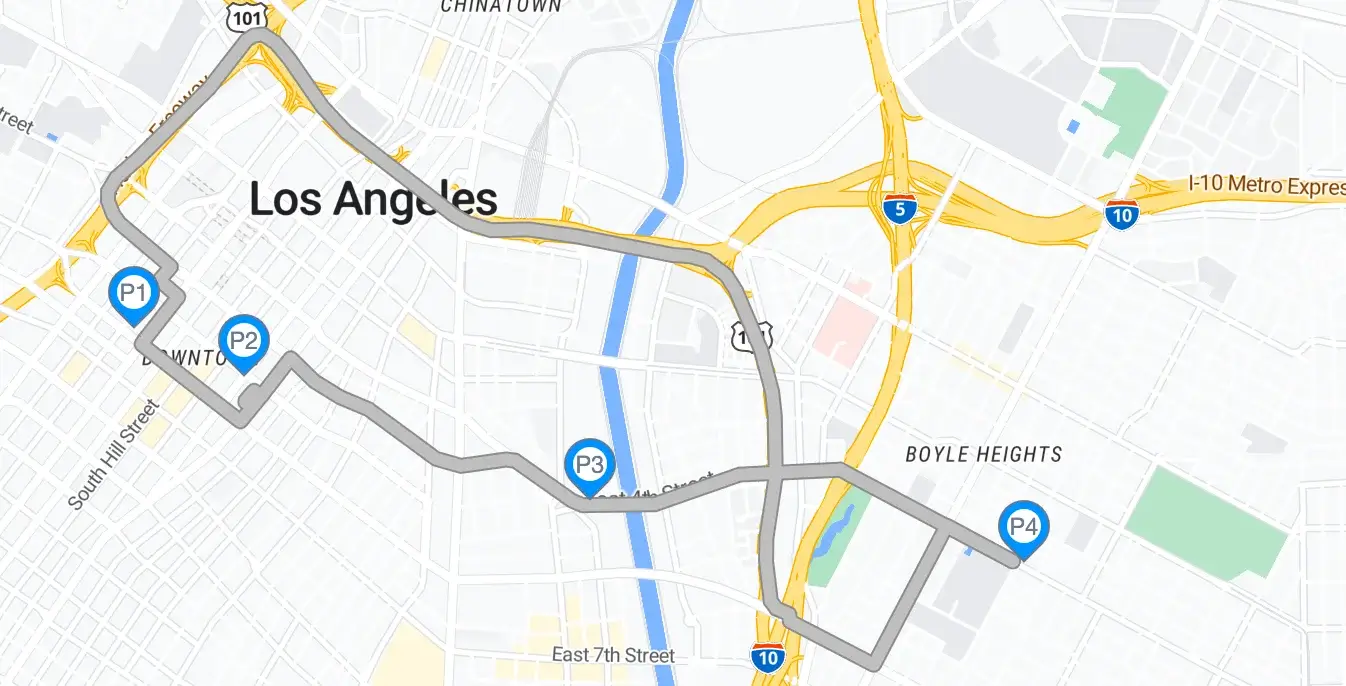
We will reconstruct the route taken during a completed trip with a set of 4 locations that we were able to track.
### Sample Request
```bash
curl --location 'https://api.nextbillion.io/route-reconstruction?mode=car&key='
--header 'Content-Type: application/json'
--data '{
"waypoints":"34.04932289,-118.25573833|34.04711381,-118.24976846|34.04153727,-118.2310818|34.03881998,-118.20756901"
}'
```
### Sample Response
```json
{
"status": "Ok",
"route": {
"geometry": "{dynEnuwpUf@`@hAoB`AiBLSt@uAR]d@{@JSdAiB^o@f@y@`@w@`@s@Zk@h@aA\\m@f@}@NWFMf@{@o@q@_@a@USkAiAUUYWa@p@j@b@NL\\XDFBD?FAHEHCBG?GC}@{@SU??EG@GLS`@q@u@u@cB_BoAmAi@c@aAw@JOHKx@eAZ_@Z_@NOT[FIFKFKBGDGJWJSz@yBFMXo@JUJ[Ni@Ha@l@eCJg@Vw@Xk@~@kB|AqC|A{C`BwCb@}@P_@DMFOj@}CD_@F[@O@O@S?SAGCe@C]KeBAIAKCc@Ck@OcCAKCk@?Q@Y?I@OBQ@KJ_@Te@h@aAd@_A~@oBnBuDv@aBHQHSDKBMDMBQDSDS@Q@W@[?ECyGAoAAsA?K?M?O?CAqA?KAsAAe@CQCSGe@GUCQgAiFSeAi@mCY}Aa@mBYwACMCGG[AKAMAYCcBCcBCq@A]Ag@?]Aq@?s@AM?OASAeAAs@Ck@A{@E{BA_A?YAK?G?o@@S?MDW@GFW@EBI@EBIFSHWPe@La@\\aA~@kCLa@L]Nc@JYr@wBv@{B^iATo@To@La@BGL_@Pc@Lc@X{@To@DKXw@FQHWZ_AXy@zAiE\\eAfAaD",
"distance": 5277.3
}
}
```
Following is a visual representation of the above response:
## Example-2
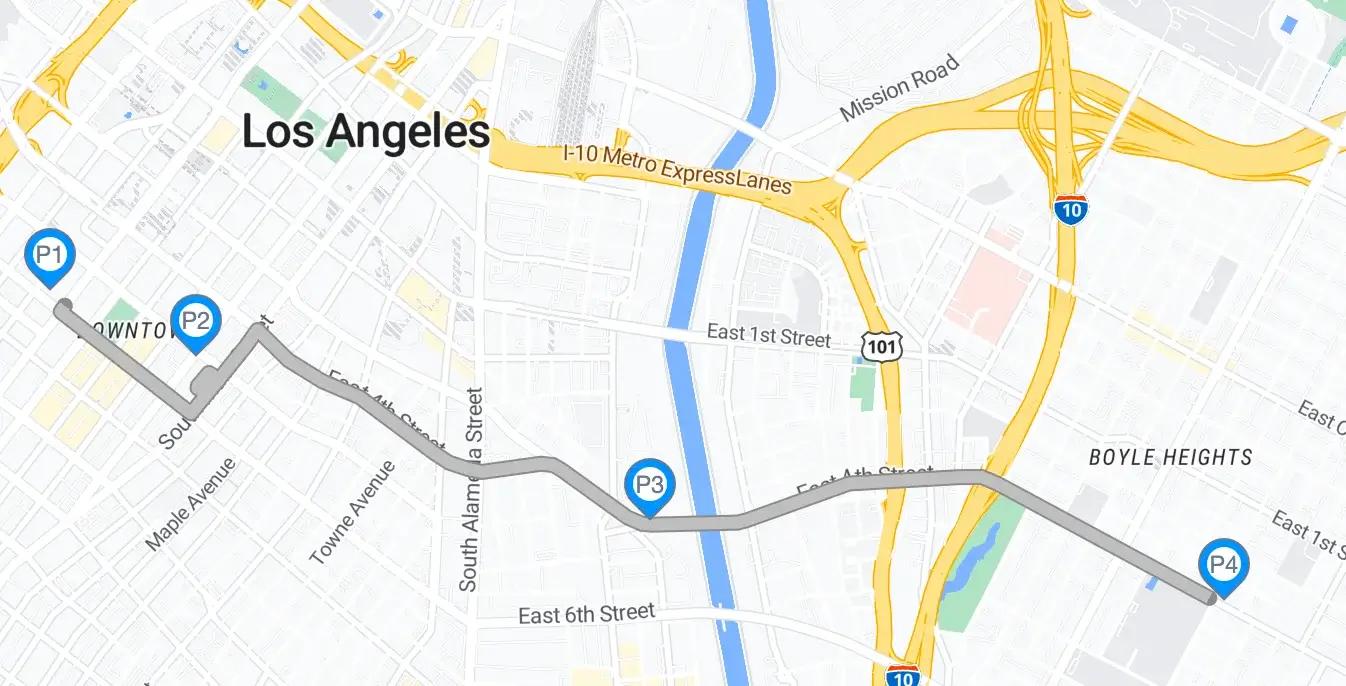
In this example, we will generate a route for the same trip we used above, with following changes:
1. We will request the route to be generated for a round trip
2. We request the geometry of the route in `polyline6` format.
### Sample Request
```bash
curl --location 'https://api.nextbillion.io/route-reconstruction?mode=car&key='
--header 'Content-Type: application/json' \
--data '{
"waypoints":"34.04932289,-118.25573833|34.04711381,-118.24976846|34.04153727,-118.2310818|34.03881998,-118.20756901",
"round_trip": true,
"geometry": "polyline6"
}'
```
### Sample Response
```json
{
"status": "Ok",
"route": {
"geometry": "wyd}_A~_vp`FnKrIbV_b@rSc`@jCgEzO{YfEkHzJwQvBgEzTc`@~H_NnKcQrIoPrIgOvGwLbLsSjHkMnKkR~CoFnAkCnKwQ_NsN_IsI{EgEwVcV{E{EcGoFsIrNvLfJ~CjCjHbGz@nAf@z@?nASbB{@bBg@f@oA?oAg@kRwQgE{E??{@oARoAjCgErIsN{O{Og^_]_XkWcLgJsSoPvB_DbBwBbQ{TvG_IvG_I~C_DzEwGnAcBnAwBnAwBf@oAz@oAvBoFvBgEvQce@nAkCbG_NvB{EvBwG~CcLbBsIjM{h@vBoKnFoPbGwL~Rw`@j\\sl@j\\wo@r]on@fJkRrD_Iz@kCnA_DvLkp@z@_InAwGR_DR_DRgE?gESoAg@{Jg@kHwB{^ScBSwBg@gJg@wL_Dgh@SwBg@wL?sDRcG?cBR_Df@sDRwBvB_IzE{JbLsSzJ_S~R_b@~a@{w@nPs]bBsDbBgEz@wBf@kCz@kCf@sDz@gEz@gERsDRoFRwG?{@g@cwAS_XSgY?wB?kC?_D?g@SsX?wBSgYS{Jg@sDg@gEoA{JoA{Eg@sDoUchAgE{TcLkk@cGk\\sIka@cGoZg@kCg@oAoAwGSwBSkCScGg@g^g@g^g@sNSkHSoK?kHSsN?gOSkC?_DSgES{TSgOg@wLSwQ{@we@S_S?cGSwB?oA?_NRgE?kCz@oFRoAnAoFR{@f@cBR{@f@cBnAgEbBoFrD{JjCsIjHsS~Rwj@jCsIjCkH~CgJvBcGfOod@nPwe@~HcVzE_NzE_NjCsIf@oAjC_IrDgJjCgJbGwQzE_Nz@wBbGoPnAsDbBoFvG_SbGcQv[c~@jH{TnUsq@????oUrq@kHzTsXoPkWsNgm@_]oi@k\\kRoK_b@oUc`@bmAcBfEgJbV_DfJ{@jCwBvGsIbVkMz^oAzEcBzEcBfEoAzEgEvLoAfEwBnFoA~C{@rD{@~CSbB?vB?RSnA?bB?vBRjCf@bVRrNR~CSjC?vB{@rDoAbG{JzYsNv`@cGjRsDnKkC~H_N~a@oF~MwBbGwBbGcBzEwV~u@{JrX{@jCkCjHcBrDgEjMcBrD{@jCwGrSsDbLcGnPsDnKg@nAg@jCSbBSf@{@fJSrI?fESvGg@rSSvGSfEoA~Cg@nKg@~HSjC?~CSnFoAnUSvBkCf@cBf@{EbBoFbB{EvBkk@nZgJfEgEjC_DzEc`@zOoFvBsDbB_DnAsDnAwBz@gObG_DbBgEvBcGjCoFvBkHjC_IrDcBf@kCnAkHjC_DbB_DbBkCnAg@RcBnAgE~C{ErD_DjCsDrD_DfEwBjCcG~HcGbLsDfJSf@kCvGwBnF{@vBSz@g@vBSz@Sz@g@jCSnAS~CSvBgEz^SjWg@rSg@vLcB~Rg@bG{@~Hg@rD{@zJoAbLoAzJ{@vGSjC{@nK{@fJg@zESbBSvBwBzYg@vG{@~MwBrX{@jMcBjR_DnZ{@jMcBfOSjCoA~Mg@vGg@vGg@jHg@bLg@rIoAnUoAfYoAbQcBzYcBbV?z@{@b[SzE?bBRrD?jHR~Hf@jMf@nKz@jM?fJSjHg@vGSfEg@nFg@nFoFzYoAnFSz@oAfEoAfEgEvLoAfEcBnFcBrDg@z@_D~HwBrDkCzEwGbLcGbL{ErIwBzEcBjCkCzE_DbGsDbGcBjCkCzEsIbQg@z@wQr]_IrNgE~HoA~CkCfEoAvBcVfc@g@z@{EzJg@z@gE~H{@bBg@nAoAvBwBfEoFzJ{EfJkH~MkMfTsIfOkHbL_IvLkCrDsN~RkMvLsIbL_D~C{JzJ{@bB{@z@_DrDoPrNgOjMcVvQsDfEwV~R{J~HwGnF{JbGkMrIwBvB_SfTgOfOgErDwBjCoAnAsDbGcBnF{@jCoAfEcBbGSf@?z@?nA?bB?f@RnARjC?fEf@vBRrDz@jCbBbGvBzEvB~CbBbBfJrIfE~CjRrNbBnArNzOr]z^jMjMf@f@v[vVjWf^fOjRrIbLjC~CjMfOfTvVbBbBbBbB~HjMfOzTnFvGRf@zOrSzEvGrDzEvB~Cz@z@z@nAjCjCfJjMjMfOfJ~Rz@nArNbQfJfOf@nAz@nAjHfJ~C~CfErDrInFvGrDnFvB~Cf@rDf@fESrD?jCg@nAg@fEoAzEkCvB{@z@SvB{@fEcBjC{@vBSnA{@~CkCbBoA~CkCnFoFzEcGfEkHrD_IfE_IbB_DzJ{OvGwLzTkW~C{Er]kk@fOsXvLjR~M~MnAz@z@z@f@Rz@Rf@Rz@SbBg@zE_InUka@zJcQzJ~HrD~CrI~HbLzJ~MvLv[b[jHjHbQbQfErDz@z@",
"distance": 12598.2
}
}
```
Following is a visual representation of the above response:
## API Query Limits
NextBillion.ai allows a maximum rate limit of 6000 queries per minute or 100 queries/second for continuous requests.
Note: We can increase the quota if needed, on request. Contact [support@nextbillion.ai](mailto:support@nextbillion.ai) for more details.
## API Error Codes
| Response Code | Description | Additional Notes |
| --- | --- | --- |
| 200 | Normal success case. | Normal success case. |
| 400 | Input validation failed. | There is a missing or an invalid parameter or a parameter with an invalid value type is added to the request. |
| 401 | APIKEY not supplied or invalid. | This error occurs when the wrong API key is passed in the request or the key is missing altogether |
| 403 | APIKEY is valid but does not have access to requested resources. | You might be querying for a geographical region which is not valid for your account, or requesting a service which is not enabled for you. |
| 404 | Requested host/path not found. | This error occurs when a malformed hostname is used. |
| 422 | Could not process the request. | Unroutable coordinates provided in the request, please check API response for more details |
| 429 | Too many requests. | QPM or API request count quota reached |
| 500 | Internal Service error. | There was an internal issue with NextBillion.ai services. You can reach out to [support@nextbillion.ai](mailto:support@nextbillion.ai) for an explanation. |