# Asset Tracking Extended
SDK, users can do asset creation and binding, switch between different tracking modes, and receive callbacks for the data tracking.
This detailed example walks you through the following steps:
- **Creating a New Asset Based on User Input**: Learn how to generate a new asset within your application, leveraging user input to create assets dynamically.
- **Binding User-Created Asset IDs to the Current Device**: Discover the process of associating user-generated asset IDs with the device you're currently using, facilitating tracking and management of these assets.
- **Starting and Stopping Tracking Based on User Operations**: Gain insights into initiating and halting tracking operations, giving users control over the tracking process.
- **Switching Between Tracking Modes Based on User Operations**: Learn how to transition between different tracking modes, providing flexibility and adaptability to user preferences.
- **Receiving AssetTrackingCallbacks and Displaying Results in the User Interface**: Explore how to handle AssetTrackingCallbacks and effectively communicate tracking results to the user interface, ensuring a seamless and informative user experience.
For all code examples, refer to [Asset Tracking Android Code Examples](https://github.com/nextbillion-ai/nb-asset-tracking-android-demo)
**activity_set_profile.xml** [view source](https://github.com/nextbillion-ai/nb-asset-tracking-android-demo/blob/main/app/src/main/res/layout/activity_set_profile.xml)
```xml
```
**activity_extended_tracking.xml** [view source](https://github.com/nextbillion-ai/nb-asset-tracking-android-demo/blob/main/app/src/main/res/layout/activity_extended_tracking.xml)
```xml
```
**SetProfileActivity** [view source](https://github.com/nextbillion-ai/nb-asset-tracking-android-demo/blob/main/app/src/main/java/ai/nextbillion/nbassettrackingdemo/SetProfileActivity.kt)
```kotlin
class SetProfileActivity : AppCompatActivity() {
private lateinit var sharedPreferences: SharedPreferences
private lateinit var editIdView: EditText
private lateinit var editAssetNameView: EditText
private lateinit var editDescriptionView: EditText
private lateinit var editAttributesView: EditText
private lateinit var editAssetIdView: EditText
private lateinit var lastAssetIdView: EditText
private lateinit var createNewAssetView: TextView
private lateinit var bindAssetView: TextView
private lateinit var progressBar: View
private lateinit var customId: String
private lateinit var assetName: String
private lateinit var assetDescription: String
private lateinit var assetAttributes: String
private lateinit var assetId: String
private var isSplash = true
override fun onCreate(savedInstanceState: Bundle?) {
super.onCreate(savedInstanceState)
setContentView(R.layout.activity_set_profile)
sharedPreferences = PreferenceManager.getDefaultSharedPreferences(this)
isSplash = intent.getBooleanExtra(Constants.IS_SPLASH_PAGE_KEY, true)
setActivityView()
initViewText()
setListeners()
checkAssetId()
}
private fun setActivityView() {
editIdView = findViewById(R.id.edit_custom_id)
editAssetNameView = findViewById(R.id.edit_asset_name)
editDescriptionView = findViewById(R.id.edit_asset_description)
editAttributesView = findViewById(R.id.edit_asset_attributes)
editAssetIdView = findViewById(R.id.edit_asset_id)
lastAssetIdView = findViewById(R.id.last_used_asset_id)
createNewAssetView = findViewById(R.id.create_new_asset)
bindAssetView = findViewById(R.id.bind_asset)
progressBar = findViewById(R.id.saving_progress)
}
private fun initViewText() {
customId =
sharedPreferences.getString(Constants.CUSTOM_ID_KEY, UUID.randomUUID().toString())
.toString()
assetName = sharedPreferences.getString(
Constants.ASSET_NAME_KEY,
getString(R.string.asset_name_example_value)
) as String
assetDescription = sharedPreferences.getString(
Constants.ASSET_DESCRIPTION_KEY,
getString(R.string.asset_description_example_value)
) as String
assetAttributes = sharedPreferences.getString(
Constants.ASSET_ATTRIBUTES_KEY,
getString(R.string.asset_attribute_example_value)
) as String
assetId = sharedPreferences.getString(Constants.ASSET_ID_KEY, "") as String
val lastAssetId = sharedPreferences.getString(Constants.LAST_ASSET_ID_KEY, "") as String
editIdView.setText(customId)
editAssetNameView.setText(assetName)
editDescriptionView.setText(assetDescription)
editAttributesView.setText(assetAttributes)
lastAssetIdView.setText(lastAssetId)
lastAssetIdView.inputType = InputType.TYPE_NULL
if (!assetId.isNullOrEmpty()) {
editAssetIdView.setText(assetId)
}
}
private fun hideKeyboard() {
this.currentFocus?.let { view ->
val imm = getSystemService(Context.INPUT_METHOD_SERVICE) as? InputMethodManager
imm?.hideSoftInputFromWindow(view.windowToken, 0)
}
}
private fun setListeners() {
createNewAssetView.setOnClickListener {
readAssetInfoFromView()
if (!checkUserInput()) {
return@setOnClickListener
}
if (assetTrackingIsRunning) {
Toast.makeText(
this@SetProfileActivity,
"Asset tracking is ON, please turn off tracking before creating new asset!",
Toast.LENGTH_LONG
).show()
return@setOnClickListener
}
hideKeyboard()
progressBar.visibility = View.VISIBLE
AssetTracking.instance.createNewAsset(
AssetProfile.Builder().setCustomId(customId).setName(assetName)
.setDescription(assetDescription).setAttributes(
mapOf("test attribute" to assetAttributes)
).build(), object : AssetApiCallback {
override fun onSuccess(result: AssetCreationResponse) {
progressBar.visibility = View.GONE
assetId = result.data.id
editAssetIdView.setText(assetId)
saveToSharedPreference()
}
override fun onFailure(exception: Exception) {
progressBar.visibility = View.GONE
Toast.makeText(
this@SetProfileActivity,
"create asset failed: " + exception.message,
Toast.LENGTH_LONG
).show()
}
}
)
}
bindAssetView.setOnClickListener {
assetId = editAssetIdView.text.toString().trim()
if (assetId.isEmpty()) {
return@setOnClickListener
}
hideKeyboard()
progressBar.visibility = View.VISIBLE
AssetTracking.instance.bindAsset(
this@SetProfileActivity,
assetId,
object : AssetApiCallback {
override fun onSuccess(result: Unit) {
progressBar.visibility = View.GONE
Toast.makeText(
this@SetProfileActivity,
String.format(
"bind asset successfully with assetId: %s",
assetId
),
Toast.LENGTH_LONG
).show()
sharedPreferences.edit().putString(Constants.LAST_ASSET_ID_KEY, assetId).apply()
if (isSplash) {
launchMainActivity()
} else {
finish()
}
}
override fun onFailure(exception: Exception) {
progressBar.visibility = View.GONE
val exceptionMessage = exception.message ?: ""
if (exceptionMessage.contains(AssetTrackingApiExceptionType.UN_UPLOADED_LOCATION_DATA.exceptionString)) {
showForceBindDialog(assetId, exceptionMessage)
} else {
Toast.makeText(
this@SetProfileActivity,
"bind asset failed: $exceptionMessage",
Toast.LENGTH_LONG
).show()
}
}
})
}
}
private fun showForceBindDialog(assetId: String, warningMessage: String) {
val alertDialogBuilder = AlertDialog.Builder(this)
alertDialogBuilder.setMessage("$warningMessage, do you want to clear local data and force bind to new asset id?")
alertDialogBuilder.setPositiveButton("Proceed") { dialogInterface: DialogInterface, _: Int ->
dialogInterface.dismiss() // Close the dialog
progressBar.visibility = View.VISIBLE
AssetTracking.instance.forceBindAsset(this, assetId, object : AssetApiCallback {
override fun onSuccess(result: Unit) {
progressBar.visibility = View.GONE
Toast.makeText(
this@SetProfileActivity,
String.format(
"Force bind new asset successfully with assetId: %s",
assetId
),
Toast.LENGTH_LONG
).show()
sharedPreferences.edit().putString(Constants.LAST_ASSET_ID_KEY, assetId).apply()
if (isSplash) {
launchMainActivity()
} else {
finish()
}
}
override fun onFailure(exception: Exception) {
progressBar.visibility = View.GONE
Toast.makeText(
this@SetProfileActivity,
"bind asset failed: " + exception.message,
Toast.LENGTH_LONG
).show()
}
})
}
alertDialogBuilder.setNegativeButton("Cancel") { dialogInterface: DialogInterface, _: Int ->
dialogInterface.dismiss() // Close the dialog
}
val alertDialog = alertDialogBuilder.create()
alertDialog.show()
}
private fun readAssetInfoFromView() {
customId = editIdView.text.toString().trim()
assetName = editAssetNameView.text.toString().trim()
assetDescription = editDescriptionView.text.toString().trim()
assetAttributes = editAttributesView.text.toString().trim()
}
private fun saveToSharedPreference() {
sharedPreferences.edit().putString(Constants.CUSTOM_ID_KEY, customId).apply()
sharedPreferences.edit().putString(Constants.ASSET_NAME_KEY, assetName).apply()
sharedPreferences.edit().putString(Constants.ASSET_DESCRIPTION_KEY, assetDescription)
.apply()
sharedPreferences.edit().putString(Constants.ASSET_ATTRIBUTES_KEY, assetAttributes).apply()
sharedPreferences.edit()
.putString(Constants.ASSET_ID_KEY, assetId)
.apply()
}
private fun checkAssetId() {
if (isSplash && !TextUtils.isEmpty(assetId)) {
launchMainActivity()
}
}
private fun launchMainActivity() {
startActivity(Intent(this, ExtendedTrackingActivity::class.java))
finish()
}
private fun checkUserInput(): Boolean {
if (assetName.isEmpty()) {
Toast.makeText(this, R.string.please_enter_name, Toast.LENGTH_SHORT).show()
return false
}
return true
}
}
```
**ExtendedTrackingActivity** [view source](https://github.com/nextbillion-ai/nb-asset-tracking-android-demo/blob/main/app/src/main/java/ai/nextbillion/nbassettrackingdemo/ExtendedTrackingActivity.kt)
```kotlin
class ExtendedTrackingActivity : AppCompatActivity(), View.OnClickListener,
AssetTrackingCallBack {
private lateinit var startTrackingButton: Button
private lateinit var stopTrackingButton: Button
private lateinit var radioGroup: RadioGroup
private lateinit var activeRadioButton: RadioButton
private lateinit var trackingStatusView: TextView
private lateinit var locationEngineInfoView: TextView
private lateinit var locationInfoView: TextView
private lateinit var editAssetProfileView: TextView
var permissionsManager: LocationPermissionsManager? = null
var currentSelectedTrackingMode = TrackingMode.ACTIVE
private val mainHandler by lazy {
Handler(Looper.getMainLooper())
}
override fun onCreate(savedInstanceState: Bundle?) {
super.onCreate(savedInstanceState)
setContentView(R.layout.activity_extended_tracking)
// custom location engine
// TrackingSDK.setLocationEngine(CustomLocationEngine());
initialize("PUT YOUR API KEY HERE")
initView()
assetTrackingAddCallback(this)
bindExistingAsset()
}
private fun bindExistingAsset() {
val sharedPreferences = PreferenceManager.getDefaultSharedPreferences(this)
val assetId = sharedPreferences.getString(Constants.LAST_ASSET_ID_KEY, "") as String
if (assetId.isNotEmpty()) {
AssetTracking.instance.bindAsset(
this@ExtendedTrackingActivity,
assetId,
object : AssetApiCallback {
override fun onSuccess(result: Unit) {
Toast.makeText(
this@ExtendedTrackingActivity,
String.format(
"bind asset successfully with assetId: %s",
assetId
),
Toast.LENGTH_LONG
).show()
}
override fun onFailure(exception: Exception) {
Toast.makeText(
this@ExtendedTrackingActivity,
"bind asset failed: " + exception.message,
Toast.LENGTH_LONG
).show()
}
}
)
}
}
override fun onDestroy() {
super.onDestroy()
assetTrackingRemoveCallback(this)
}
private fun initView() {
startTrackingButton = findViewById(R.id.start_tracking)
stopTrackingButton = findViewById(R.id.stop_tracking)
startTrackingButton.setOnClickListener(this)
stopTrackingButton.setOnClickListener(this)
activeRadioButton = findViewById(R.id.radioButtonActive)
activeRadioButton.isChecked = true
radioGroup = findViewById(R.id.radioGroup)
radioGroup.setOnCheckedChangeListener { group, checkedId ->
currentSelectedTrackingMode = enumValues().find {
it.value == group.indexOfChild(group.findViewById(checkedId))
}!!
AssetTracking.instance.updateLocationConfig(this, LocationConfig(currentSelectedTrackingMode))
}
editAssetProfileView = findViewById(R.id.edit_asset_profile)
editAssetProfileView.setOnClickListener {
if (AssetTracking.instance.isRunning(this)) {
Toast.makeText(this, "please stop tracking before editing asset profile", Toast.LENGTH_LONG).show()
return@setOnClickListener
}
val intent = Intent(this@ExtendedTrackingActivity, SetProfileActivity::class.java)
intent.putExtra(Constants.IS_SPLASH_PAGE_KEY, false)
startActivity(intent)
}
trackingStatusView = findViewById(R.id.isStopTracking)
locationEngineInfoView = findViewById(R.id.locationEngineInfo)
locationInfoView = findViewById(R.id.locationInfo)
}
@SuppressLint("SetTextI18n")
override fun onClick(view: View) {
if (view.id == R.id.start_tracking) {
checkPermissionsAndStartTracking()
} else if (view.id == R.id.stop_tracking) {
// TrackingSDK.stopTracking()
assetTrackingStop()
updateTrackingStatus()
}
}
@SuppressLint("SetTextI18n")
private fun updateTrackingStatus() {
Log.d("asset", "updateTrackingStatus")
mainHandler.postDelayed({
val isTrackingOn = AssetTracking.instance.isRunning(this)
trackingStatusView.text = "Tracking Status: " + if (isTrackingOn) "ON" else "OFF"
if (!isTrackingOn) {
locationInfoView.text = ""
locationEngineInfoView.text = ""
}
}, 1000)
}
@SuppressLint(*["SetTextI18n", "MissingPermission"])
fun startTracking() {
assetTrackingStart()
updateTrackingStatus()
}
private fun showLocationServiceOffDialog() {
val alertDialogBuilder = AlertDialog.Builder(this)
alertDialogBuilder.setTitle("Location Services Disabled")
alertDialogBuilder.setMessage("To enable location services, please go to Settings > Privacy > Location Services.")
alertDialogBuilder.setPositiveButton("OK") { dialogInterface: DialogInterface, _: Int ->
dialogInterface.dismiss() // Close the dialog
}
val alertDialog = alertDialogBuilder.create()
alertDialog.show()
}
private fun checkPermissionsAndStartTracking() {
if (areAllLocationPermissionGranted(this@ExtendedTrackingActivity)) {
startTracking()
} else if (!isLocationServiceEnabled(this@ExtendedTrackingActivity)) {
showLocationServiceOffDialog()
} else {
permissionsManager = LocationPermissionsManager(object : LocationPermissionsListener {
override fun onExplanationNeeded(permissionsToExplain: List?) {
Toast.makeText(
this@ExtendedTrackingActivity, "You need to accept location permissions.",
Toast.LENGTH_SHORT
).show()
}
override fun onPermissionResult(granted: Boolean) {
if (granted) {
if (isBackgroundLocationPermissionGranted(this@ExtendedTrackingActivity)) {
startTracking()
} else {
permissionsManager?.requestBackgroundLocationPermissions(this@ExtendedTrackingActivity)
}
} else {
Toast.makeText(
this@ExtendedTrackingActivity, "You need to accept location permissions.$granted",
Toast.LENGTH_SHORT
).show()
}
}
})
permissionsManager?.requestLocationPermissions(this)
}
}
override fun onRequestPermissionsResult(
requestCode: Int,
permissions: Array,
grantResults: IntArray
) {
super.onRequestPermissionsResult(requestCode, permissions, grantResults)
permissionsManager?.onRequestPermissionsResult(requestCode, permissions, grantResults)
}
private fun getTrackingModeString(trackingMode: TrackingMode): String {
return when (trackingMode.value) {
0 -> "TRACKING_MODE_ACTIVE"
1 -> "TRACKING_MODE_BALANCED"
2 -> "TRACKING_MODE_PASSIVE"
else -> "Unknown tracking mode"
}
}
@SuppressLint("SetTextI18n")
override fun onLocationSuccess(result: Location) {
locationInfoView.text = """
--------- Location Info ---------
Provider: ${result.provider}
Latitude: ${result.latitude}
Longitude: ${result.longitude}
Altitude: ${result.altitude}
Accuracy: ${result.accuracy}
speed:${result.speed}
Bearing: ${result.bearing}
Time: ${result.time}
""".trimIndent()
}
override fun onLocationFailure(exception: Exception) {
locationInfoView.text = exception.message
}
override fun onTrackingStart(assetId: String) {
updateTrackingStatus()
}
override fun onTrackingStop(assetId: String, trackingDisableType: TrackingDisableType) {
Log.d("asset", "onTrackingStop")
updateTrackingStatus()
}
}
```
Upon executing the code example provided above, your app's appearance will resemble the following snippet:
| 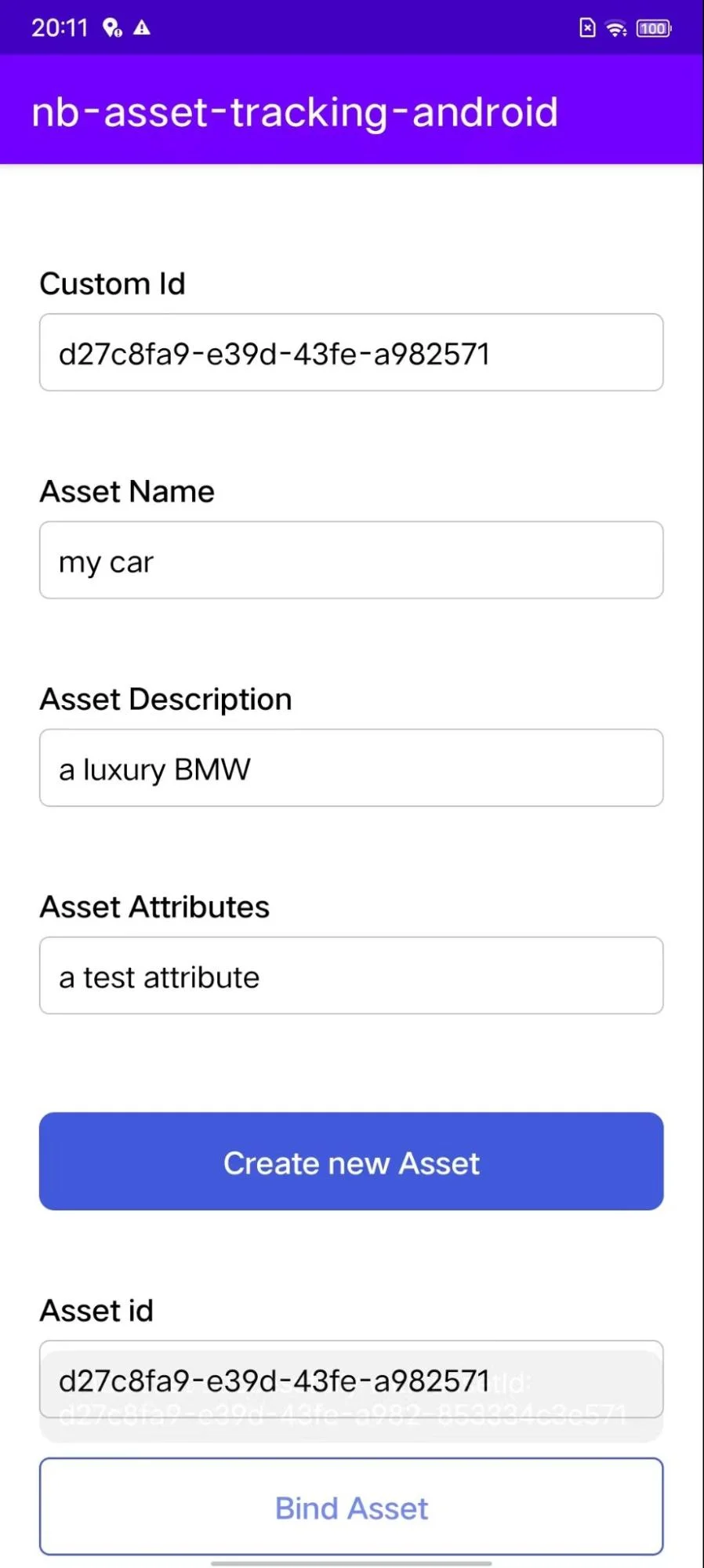 | 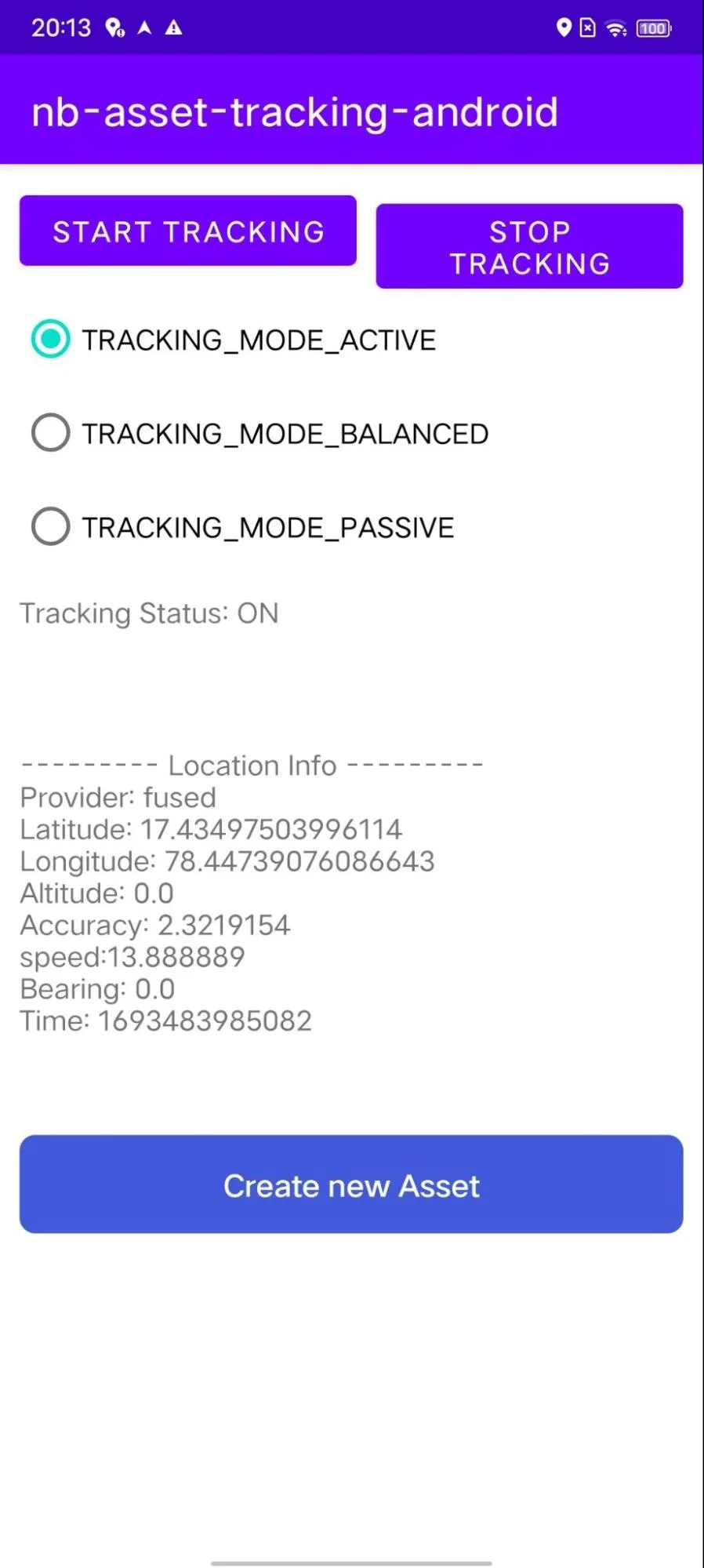 |
| --- | --- |
| **Asset Profile Page** | **Asset Tracking Page** |
### Code Highlights
The SetProfileActivity is for an Android activity that allows users to create and bind assets. The activity has the following main steps:
1. Initialize the shared preferences.
2. Initialize the view objects.
3. Read the asset information from the view.
4. Validate the user input.
5. Check whether the asset ID is already set in shared preferences.
6. Create a new asset or bind an existing asset.
7. Save the asset information to shared preferences.
8. Launch the MainActivity if the asset ID is already set in shared preferences and the activity was launched from the splash screen.
The following is a description of each step:
1. To initialize the shared preferences, the activity calls the **PreferenceManager.getDefaultSharedPreferences()** method. This method returns a SharedPreferences object that contains the default shared preferences for the application.
2. To initialize the view objects, the activity finds the view objects by their ID. The view objects include the following:
1. editIdView: An EditText object that allows users to enter the asset's custom ID.
2. editAssetNameView: An EditText object that allows users to enter the asset's name.
3. editDescriptionView: An EditText object that allows users to enter the asset's description.
4. editAttributesView: An EditText object that allows users to enter the asset's attributes.
5. editAssetIdView: An EditText object that allows users to enter the asset's ID.
6. lastAssetIdView: An EditText object that displays the last used asset ID.
3. To read the asset information from the view, the activity gets the text from each of the EditText objects.
4. To validate the user input, the activity checks the following:
1. The asset's custom ID must be a valid UUID.
2. The asset's name must not be empty.
3. The asset's description must not be empty.
4. The asset's attributes must be a valid JSON string.
5. To check whether the asset ID is already set in shared preferences, the activity calls the **checkAssetId()** function.
6. To create a new asset, the activity calls the **AssetTracking.instance.createNewAsset()** method. This method creates a new asset with the information that was entered by the user.
7. To bind an existing asset, the activity calls the **AssetTracking.instance.bindAsset()** method. This method binds the asset that is specified by the assetId parameter to the device.
8. To save the asset information to shared preferences, the activity calls the **SharedPreferences.Editor.putString()** method for each of the asset information keys.
9. To launch the MainActivity, if the asset ID is already set in shared preferences and the activity was launched from the splash screen, the activity calls the **launchMainActivity()** function.
The **ExtendedTrackingActivity** is for an Android activity that allows users to start and stop tracking an asset. The activity has the following main steps:
1. Initialize the location permissions manager.
2. Bind an existing asset, if there is one.
3. Initialize the view.
4. Set up the click listeners for the buttons.
5. Implement the **onRequestPermissionsResult()** method to handle the results of the location permission requests.
6. Implement the **onLocationSuccess()** and **onLocationFailure()** methods to handle location updates.
7. Implement the **onTrackingStart()** and **onTrackingStop()** methods to handle tracking events.
The following is a description of each step:
1. To initialize the location permissions manager, the activity creates a new LocationPermissionsManager object and sets a listener for the **onPermissionResult()** event.
2. To bind an existing asset, the activity gets the asset ID from shared preferences and calls the AssetTracking.instance.bindAsset() method.
3. To initialize the view, the activity finds the view objects by their ID. The view objects include the following:
1. start_tracking: A button that starts tracking the asset.
2. stop_tracking: A button that stops tracking the asset.
3. dit_asset_profile: A button that opens the asset profile activity.
4. isStopTracking: A text view that displays the tracking status.
5. locationInfo: A text view that displays location information.
6. locationEngineInfo: A text view that displays the location engine information.
4. To set up the click listeners for the buttons, the activity sets a click listener for the start_tracking button that calls the **checkPermissionsAndStartTracking()** method. The activity also sets a click listener for the stop_tracking button that calls the **assetTrackingStop()** method.
5. To implement the onRequestPermissionsResult() method, the activity checks the results of the location permission requests and calls the **startTracking()** method if the permissions are granted.
6. To implement the **onLocationSuccess()** and **onLocationFailure()** methods, the activity updates the locationInfo text view with the location information or the error message, respectively.
7. To implement the **onTrackingStart()** and **onTrackingStop()** methods, the activity updates the isStopTracking text view to reflect the tracking status.