# Isochrone API
## Introduction
An isochrone represents a path that joins all the points with the same travel time or travel distance from a specific point of reference. NextBillion.ai’s Isochrone API calculates the regions that can be reached within a designated time frame from a given location. It returns these accessible areas as contours of polygons or lines, which can be conveniently displayed on a map. Additionally, this API also enables the creation of contours based on distance. With the Isochrone API users can easily define serviceable areas or delivery zones based on travel times from a starting location
The Isochrone API can be accessed through the HTTPS GET method. Let’s take a look at the features and properties of this service.
GET
https://api.nextbillion.io/isochrone/json?key={your_api_key}
## Request Parameters
| Name | Required | Format and Usage | Description |
|------|----------|------------------|-------------|
| `key` | Yes | Type: `string`
Format: 32 character alphanumeric string
Example: key=API_KEY | A key is a unique identifier that is required to authenticate a request to the API. |
| `coordinates` | Yes | Type: `string`
Format: `latitude,longitude`
Example: `coordinates=1.29363713,103.8383112` | The coordinates of the location which acts as the starting point for which the isochrone lines need to be determined. |
| `contours_minutes` | No | Type: `string`
Format: `value_1,value_2,value_3`
Example: `contours_minutes=15,25` | The time, in minutes, for which an isochrone contour needs to be determined. You can request up to 4 time based contours in a single request using a `,` as a separator. Please note that, when requesting multiple isochrones, the times must be provided in an increasing order. The maximum time that can be specified is 40 minutes. This parameter is mandatory when `contours_meters` is not provided in the request. |
| `contours_meters` | No | Type: `string`
Format: `value_1,value2,...`
Example: `contours_meters=2500,3000` | The distance, in meters, for which an isochrone contour needs to be determined. You can request up to 4 distance based contours in a single request using a `,` as a separator. Please note that, when requesting multiple isochrones, the distances must be provided in an increasing order. The maximum distance that can be specified is 60000 meters (60km). This parameter is mandatory when `contours_minutes` is not provided in the request. |
| `mode` | No | Type: `string`
Default: `car`
Allowed values: `car`, `truck`, `motorcycle`, `bike`, `walk`
Example: `mode=car` | Set which driving mode the service should use to determine the contour. For example, if you use `car`, the API will return an isochrone contour that a car can reach within the specified time or after driving the specified distance. Using `truck` will return a contour that a truck can reach after taking into account appropriate truck routing restrictions. \[**Note:** Only the `car` profile is enabled by default. Please note that other profiles might not be available for all regions. Please contact your [NextBillion.ai](https://nextbillion.ai) account manager, sales representative or reach out at [support@nextbillion.ai](mailto:support@nextbillion.ai) in case you need additional profiles.\] |
| `contours_colors` | No | Type: `string`
Format: `value_1,value_2,...`
Example: `contours_colors=ff0000,bf4040` | The hex code of the color to fill isochrone contour. When requesting multiple contours, it is recommended to provide color codes for each of the requested contours, separated by a `,`. If no colors are specified, the Isochrone API will assign a random color scheme to the output. |
| `polygons` | No | Type: `boolean`
Default: `false` | When `true` the contour is returned as a GeoJSON polygon. The contour is returned as a linestring when the value for this parameter is`false`(default value). |
| `denoise` | No | Type: `number`
Default: `1`
Example: `denoise=0.5` | A floating point value from 0.0 to 1.0 that can be used to remove smaller contours. A value of 1.0 will only return the largest contour for a given value. A value of 0.5 drops any contours that are less than half the area of the largest contour in the set of contours for that same value. |
| `generalize` | No | Type: `number`
Example: `generalize=110.3` | A positive floating point value, in meters, used as the tolerance for [Douglas-Peucker generalization](https://en.wikipedia.org/wiki/Ramer%E2%80%93Douglas%E2%80%93Peucker_algorithm). There is no upper bound. As the generalization value goes higher, more and more straight lines form the resulting contour because of higher approximation of actual contour boundary. If no value is specified in the request, the Isochrone API will choose the most optimized generalization to use for the request. Please note that the generalization of contours can lead to self-intersections, as well as intersections of adjacent contours. |
| `departure_time` | No | Type: `integer`
Example: `departure_time=1563254734` | Use this parameter to set a departure time, expressed as UNIX epoch timestamp in seconds, for calculating the isochrone contour. The response will consider the typical traffic conditions at the given time and return a contour which can be reached under those traffic conditions. Please note that if no input is provided for this parameter then the traffic conditions at the time of making the request are considered. |
## Response Schema
| Field | Type | Description |
|-------|------|-------------|
| `features` | array of object | A [GeoJSON FeatureCollection](https://datatracker.ietf.org/doc/html/rfc7946#section-3.3) object with details of the isochrone contours. Each `feature` object in this collection represents an isochrone. |
| `features[].properties` | object | An object with details of how the isochrone contour can be drawn on a map. |
| `features[].properties.fill` | string | The hex code for the fill color of the isochrone contour line. |
| `features[].properties.fillOpacity` | number | The fill opacity for the isochrone contour line. It is a float value starting from 0.0 with a max value of 1.0. Higher number indicates a higher fill opacity. |
| `features[].properties.fillColor` | string | The hex code for the fill color of the isochrone contour line |
| `features[].properties.color` | string | The hex code of the color of the isochrone contour line |
| `features[].properties.contour` | number | The value of the metric used in this contour. See the `metric` property to determine whether this is a `time` or `distance` contour. When the `metric` is `time` this value denotes the travel time in minutes and when the `metric` is `distance` this value denotes the travel distance in kilometers. |
| `features[].properties.opacity` | number | The opacity of the isochrone contour line. It is a float value starting from 0.0 with a max value of 1.0. Higher number indicates a higher line opacity |
| `features[].properties.metric` | string | The metric that the contour represents - either `distance` or `time` |
| `features[].geometry` | object | A [GeoJSON geometry](https://datatracker.ietf.org/doc/html/rfc7946#page-7) object with details of the contour line. |
| `features[].geometry.coordinates` | array of number | An array of coordinate points, in [longitude,latitude] format representing the isochrone contour line. |
| `features[].geometry.type` | string | Type of the geoJSON geometry. |
| `features[].type` | string | Type of the GeoJSON object. Its value is `Feature` as per the [GeoJSON standard](https://datatracker.ietf.org/doc/html/rfc7946#section-1.4) object. |
| `type` | string | Type of the GeoJSON object. As prescribed in [GeoJSON standard](https://datatracker.ietf.org/doc/html/rfc7946#section-1.4), its value is `FeatureCollection` as the `feature` property contains a list of geoJSON feature objects. |
| `status` | string | A string indicating the state of the response. On normal responses, the value will be `Ok`. Indicative HTTP error codes are returned for different errors. See the [API Errors Codes](#api-error-codes) section below for more information. |
| `msg` | string | Displays the error message in case of a failed request or operation. Please note that this parameter is not returned in the response in case of a successful request. |
## Sample Queries
### GET Request Example 1
Let’s build a basic Isochrone API request to determine the area that a `car` can cover within a driving time of 5 minutes when a given `coordinates` is the starting point.
#### Request
```bash
curl --location 'https://api.nextbillion.io/isochrone/json?key=&coordinates=34.04715844,-118.24977187&mode=car&contours_minutes=5'
```
#### Response
```json
{
"features": [
{
"properties": {
"fill": "#bf4040",
"fillOpacity": 0.33,
"fillColor": "#bf4040",
"color": "#bf4040",
"contour": 5,
"opacity": 0.33,
"metric": "time"
},
"geometry": {
"coordinates": [
[
-118.242242,
34.04952
],
[
-118.242548,
34.048495
],
[
-118.243242,
34.047954
],
[
-118.24413,
34.049495
],
[
-118.245242,
34.049577
],
[
-118.246445,
34.047697
],
[
-118.249186,
34.047438
],
[
-118.249793,
34.046045
],
[
-118.253166,
34.044495
],
[
-118.25352,
34.041495
],
[
-118.254097,
34.040495
],
[
-118.254048,
34.03869
],
[
-118.253201,
34.038495
],
[
-118.254135,
34.038388
],
[
-118.25409,
34.037647
],
[
-118.254908,
34.036495
],
[
-118.254159,
34.035495
],
[
-118.255123,
34.034375
],
[
-118.254582,
34.032495
],
[
-118.255502,
34.031235
],
[
-118.255243,
34.030795
],
[
-118.254242,
34.0311
],
[
-118.252969,
34.030768
],
[
-118.251069,
34.028495
],
[
-118.252122,
34.027495
],
[
-118.250902,
34.026836
],
[
-118.249646,
34.025091
],
[
-118.247242,
34.02607
],
[
-118.246243,
34.025255
],
[
-118.242843,
34.025095
],
[
-118.242352,
34.025385
],
[
-118.241796,
34.024495
],
[
-118.241243,
34.024365
],
[
-118.240242,
34.025559
],
[
-118.239243,
34.0258
],
[
-118.237243,
34.027182
],
[
-118.237058,
34.028495
],
[
-118.23568,
34.029932
],
[
-118.235242,
34.030128
],
[
-118.234243,
34.029306
],
[
-118.233051,
34.029686
],
[
-118.232243,
34.028547
],
[
-118.228636,
34.033888
],
[
-118.224525,
34.034495
],
[
-118.228242,
34.034843
],
[
-118.229368,
34.035369
],
[
-118.229116,
34.036495
],
[
-118.229769,
34.037495
],
[
-118.229505,
34.037757
],
[
-118.228242,
34.038292
],
[
-118.225835,
34.038495
],
[
-118.231242,
34.039209
],
[
-118.232243,
34.040234
],
[
-118.235506,
34.041495
],
[
-118.235242,
34.042599
],
[
-118.234472,
34.042265
],
[
-118.233772,
34.042495
],
[
-118.234156,
34.042581
],
[
-118.234243,
34.043736
],
[
-118.235611,
34.044126
],
[
-118.236242,
34.045146
],
[
-118.237923,
34.045815
],
[
-118.239243,
34.048846
],
[
-118.240242,
34.04804
],
[
-118.241243,
34.048137
],
[
-118.242242,
34.04952
]
],
"type": "LineString"
},
"type": "Feature"
}
],
"type": "FeatureCollection",
"status": "Ok"
}
```
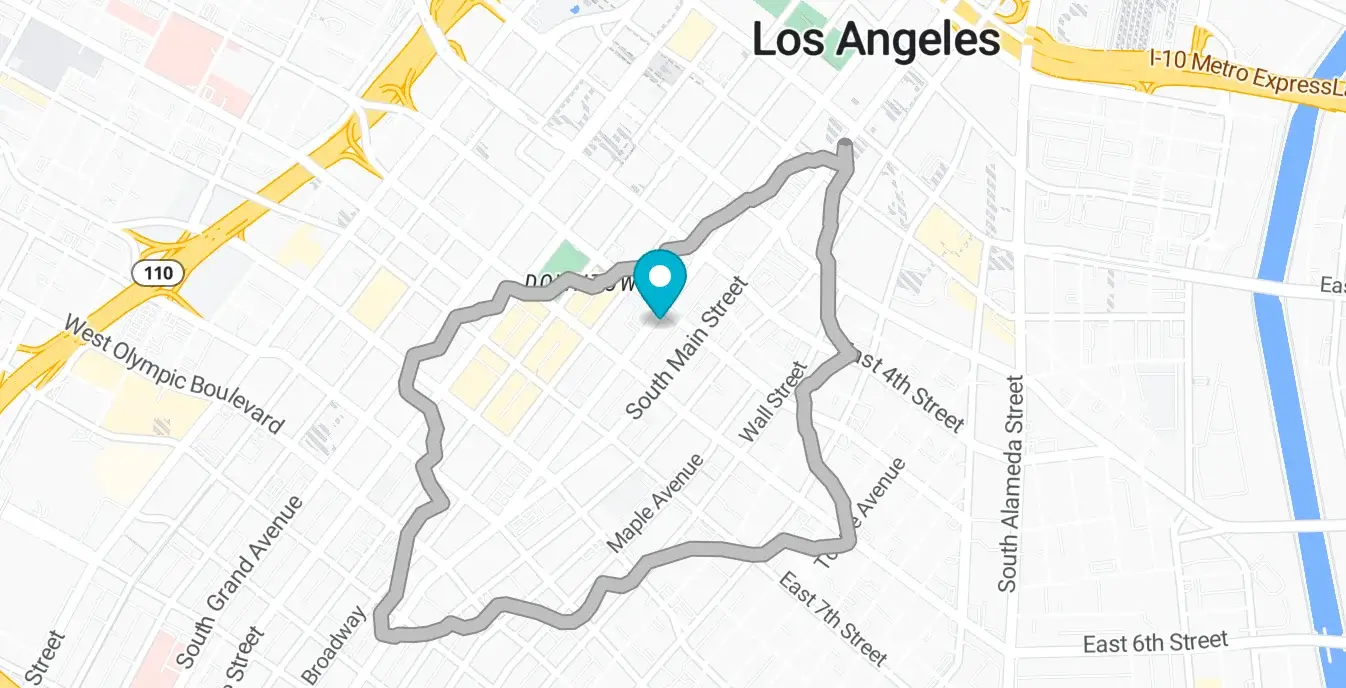
Here is how the above response looks on a map. We can easily visualize the area reachable within 5 minutes. It is enclosed by a contour line or a polygon around the starting point provided in the `coordinates` parameter
### GET Request Example 2
Taking the next step for the same `coordinates` point and same `contour_minutes` value, let’s expand the request to configure the following parameters:
* set `mode` = `truck` to see what areas can a truck cover
* set `denoise` to a low value to receive exact pockets of areas that can or cannot be covered within the given time
#### Request
```bash
curl --location 'https://api.nextbillion.io/isochrone/json?key=&coordinates=34.03849472,-118.24424250&mode=truck&contours_minutes=5&denoise=0.001'
```
#### Response
```json
{
"features": [
{
"properties": {
"fill": "#bf4040",
"fillOpacity": 0.33,
"fillColor": "#bf4040",
"color": "#bf4040",
"contour": 5.0,
"opacity": 0.33,
"metric": "time"
},
"geometry": {
"coordinates": [
[
-118.244772,
34.050702
],
[
-118.247946,
34.049333
],
[
-118.248772,
34.047859
],
[
-118.250562,
34.048369
],
[
-118.246772,
34.040776
],
[
-118.245772,
34.041169
],
[
-118.243697,
34.041084
],
[
-118.243819,
34.042158
],
[
-118.244694,
34.043158
],
[
-118.245452,
34.045158
],
[
-118.243559,
34.046158
],
[
-118.244317,
34.047158
],
[
-118.244772,
34.050702
]
],
"type": "LineString"
},
"type": "Feature"
},
{
"properties": {
"fill": "#bf4040",
"fillOpacity": 0.33,
"fillColor": "#bf4040",
"color": "#bf4040",
"contour": 5.0,
"opacity": 0.33,
"metric": "time"
},
"geometry": {
"coordinates": [
[
-118.254488,
34.045442
],
[
-118.254488,
34.044874
],
[
-118.255105,
34.044825
],
[
-118.255169,
34.045556
],
[
-118.254488,
34.045442
]
],
"type": "LineString"
},
"type": "Feature"
}
],
"type": "FeatureCollection"
}
```
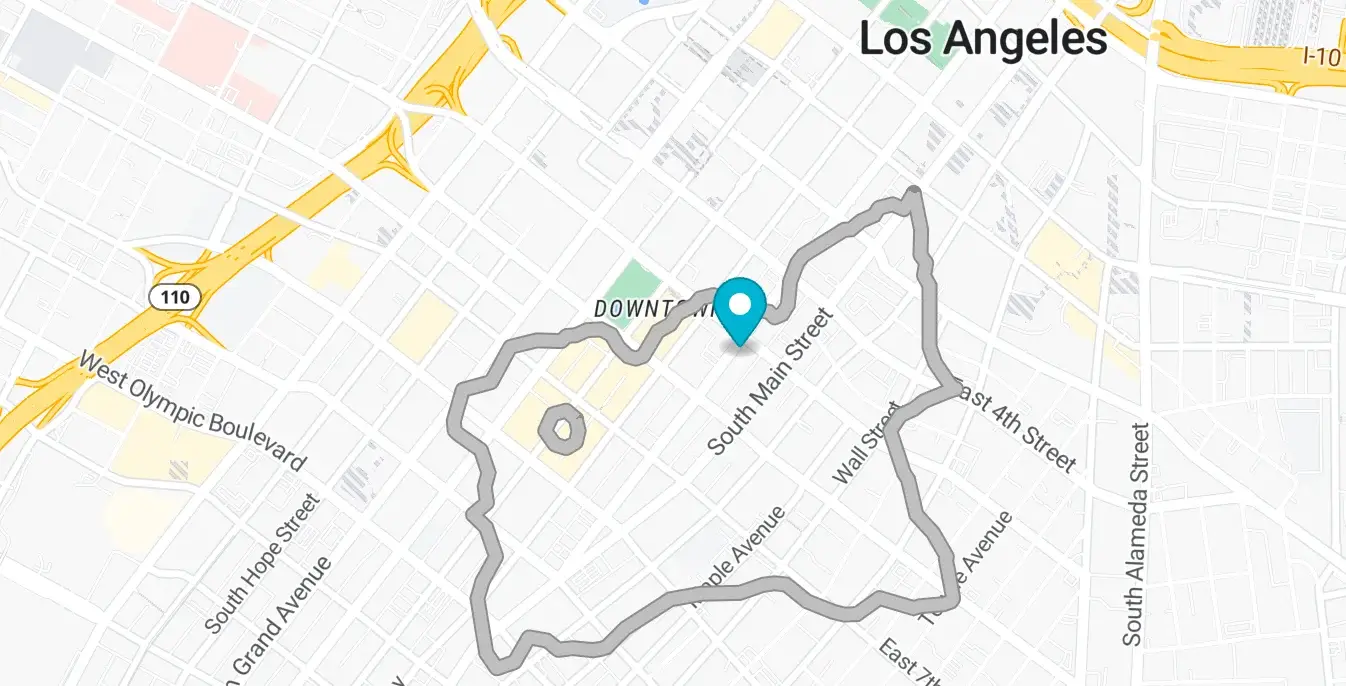
Here is how the above response looks. Notice a smaller polygon appears within the large one when we set `denoise` to a low value. This smaller polygon encloses the area that can not be reached by a truck within 20 minutes from the starting point.
## API Query Limits
* Only one of `contours_meters` or `contours_minutes` should be provided in the input request. A 400 error is returned if none of them are provided. We do not recommend using both `contours_meters` or `contours_minutes` together in a request.
* Up to 4 isochrones can be requested using the `contours_minutes` parameter with a maximum allowed value of 40 minutes.
* Up to 4 isochrones can be requested using the `contours_meters` parameter with a maximum allowed value of value of 60000 meters.
* NextBillion.ai allows a maximum rate limit of 6000 queries per minute or 100 queries/second for continuous requests.
*Note*: We can increase the quota if needed, on request. Contact [support@nextbillion.ai](mailto:support@nextbillion.ai) for more details.
## API Error Codes
| Response Code | Description | Additional Notes |
| --- | --- | --- |
| 200 | Normal success case. | Normal success case. |
| 400 | Input validation failed. | Such as missing parameter or parameter with invalid value type (for example value cannot be parsed into number). |
| 401 | APIKEY not supplied or invalid. | This error occurs when the wrong API key is passed in the request or the key is missing altogether |
| 403 | APIKEY is valid but does not have access to requested resources. | You might be querying for a geographical region which is not valid for your account, or requesting a service which is not enabled for you. |
| 404 | Requested host/path not found. | This error occurs when there is a malformed host name used. |
| 422 | Could not process the request. | There is an underlying map issue which prevents the processing of the request. |
| 429 | Too many requests. | QPM reached or API request count quota reached. |
| 500 | Internal Service error. | There was an internal issue with NextBillion.ai services. You can reach out to [support@nextbillion.ai](mailto:support@nextbillion.ai) for an explanation. |