# User Interfaces and Customization
## Components of Navigation View
To gain an understanding of the elements that can be modified in the navigation view, let's break it down into smaller parts:
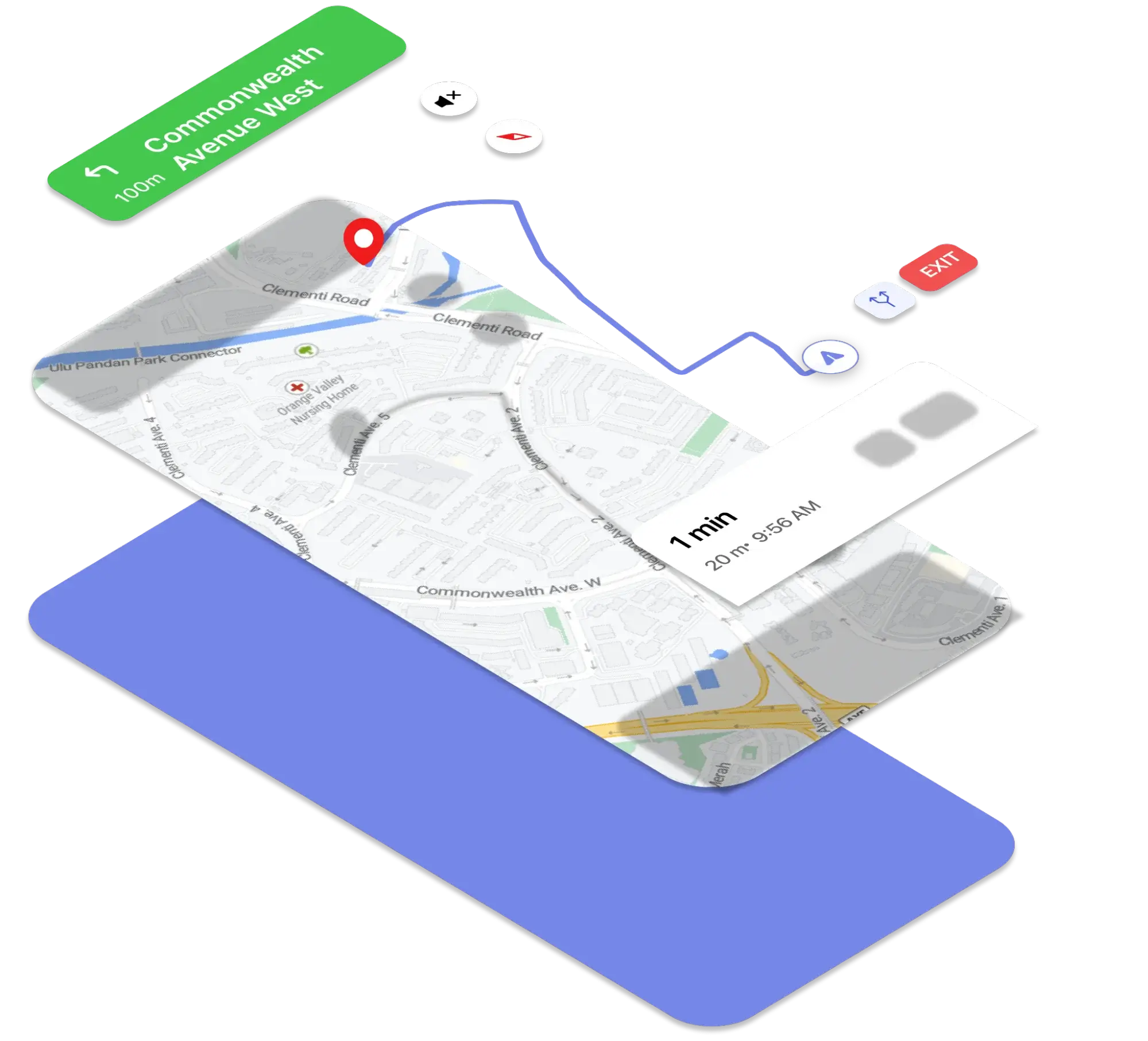
- **Base Maps(StyleUrl)**
- **RoutLine**
- **Instruction Banner**
- **Bottom Summary**
- **Steps list**
- **Location Component**
- **Destination Marker**
## Customize the navigation view
A screenshot of the navigation screen's components.
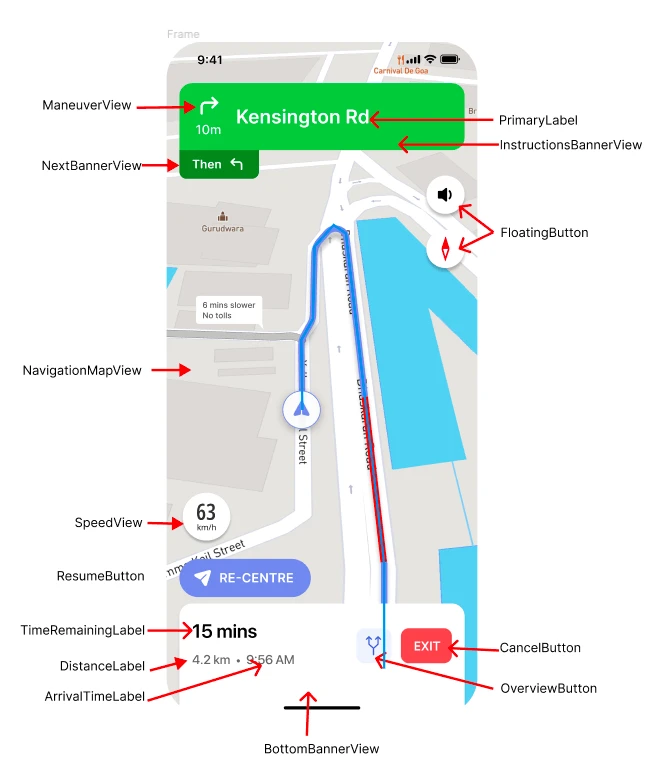
Attribute definition summary:
| No. | Attribute Name | Type |
| --- | --- | --- |
| 1 | ArrivalTimeLabel.appearance().font | font |
| 2 | ArrivalTimeLabel.appearance().normalTextColor | color |
| 3 | BottomBannerContentView.appearance().backgroundColor | color |
| 4 | BottomBannerView.appearance().backgroundColor | color |
| 5 | Button.appearance().textColor | color |
| 6 | CancelButton.appearance().backgroundColor | color |
| 7 | CancelButton.appearance().textFont | color |
| 8 | CancelButton.appearance().textColor | color |
| 9 | OverviewButton.appearance().borderColor | color |
| 10 | OverviewButton.appearance().tintColor | color |
| 11 | DistanceLabel.appearance().unitFont | font |
| 12 | DistanceLabel.appearance().valueFont | color |
| 13 | DistanceLabel.appearance(whenContainedInInstancesOf: \[InstructionsBannerView.self\]).unitTextColor | color |
| 14 | DistanceLabel.appearance(whenContainedInInstancesOf: \[InstructionsBannerView.self\]).valueTextColor | color |
| 15 | ExitView.appearance().backgroundColor | color |
| 16 | ExitView.appearance().borderWidth | double |
| 17 | ExitView.appearance().cornerRadius | double |
| 18 | ExitView.appearance().foregroundColor | color |
| 19 | ExitView.appearance(for: UITraitCollection(userInterfaceIdiom: .carPlay)).foregroundColor | color |
| 20 | FloatingButton.appearance().backgroundColor | color |
| 21 | FloatingButton.appearance().tintColor | color |
| 22 | GenericRouteShield.appearance().backgroundColor | color |
| 23 | GenericRouteShield.appearance().borderWidth | double |
| 24 | GenericRouteShield.appearance().cornerRadius | double |
| 25 | GenericRouteShield.appearance().foregroundColor | color |
| 26 | GenericRouteShield.appearance(for: UITraitCollection(userInterfaceIdiom: .carPlay)).foregroundColor | color |
| 27 | InstructionsBannerView.appearance().backgroundColor | color |
| 28 | LaneView.appearance().primaryColor | color |
| 29 | LaneView.appearance().secondaryColor | color |
| 30 | LanesView.appearance().backgroundColor | color |
| 31 | LineView.appearance().lineColor | color |
| 32 | ManeuverView.appearance().backgroundColor | color |
| 33 | ManeuverView.appearance(whenContainedInInstancesOf: \[InstructionsBannerView.self\]).primaryColor | color |
| 34 | ManeuverView.appearance(whenContainedInInstancesOf: \[InstructionsBannerView.self\]).secondaryColor | color |
| 35 | ManeuverView.appearance(whenContainedInInstancesOf: \[NextBannerView.self\]).primaryColor | color |
| 36 | ManeuverView.appearance(whenContainedInInstancesOf: \[NextBannerView.self\]).secondaryColor | color |
| 37 | ManeuverView.appearance(whenContainedInInstancesOf: \[StepInstructionsView.self\]).primaryColor | color |
| 38 | ManeuverView.appearance(whenContainedInInstancesOf: \[StepInstructionsView.self\]).secondaryColor | color |
| 39 | NavigationMapView.appearance().maneuverArrowColor | color |
| 40 | NavigationMapView.appearance().maneuverArrowStrokeColor | color |
| 41 | NavigationMapView.appearance().routeAlternateColor | color |
| 42 | NavigationMapView.appearance().routeCasingColor | |
| 43 | NavigationMapView.appearance().trafficHeavyColor | |
| 44 | NavigationMapView.appearance().trafficLowColor | |
| 45 | NavigationMapView.appearance().trafficModerateColor | color |
| 46 | NavigationMapView.appearance().trafficSevereColor | color |
| 47 | NavigationMapView.appearance().trafficUnknownColor | color |
| 48 | NavigationView.appearance().backgroundColor | color |
| 49 | NextBannerView.appearance().backgroundColor | color |
| 50 | NextInstructionLabel.appearance().font | color |
| 51 | NextInstructionLabel.appearance().normalTextColor | color |
| 52 | PrimaryLabel.appearance().normalFont | color |
| 53 | PrimaryLabel.appearance(whenContainedInInstancesOf: \[InstructionsBannerView.self\]).normalTextColor | color |
| 54 | PrimaryLabel.appearance(whenContainedInInstancesOf: \[StepInstructionsView.self\]).normalTextColor | color |
| 55 | PrimaryLabel.appearance(whenContainedInInstancesOf: \[StepInstructionsView.self\]).normalFont | color |
| 56 | ProgressBar.appearance().barColor | color |
| 57 | ResumeButton.appearance().backgroundColor
ResumeButton.appearance().tintColor | color |
| 58 | SecondaryLabel.appearance().normalFont | color |
| 59 | SecondaryLabel.appearance(whenContainedInInstancesOf: \[InstructionsBannerView.self\]).normalTextColor | color |
| 60 | SecondaryLabel.appearance(whenContainedInInstancesOf: \[StepInstructionsView.self\]).normalTextColor | color |
| 61 | StatusView.appearance().backgroundColor | color |
| 62 | StepInstructionsView.appearance().backgroundColor | color |
| 63 | StepListIndicatorView.appearance().gradientColors | color |
| 64 | StepTableViewCell.appearance().backgroundColor | color |
| 65 | StepsBackgroundView.appearance().backgroundColor | color |
| 66 | TimeRemainingLabel.appearance().font | color |
| 67 | TimeRemainingLabel.appearance().normalTextColor
TimeRemainingLabel.appearance().trafficHeavyColor | color |
| 68 | TimeRemainingLabel.appearance().trafficLowColor | color |
| 69 | TimeRemainingLabel.appearance().trafficModerateColor | color |
| 70 | TimeRemainingLabel.appearance().trafficSevereColor | color |
| 71 | TimeRemainingLabel.appearance().trafficUnknownColor | color |
| 72 | WayNameLabel.appearance().normalFont | color |
| 73 | WayNameLabel.appearance().normalTextColor | color |
| 74 | WayNameView.appearance().backgroundColor | color |
| 75 | WayNameView.appearance().borderColor | color |
| 76 | SpeedView.appearance().textColor | color |
| 77 | SpeedView.appearance().signBackColor | color |
A Full example of Navigation Style
```swift
ArrivalTimeLabel.appearance().font = UIFont.systemFont(ofSize: 18, weight: .medium).adjustedFont
ArrivalTimeLabel.appearance().normalTextColor = .defaultPrimaryText
BottomBannerContentView.appearance().backgroundColor = colorLiteral(red: 1, green: 1, blue: 1, alpha: 1)
BottomBannerView.appearance().backgroundColor = colorLiteral(red: 1, green: 1, blue: 1, alpha: 1)
Button.appearance().textColor = .defaultPrimaryText
CancelButton.appearance().backgroundColor = colorLiteral(red: 0.9254902005, green: 0.2352941185, blue: 0.1019607857, alpha: 1)
CancelButton.appearance().textFont = UIFont.systemFont(ofSize: 16, weight: .regular).adjustedFont
CancelButton.appearance().textColor = colorLiteral(red: 0.9842069745, green: 0.9843751788, blue: 0.9841964841, alpha: 1)
OverviewButton.appearance().borderColor = colorLiteral(red: 0.94117647, green: 0.95294118, blue: 1, alpha: 1)
OverviewButton.appearance().tintColor = colorLiteral(red: 0.2566259801, green: 0.3436664343, blue: 0.8086165786, alpha: 0.6812137831)
DismissButton.appearance().backgroundColor = colorLiteral(red: 1, green: 1, blue: 1, alpha: 1)
DismissButton.appearance().textColor = colorLiteral(red: 0.09803921569, green: 0.09803921569, blue: 0.09803921569, alpha: 1)
DismissButton.appearance().textFont = UIFont.systemFont(ofSize: 20, weight: .medium).adjustedFont
DistanceLabel.appearance().unitFont = UIFont.systemFont(ofSize: 14, weight: .medium).adjustedFont
DistanceLabel.appearance().valueFont = UIFont.systemFont(ofSize: 22, weight: .medium).adjustedFont
DistanceLabel.appearance(whenContainedInInstancesOf: [InstructionsBannerView.self]).unitTextColor = colorLiteral(red: 0.980392158, green: 0.980392158, blue: 0.980392158, alpha: 1)
DistanceLabel.appearance(whenContainedInInstancesOf: [InstructionsBannerView.self]).valueTextColor = colorLiteral(red: 0.980392158, green: 0.980392158, blue: 0.980392158, alpha: 1)
DistanceLabel.appearance(whenContainedInInstancesOf: [StepInstructionsView.self]).unitTextColor = colorLiteral(red: 0.3999999762, green: 0.3999999762, blue: 0.3999999762, alpha: 1)
DistanceLabel.appearance(whenContainedInInstancesOf: [StepInstructionsView.self]).valueTextColor = colorLiteral(red: 0.3999999762, green: 0.3999999762, blue: 0.3999999762, alpha: 1)
DistanceRemainingLabel.appearance().font = UIFont.systemFont(ofSize: 18, weight: .medium).adjustedFont
DistanceRemainingLabel.appearance().normalTextColor = colorLiteral(red: 0.3999999762, green: 0.3999999762, blue: 0.3999999762, alpha: 1)
EndOfRouteButton.appearance().textColor = .darkGray
EndOfRouteButton.appearance().textFont = .systemFont(ofSize: 15)
EndOfRouteContentView.appearance().backgroundColor = .white
EndOfRouteStaticLabel.appearance().normalFont = .systemFont(ofSize: 14.0)
EndOfRouteStaticLabel.appearance().normalTextColor = colorLiteral(red: 0.217173934, green: 0.3645851612, blue: 0.489295125, alpha: 1)
EndOfRouteTitleLabel.appearance().normalFont = .systemFont(ofSize: 36.0)
EndOfRouteTitleLabel.appearance().normalTextColor = .black
ExitView.appearance().backgroundColor = .clear
ExitView.appearance().borderWidth = 1.0
ExitView.appearance().cornerRadius = 5.0
ExitView.appearance().foregroundColor = .black
ExitView.appearance(for: UITraitCollection(userInterfaceIdiom: .carPlay)).foregroundColor = .white
FloatingButton.appearance().backgroundColor = colorLiteral(red: 1, green: 1, blue: 1, alpha: 1)
FloatingButton.appearance().tintColor = tintColor
GenericRouteShield.appearance().backgroundColor = .clear
GenericRouteShield.appearance().borderWidth = 1.0
GenericRouteShield.appearance().cornerRadius = 5.0
GenericRouteShield.appearance().foregroundColor = .black
GenericRouteShield.appearance(for: UITraitCollection(userInterfaceIdiom: .carPlay)).foregroundColor = .white
InstructionsBannerContentView.appearance().backgroundColor = colorLiteral(red: 1, green: 1, blue: 1, alpha: 1)
InstructionsBannerView.appearance().backgroundColor = colorLiteral(red: 0.2755675018, green: 0.7829894423, blue: 0.3109624088, alpha: 1)
LaneView.appearance().primaryColor = .defaultLaneArrowPrimary
LaneView.appearance().secondaryColor = .defaultLaneArrowSecondary
LanesView.appearance().backgroundColor = colorLiteral(red: 0.1522715986, green: 0.5290428996, blue: 0.1787364483, alpha: 1)
LineView.appearance().lineColor = colorLiteral(red: 0, green: 0, blue: 0, alpha: 0.1)
ManeuverView.appearance().backgroundColor = .clear
ManeuverView.appearance(whenContainedInInstancesOf: [InstructionsBannerView.self]).primaryColor = .defaultTurnArrowPrimary
ManeuverView.appearance(whenContainedInInstancesOf: [InstructionsBannerView.self]).secondaryColor = .defaultTurnArrowSecondary
ManeuverView.appearance(whenContainedInInstancesOf: [NextBannerView.self]).primaryColor = .defaultTurnArrowPrimary
ManeuverView.appearance(whenContainedInInstancesOf: [NextBannerView.self]).secondaryColor = .defaultTurnArrowSecondary
ManeuverView.appearance(whenContainedInInstancesOf: [StepInstructionsView.self]).primaryColor = colorLiteral(red: 0.2392157018, green: 0.2392157018, blue: 0.2392157018, alpha: 1) //.defaultTurnArrowPrimary
ManeuverView.appearance(whenContainedInInstancesOf: [StepInstructionsView.self]).secondaryColor = .defaultTurnArrowSecondary
NavigationMapView.appearance().maneuverArrowColor = .defaultManeuverArrow
NavigationMapView.appearance().maneuverArrowStrokeColor = .defaultManeuverArrowStroke
NavigationMapView.appearance().routeAlternateColor = .defaultAlternateLine
NavigationMapView.appearance().routeCasingColor = .defaultRouteCasing
NavigationMapView.appearance().trafficHeavyColor = .trafficHeavy
NavigationMapView.appearance().trafficLowColor = .trafficLow
NavigationMapView.appearance().trafficModerateColor = .trafficModerate
NavigationMapView.appearance().trafficSevereColor = .trafficSevere
NavigationMapView.appearance().trafficUnknownColor = .trafficUnknown
NavigationView.appearance().backgroundColor = colorLiteral(red: 0.764706, green: 0.752941, blue: 0.733333, alpha: 1)
NextBannerView.appearance().backgroundColor = colorLiteral(red: 0.1522715986, green: 0.5290428996, blue: 0.1787364483, alpha: 1)
NextInstructionLabel.appearance().font = UIFont.systemFont(ofSize: 20, weight: .medium).adjustedFont
NextInstructionLabel.appearance().normalTextColor = colorLiteral(red: 1, green: 1, blue: 1, alpha: 1)
PrimaryLabel.appearance().normalFont = UIFont.systemFont(ofSize: 30, weight: .medium).adjustedFont
PrimaryLabel.appearance(whenContainedInInstancesOf: [InstructionsBannerView.self]).normalTextColor = colorLiteral(red: 1, green: 1, blue: 1, alpha: 1)
PrimaryLabel.appearance(whenContainedInInstancesOf: [StepInstructionsView.self]).normalTextColor = colorLiteral(red: 0.09803921569, green: 0.09803921569, blue: 0.09803921569, alpha: 1)
PrimaryLabel.appearance(whenContainedInInstancesOf: [StepInstructionsView.self]).normalFont = UIFont.systemFont(ofSize: 15, weight: .medium).adjustedFont
ProgressBar.appearance().barColor = colorLiteral(red: 0.149, green: 0.239, blue: 0.341, alpha: 1)
RatingControl.appearance().normalColor = colorLiteral(red: 0.8508961797, green: 0.8510394692, blue: 0.850877285, alpha: 1)
RatingControl.appearance().selectedColor = colorLiteral(red: 0.1205472574, green: 0.2422055006, blue: 0.3489340544, alpha: 1)
ReportButton.appearance().backgroundColor = colorLiteral(red: 1, green: 1, blue: 1, alpha: 1)
ReportButton.appearance().textColor = tintColor!
ReportButton.appearance().textFont = UIFont.systemFont(ofSize: 15, weight: .medium).adjustedFont
ResumeButton.appearance().backgroundColor = colorLiteral(red: 0.4609908462, green: 0.5315783024, blue: 0.9125307202, alpha: 1)
ResumeButton.appearance().tintColor = colorLiteral(red: 1, green: 1, blue: 1, alpha: 1)
SecondaryLabel.appearance().normalFont = UIFont.systemFont(ofSize: 26, weight: .medium).adjustedFont
SecondaryLabel.appearance(whenContainedInInstancesOf: [InstructionsBannerView.self]).normalTextColor = colorLiteral(red: 0.2156862745, green: 0.2156862745, blue: 0.2156862745, alpha: 1)
SecondaryLabel.appearance(whenContainedInInstancesOf: [StepInstructionsView.self]).normalTextColor = colorLiteral(red: 0.2156862745, green: 0.2156862745, blue: 0.2156862745, alpha: 1)
SeparatorView.appearance().backgroundColor = colorLiteral(red: 0.737254902, green: 0.7960784314, blue: 0.8705882353, alpha: 1)
StatusView.appearance().backgroundColor = UIColor.black.withAlphaComponent(2.0/3.0)
StepInstructionsView.appearance().backgroundColor = colorLiteral(red: 1, green: 1, blue: 1, alpha: 1)
StepListIndicatorView.appearance().gradientColors = [ colorLiteral(red: 0.431372549, green: 0.431372549, blue: 0.431372549, alpha: 1), colorLiteral(red: 0.6274509804, green: 0.6274509804, blue: 0.6274509804, alpha: 1), colorLiteral(red: 0.431372549, green: 0.431372549, blue: 0.431372549, alpha: 1)]
StepTableViewCell.appearance().backgroundColor = colorLiteral(red: 0.9675388083, green: 0.9675388083, blue: 0.9675388083, alpha: 1)
StepsBackgroundView.appearance().backgroundColor = colorLiteral(red: 1, green: 1, blue: 1, alpha: 1)
TimeRemainingLabel.appearance().font = UIFont.systemFont(ofSize: 28, weight: .medium).adjustedFont
TimeRemainingLabel.appearance().normalTextColor = .defaultPrimaryText
TimeRemainingLabel.appearance().trafficHeavyColor = colorLiteral(red:0.91, green:0.20, blue:0.25, alpha:1.0)
TimeRemainingLabel.appearance().trafficLowColor = colorLiteral(red: 0.4666666687, green: 0.7647058964, blue: 0.2666666806, alpha: 1)
TimeRemainingLabel.appearance().trafficModerateColor = colorLiteral(red:0.95, green:0.65, blue:0.31, alpha:1.0)
TimeRemainingLabel.appearance().trafficSevereColor = colorLiteral(red: 0.7705719471, green: 0.1753477752, blue: 0.1177056804, alpha: 1)
TimeRemainingLabel.appearance().trafficUnknownColor = .defaultPrimaryText
//UserPuckCourseView.appearance().puckColor = #colorLiteral(red: 0.4609908462, green: 0.5315783024, blue: 0.9125307202, alpha: 1)
WayNameLabel.appearance().normalFont = UIFont.systemFont(ofSize:20, weight: .medium).adjustedFont
WayNameLabel.appearance().normalTextColor = colorLiteral(red: 0.968627451, green: 0.968627451, blue: 0.968627451, alpha: 1)
WayNameView.appearance().backgroundColor = UIColor.defaultRouteLayer.withAlphaComponent(0.85)
WayNameView.appearance().borderColor = UIColor.defaultRouteCasing.withAlphaComponent(0.8)
SpeedView.appearance().textColor = UIColor.defaultPrimaryText
SpeedView.appearance().signBackColor = colorLiteral(red: 1, green: 1, blue: 1, alpha: 1)
```
## Customize navigation screen styles
Our navigation SDK includes two default classes, `DayStyle` and `NightStyle`, for providing different color schemes for day and night modes. If you need to customize the color styles of specific components, you can inherit these classes and modify the relevant control properties in the **apply()** method. Please refer to the following code for an example of how to create a custom style.
```swift
class YourDayStyle: DayStyle {
required init() {
super.init()
}
override func apply() {
super.apply()
BottomBannerView.appearance().backgroundColor = .orange
...
}
}
```
```swift
open class DayStyle: Style {
public required init() {
super.init()
mapStyleURL = NGLStyle.navigationGuidanceDayStyleURL
styleType = .day
statusBarStyle = .default
}
open override func apply() {
super.apply()
BottomBannerView.appearance().backgroundColor = .orange
...
}
}
```
```swift
open class NightStyle: Style {
public required init() {
super.init()
mapStyleURL = NGLStyle.navigationGuidanceDayStyleURL
styleType = .night
statusBarStyle = .default
}
open override func apply() {
super.apply()
// General styling
if let color = UIApplication.shared.delegate?.window??.tintColor {
tintColor = color
} else {
tintColor = .defaultTint
}
BottomBannerView.appearance().backgroundColor = .orange
...
}
}
```
If you want to see all the available control properties for customization, you can refer to this section of the code.
```swift
ArrivalTimeLabel.appearance().font
ArrivalTimeLabel.appearance().normalTextColor
BottomBannerContentView.appearance().backgroundColor
BottomBannerView.appearance().backgroundColor
Button.appearance().textColor
CancelButton.appearance().backgroundColor
CancelButton.appearance().textFont
CancelButton.appearance().textColor
OverviewButton.appearance().borderColor
OverviewButton.appearance().tintColor
DismissButton.appearance().backgroundColor
DismissButton.appearance().textColor
DismissButton.appearance().textFont
DistanceLabel.appearance().unitFont
DistanceLabel.appearance().valueFont
DistanceLabel.appearance(whenContainedInInstancesOf: [InstructionsBannerView.self]).unitTextColor
DistanceLabel.appearance(whenContainedInInstancesOf: [InstructionsBannerView.self]).valueTextColor
DistanceLabel.appearance(whenContainedInInstancesOf: [StepInstructionsView.self]).unitTextColor
DistanceLabel.appearance(whenContainedInInstancesOf: [StepInstructionsView.self]).valueTextColor
DistanceRemainingLabel.appearance().font
DistanceRemainingLabel.appearance().normalTextColor
EndOfRouteButton.appearance().textColor
EndOfRouteButton.appearance().textFont
EndOfRouteContentView.appearance().backgroundColor
EndOfRouteStaticLabel.appearance().normalFont
EndOfRouteStaticLabel.appearance().normalTextColor
EndOfRouteTitleLabel.appearance().normalFont
EndOfRouteTitleLabel.appearance().normalTextColor
ExitView.appearance().backgroundColor
ExitView.appearance().borderWidth
ExitView.appearance().cornerRadius
ExitView.appearance().foregroundColor
ExitView.appearance(for: UITraitCollection(userInterfaceIdiom: .carPlay)).foregroundColor
FloatingButton.appearance().backgroundColor
FloatingButton.appearance().tintColor
GenericRouteShield.appearance().backgroundColor
GenericRouteShield.appearance().borderWidth
GenericRouteShield.appearance().cornerRadius
GenericRouteShield.appearance().foregroundColor
GenericRouteShield.appearance(for: UITraitCollection(userInterfaceIdiom: .carPlay)).foregroundColor
InstructionsBannerContentView.appearance().backgroundColor
InstructionsBannerView.appearance().backgroundColor
LaneView.appearance().primaryColor
LaneView.appearance().secondaryColor
LanesView.appearance().backgroundColor
LineView.appearance().lineColor
ManeuverView.appearance().backgroundColor
ManeuverView.appearance(whenContainedInInstancesOf: [InstructionsBannerView.self]).primaryColor
ManeuverView.appearance(whenContainedInInstancesOf: [InstructionsBannerView.self]).secondaryColor
ManeuverView.appearance(whenContainedInInstancesOf: [NextBannerView.self]).primaryColor
ManeuverView.appearance(whenContainedInInstancesOf: [NextBannerView.self]).secondaryColor
ManeuverView.appearance(whenContainedInInstancesOf: [StepInstructionsView.self]).primaryColor
ManeuverView.appearance(whenContainedInInstancesOf: [StepInstructionsView.self]).secondaryColor
NavigationMapView.appearance().maneuverArrowColor
NavigationMapView.appearance().maneuverArrowStrokeColor
NavigationMapView.appearance().routeAlternateColor
NavigationMapView.appearance().routeCasingColor
NavigationMapView.appearance().trafficHeavyColor
NavigationMapView.appearance().trafficLowColor
NavigationMapView.appearance().trafficModerateColor
NavigationMapView.appearance().trafficSevereColor
NavigationMapView.appearance().trafficUnknownColor
NavigationView.appearance().backgroundColor
NextBannerView.appearance().backgroundColor
NextInstructionLabel.appearance().font
NextInstructionLabel.appearance().normalTextColor
PrimaryLabel.appearance().normalFont
PrimaryLabel.appearance(whenContainedInInstancesOf: [InstructionsBannerView.self]).normalTextColor
PrimaryLabel.appearance(whenContainedInInstancesOf: [StepInstructionsView.self]).normalTextColor
PrimaryLabel.appearance(whenContainedInInstancesOf: [StepInstructionsView.self]).normalFont
ProgressBar.appearance().barColor
RatingControl.appearance().normalColor
RatingControl.appearance().selectedColor
ReportButton.appearance().backgroundColor
ReportButton.appearance().textColor
ReportButton.appearance().textFont
ResumeButton.appearance().backgroundColor
ResumeButton.appearance().tintColor
SecondaryLabel.appearance().normalFont
SecondaryLabel.appearance(whenContainedInInstancesOf: [InstructionsBannerView.self]).normalTextColor
SecondaryLabel.appearance(whenContainedInInstancesOf: [StepInstructionsView.self]).normalTextColor
SeparatorView.appearance().backgroundColor
StatusView.appearance().backgroundColor
StepInstructionsView.appearance().backgroundColor
StepListIndicatorView.appearance().gradientColors 0.6274509804, blue: 0.6274509804, alpha: 1), colorLiteral(red: 0.431372549, green: 0.431372549, blue: 0.431372549, alpha: 1)]
StepTableViewCell.appearance().backgroundColor
StepsBackgroundView.appearance().backgroundColor
TimeRemainingLabel.appearance().font
TimeRemainingLabel.appearance().normalTextColor
TimeRemainingLabel.appearance().trafficHeavyColor
TimeRemainingLabel.appearance().trafficLowColor
TimeRemainingLabel.appearance().trafficModerateColor
TimeRemainingLabel.appearance().trafficSevereColor
TimeRemainingLabel.appearance().trafficUnknownColor
UserPuckCourseView.appearance().puckColor
WayNameLabel.appearance().normalFont
WayNameLabel.appearance().normalTextColor
WayNameView.appearance().backgroundColor
WayNameView.appearance().borderColor
SpeedView.appearance().textColor
SpeedView.appearance().signBackColor
```
When initializing _NavigationOptions_, you can pass an array of `styles`. If you only want to support one mode (_day_ or _night_), you can pass the corresponding style in the array. Additionally, you can use the _automaticallyAdjustsStyleForTimeOfDay_ property of _NavigationViewController_ to automatically switch between day and night styles based on the current time.
```swift
let styles = [YourDayStyle(), YourNightStyle()]
let navigationOptions = NavigationOptions(styles:styles,navigationService: navigationService)
let navigationViewController = NavigationViewController(for: routes,navigationOptions: navigationOptions)
navigationViewController.automaticallyAdjustsStyleForTimeOfDay = true
```
## Use a different destination icon

If you need to customize the destination icon on the map page of the app's home screen, you can use the _NavigationMapView_ proxy method. Here's an example of how to implement it:
```swift
// Set the delegate for the mapview
mapView.delegate = self
// Implement the delegate method for customizing the destination icon
extension ViewController: NGLMapViewDelegate {
func mapView(_ mapView: NGLMapView, imageFor annotation: NGLAnnotation) -> NGLAnnotationImage? {
// Create a custom image for the destination icon
let image = UIImage(named: "destination_icon", in: .main, compatibleWith: nil)!.withRenderingMode(.alwaysOriginal)
return NGLAnnotationImage(image: image, reuseIdentifier: "destination_icon_identifier")
}
}
```
In the code snippet above, we set the delegate for the `mapView` object to the _ViewController_ instance. Then, we implement the **mapView(_:imageFor:)** delegate method to create a custom image for the destination icon. This method is called by the _NavigationMapView_ proxy when it needs to display an annotation image.
For the navigation pages, if you want to customize the destination icon, you can use the _NavigationViewControllerDelegate_ method.
```swift
// Initialize the NavigationViewController with the provided routes and navigation options
let navigationViewController = NavigationViewController(for: routes, navigationOptions: navigationOptions)
// Set the delegate of the NavigationViewController to subscribe to NavigationView's events (optional)
navigationViewController.delegate = self
// Set the presentation style of the NavigationViewController to full-screen
navigationViewController.modalPresentationStyle = .fullScreen
// Implement the delegate method for customizing the destination icon
extension ViewController: NavigationViewControllerDelegate {
func navigationViewController(_ navigationViewController: NavigationViewController, imageFor annotation: NGLAnnotation) -> NGLAnnotationImage? {
// Create a custom image for the destination icon
let image = UIImage(named: "destination_icon", in: .main, compatibleWith: nil)!.withRenderingMode(.alwaysOriginal)
return NGLAnnotationImage(image: image, reuseIdentifier: "destination_icon_identifier")
}
}
```
In the code snippet above, we initialize the _navigationViewController_ object with the provided routes and navigation options, and set its delegate to the _ViewController_ instance. We also set the presentation `style` to full screen.
Then, we implement the **navigationViewController(_:imageFor:)** delegate method to create a custom image for the destination icon. This method is called by the _NavigationViewController_ when it needs to display an annotation image.
## Customize the route style
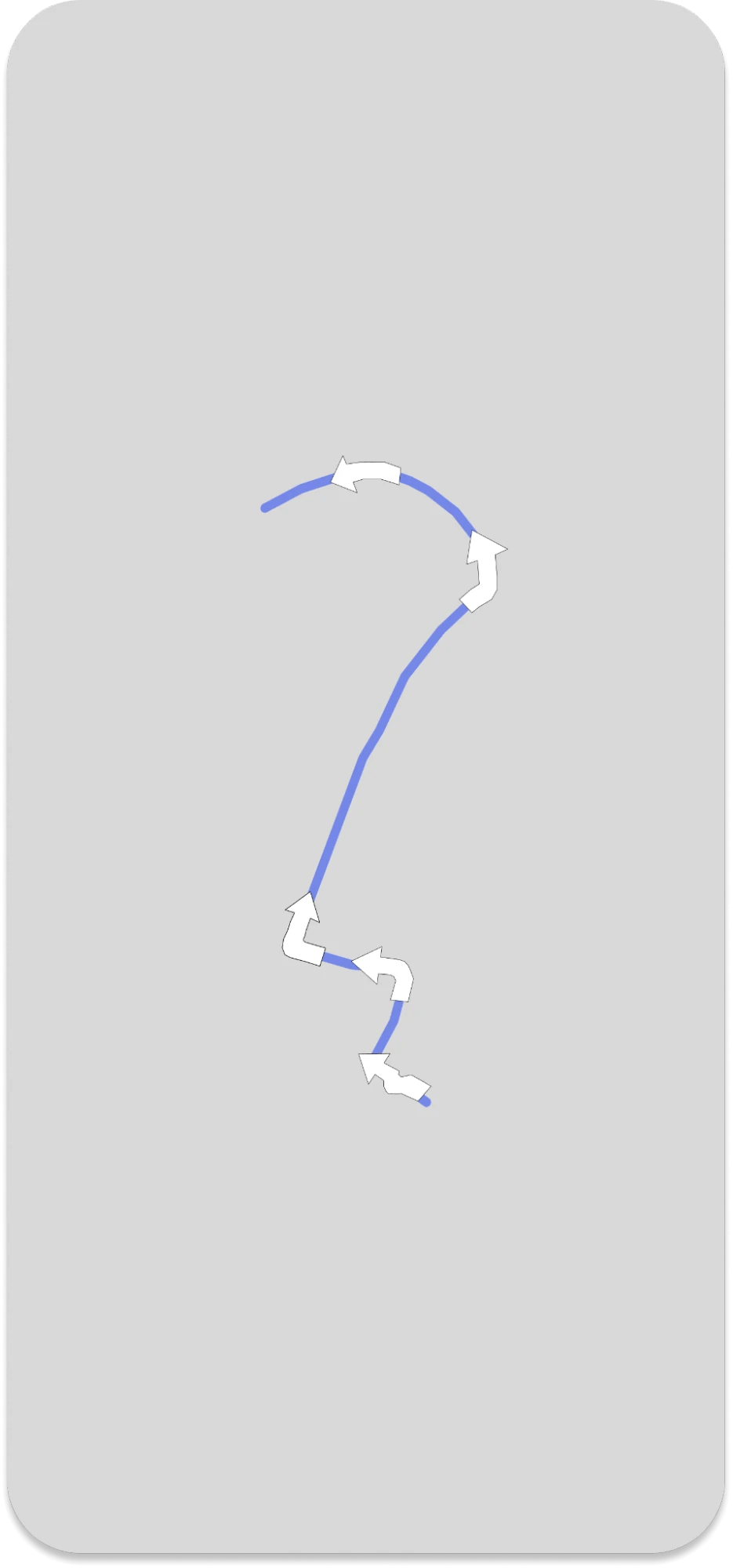
### Colors
```swift
NavigationMapView.appearance().routeAlternateColor = .defaultAlternateLine
NavigationMapView.appearance().routeCasingColor = .defaultRouteCasing
NavigationMapView.appearance().trafficHeavyColor = .trafficHeavy
NavigationMapView.appearance().trafficLowColor = .trafficLow
NavigationMapView.appearance().trafficModerateColor = .trafficModerate
NavigationMapView.appearance().trafficSevereColor = .trafficSevere
NavigationMapView.appearance().trafficUnknownColor = .trafficUnknown
```
### Upcoming Maneuver arrow
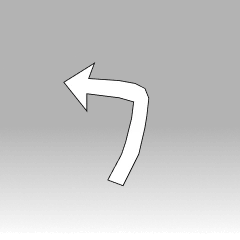
```swift
NavigationMapView.appearance().maneuverArrowColor = .defaultManeuverArrow
NavigationMapView.appearance().maneuverArrowStrokeColor = .defaultManeuverArrowStroke
```
The default values:
| No. | Attribute Name | Color Code/ Value |
| --- | --- | --- |
| 1 | routeColor | #7588E9 |
| 2 | routeShieldColor | #7588E9 |
| 3 | routeModerateCongestionColor | #F3A64F |
| 4 | routeSevereCongestionColor | #E93340 |
| 5 | maneuverArrowColor | #FFFFFF |
| 6 | maneuverArrowBorderColor | #2D3F53 |
| 7 | routeScale | 0.8 |
| 8 | roundedLineCap | true |
## Customize the colors of banner instructions
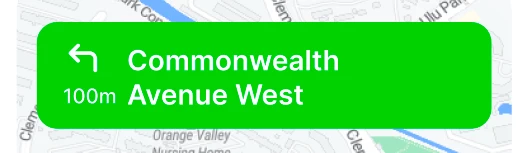
| No. | Attribute Name | Type |
| --- | --- | --- |
| 1 | InstructionsBannerView.appearance().backgroundColor | color |
| 2 | ManeuverView.appearance(whenContainedInInstancesOf:
\[InstructionsBannerView.self\]).primaryColor | color |
| 3 | ManeuverView.appearance(whenContainedInInstancesOf:
\[InstructionsBannerView.self\]).secondaryColor | color |
| 4 | ManeuverView.appearance(whenContainedInInstancesOf:
\[NextBannerView.self\]).primaryColor | color |
| 5 | ManeuverView.appearance(whenContainedInInstancesOf:
\[NextBannerView.self\]).secondaryColor | color |
| 6 | ManeuverView.appearance(whenContainedInInstancesOf:
\[NextBannerView.self\]).secondaryColor | color |
| 7 | ManeuverView.appearance(whenContainedInInstancesOf:
\[StepInstructionsView.self\]).secondaryColor | color |
| 8 | NextBannerView.appearance().backgroundColor | color |
| 9 | NextInstructionLabel.appearance().font | font |
| 10 | NextInstructionLabel.appearance().normalTextColor | color |
| 11 | PrimaryLabel.appearance().normalFont | font |
| 12 | PrimaryLabel.appearance(whenContainedInInstancesOf:
\[InstructionsBannerView.self\]).normalTextColor | color |
| 13 | PrimaryLabel.appearance(whenContainedInInstancesOf:
\[StepInstructionsView.self\]).normalTextColor | color |
| 14 | PrimaryLabel.appearance(whenContainedInInstancesOf:
\[StepInstructionsView.self\]).normalFont | font |
## Voice Instruction
For voice guidance, pass the _voiceController_ into _NavigationOptions_ when starting navigation.
Code example
```swift
// Initialize RouteVoiceController
let voiceController = RouteVoiceController()
// Setup VoiceControllerDelegate
voiceController.voiceControllerDelegate = self
let navigationOptions = NavigationOptions(styles: styles, navigationService: navigationService,voiceController: voiceController)
let navigationViewController = NavigationViewController(for: routes,navigationOptions: navigationOptions)
```
Delegate implementation: use _VoiceControllerDelegate_ with `spokenInstructionsDidFailWith`; avoid `willSpeak` and `didInterrupt` here unless you explicitly wire speech synthesizer delegate APIs.
```swift
extension ViewController: VoiceControllerDelegate {
// Called when there is an error with speaking a voice instruction.
func voiceController(_ voiceController: RouteVoiceController, spokenInstructionsDidFailWith error: Error) {
print(error.localizedDescription)
}
// Called when an instruction is interrupted by a new voice instruction.
func voiceController(_ voiceController: RouteVoiceController, didInterrupt interruptedInstruction: SpokenInstruction, with interruptingInstruction: SpokenInstruction) {
print(interruptedInstruction.text, interruptingInstruction.text)
}
func voiceController(_ voiceController: RouteVoiceController, willSpeak instruction: SpokenInstruction, routeProgress: RouteProgress) -> SpokenInstruction? {
return SpokenInstruction(distanceAlongStep: instruction.distanceAlongStep, text: "New Instruction!", ssmlText: "New Instruction!",unit: .meters)
}
}
```
## Change the base map’s style
To specify the style of the _MapView_ in the **Homepage**, we can set the `styleURL` property when initializing the _MapView_ object:
```swift
// Set the style URL for the MapView in the Homepage
mapView?.styleURL = URL(string: styleUrl)
```
In the code snippet above, we set the `styleURL` property of the _mapView_ object to the specified URL string. This URL determines the visual style of the map displayed on the _MapView_ object on the **Homepage**.
To specify the style of the _MapView_ in the Navigation Page, we can create a custom style class that inherits from one of the default style classes (such as _DayStyle_), and set the _mapStyleURL_ property in the initializer:
```swift
// Define a custom style class that inherits from DayStyle
class CustomDayStyle: DayStyle {
required init() {
super.init()
mapStyleURL = URL(string: styleUrl)
}
}
```
In the code snippet above, we define a class _CustomDayStyle_ inheriting from _DayStyle_ and set `mapStyleURL` in its initializer. If you need to update map style directly on the navigation page, use `navigationViewController.navigationMapView?.styleURL`.
Use `navigationViewController.navigationMapView?.styleURL` for direct navigation-page style updates