# Usage
The NextBillion.ai Flutter Navigation SDK empowers you to integrate advanced navigation capabilities into your Flutter application. Follow these steps to utilize the SDK effectively:
## NB Maps
If you need to use Map-related functions, such as displaying a Map widget, please refer to our [Flutter Maps Plugin](https://pub.dev/packages/nb_maps_flutter) Documentation.
## Fetch routes
To request routes, use `RouteRequestParams` with _NBNavigation_. For supported parameters, please refer to [Navigation API](/routing/navigation-api) documentation.
Create the `RouteRequestParams` object with the required parameters:
```dart
RouteRequestParams requestParams = RouteRequestParams(
origin: origin,
destination: dest,
// waypoints: [waypoint1, waypoint2],
// language: 'en',
// alternatives: true,
// overview: ValidOverview.simplified,
// avoid: [SupportedAvoid.toll, SupportedAvoid.ferry],
// option: SupportedOption.flexible,
// unit: SupportedUnits.imperial,
// mode: ValidModes.car,
// geometryType: SupportedGeometry.polyline,
);
```
Following is a list of all the supported parameters and their details:
| Parameter | Required | Type | Format & Usage | Description |
| --- | --- | --- | --- | --- |
| origin | Yes | `LatLng` | **Format:** Latitude, Longitude
**Usage:** LatLng(34.052235, -118.243683) | The starting point coordinates for the route request. |
| destination | Yes | `LatLng` | **Format:** Latitude, Longitude
**Usage:** LatLng(40.712776, -74.005974) | The ending point coordinates for the route request. |
| mode | No | `ValidModes` | **Usage:** ValidModes.car (default)
ValidModes.truck, ValidModes.bike, ValidModes.motorcycle | Specifies the primary mode of transportation for the route. When using "truck", "bike", or "motorcycle", option must be set to SupportedOption.flexible. |
| option | No | `SupportedOption` | **Usage:** SupportedOption.fast (default)
SupportedOption.flexible | Route calculation option. "flexible" offers customizable features for advanced navigation. |
| routeType | No | `RouteType` | **Usage:** RouteType.fastest (default)
RouteType.shortest | Type of route to calculate. shortest is only available when option=SupportedOption.flexible. |
| alternatives | No | `bool` | Default: false | Whether to return alternative routes. If true, up to two alternatives may be returned. |
| altCount | No | `int` | e.g., 2 | Number of alternative routes to request. |
| avoidType | No | `List` | _Allowed Values:_ "toll", "ferry", "highway", "sharp_turn", "service_road", "left_turn", "right_turn", "bbox", "geofence_id", "none"
**Special formats:** bbox: min_lat, min_lng, max_lat, max_lng
**Multiple bboxes usage:** bbox: 34.0635, -118.2547, 34.0679, -118.2478 \| bbox:34.0521, -118.2342, 34.0478, -118.2437 | Types of road segments to avoid during route calculation. Use a \| (pipe) operator to add multiple values. Values "toll", "ferry", "highway" and "none" can be used with either of the SupportedOption.fast or SupportedOption.flexible. All other values require option=SupportedOption.flexible to be set. |
| language | No | `String` | "en" (default) | Language for returning turn-by-turn text instructions. This parameter accepts two-lettered ISO 639-1 codes to identify the language for instructions.
Currently, only the following languages are supported: English(`en`), Spanish(`es`), French(`fr`), Mandarin(`zh`),German(`de`), and Catalan(`ca`) and other languages available in [OSRM translations](https://github.com/Project-OSRM/osrm-text-instructions/tree/master/languages/translations). |
| unit | No | `SupportedUnits` | **Usage:** SupportedUnits.metric (default),
SupportedUnits.imperial | Unit of measurement for route distances.
Please note that configuration of this parameter affects how distances and maneuver instructions are displayed in the response. It has no effect on the units used for collecting input values for fields like `truckWeight`, `truckSize` and other similar parameters. |
| overview | No | `ValidOverview` | **Usage:** ValidOverview.full (default),
ValidOverview.simplified, ValidOverview.none | Level of detail for returned route geometry. |
| geometry | No | `SupportedGeometry` | **Usage:** SupportedGeometry.polyline, SupportedGeometry.polyline6 (default) | Encoding format of route geometry to be returned. |
| waypoints | No | `List` | **Usage:** \[LatLng(34.052235, -118.243683), LatLng(35.052235, -119.243683)\] | List of intermediate points to visit along the route (non-snapped coordinates). |
| approaches | No | `List` | **Usage:** SupportedApproaches.unrestricted (default), SupportedApproaches.curb | Specifies from which side of the road to approach waypoints. Must match waypoints length if provided. |
| truckWeight | No | `int` | **Format:** Range: 1-100000 (kg) | Total weight of the truck including trailers and cargo. Only effective when mode=ValidModes.truck and option=SupportedOption.flexible. |
| truckSize | No | `List` | **Format:** \[height, width, length\] in cm (Maximum values: \[1000, 5000, 5000\]) | Truck dimensions in centimeters. Only effective when mode=ValidModes.truck and option=SupportedOption.flexible. |
| hazmatType | No | `List` | **Usage:** SupportedHazmatType.general, SupportedHazmatType.circumstantial, SupportedHazmatType.explosive, SupportedHazmatType.harmfulToWater | Specifies hazardous material type to avoid unsuitable roads. Only effective when mode=ValidModes.truck and option=SupportedOption.flexible. |
| crossBorder | No | `bool` | true (default), false | Whether to allow crossing international borders. Only available in North America. |
| truckAxleLoad | No | `num` | e.g., 10.5 (tonnes) | Total load per axle (including trailers and cargo weight). Only effective when mode=ValidModes.truck. |
| allow | No | `String` | "taxi", "hov" | Special route types to allow (e.g., taxi or HOV routes). |
### Fetch routes
Use **NBNavigation.fetchRoute()** to fetch routes with the specified `requestParams`, and get the route response DirectionsRouteResponse, the response will contain the route info.
```dart
DirectionsRouteResponse response = await NBNavigation.fetchRoute(requestParams);
```
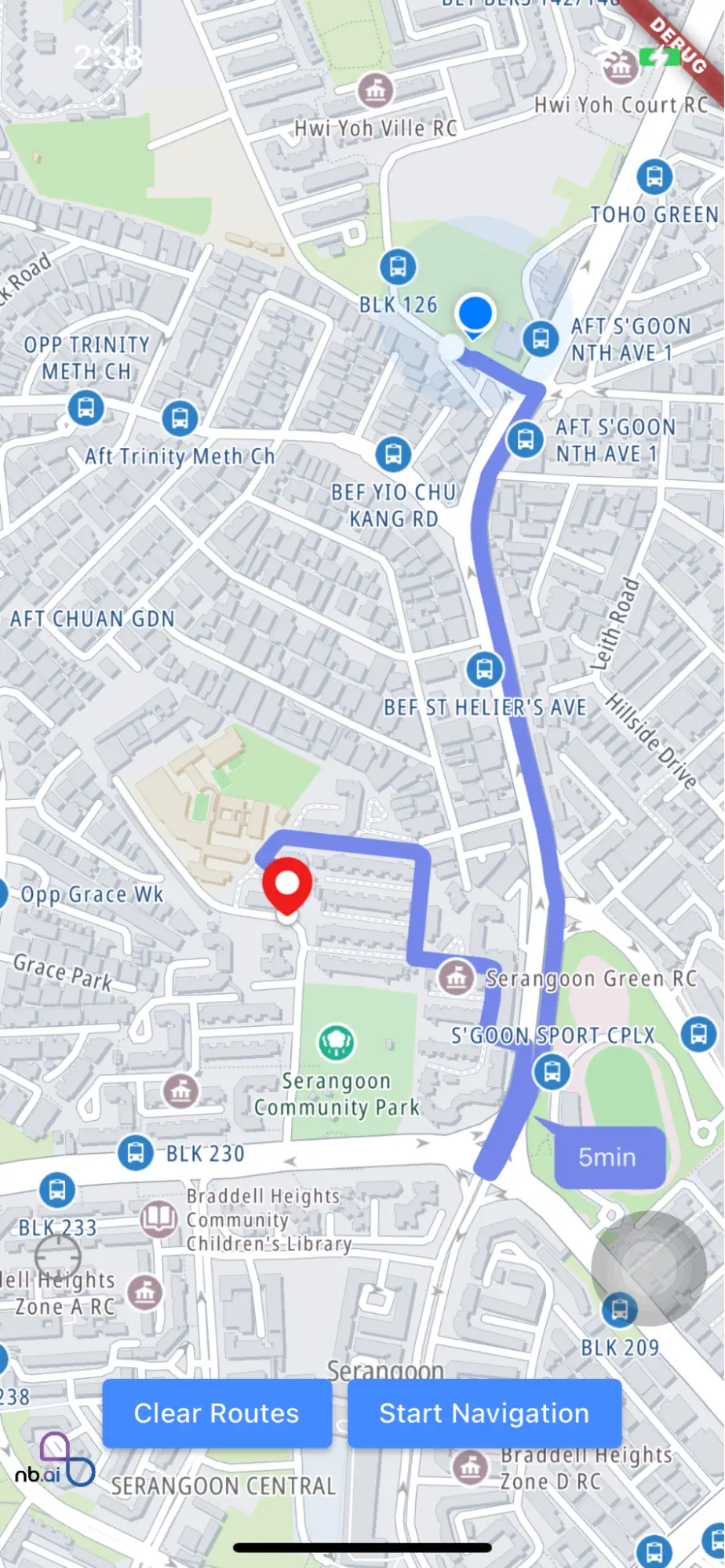
## Draw routes
After obtaining the routes, you can draw routes on the map view using _NavNextBillionMap_. Ensure you have the _NextbillionMapController_ created in the _onMapCreated_ callback of the `NBMap` widget. Refer to [Flutter Maps Plugin](https://pub.dev/packages/nb_maps_flutter) documentation for more information.
Create _NavNextBillionMap_ with _NextbillionMapController_ in `NBMap` widget’s `onStyleLoaded` callback:
```dart
void _onMapCreated(NextbillionMapController controller) {
this.controller = controller;
}
void _onStyleLoaded() async {
if (controller != null) {
navNextBillionMap = await NavNextBillionMap.create(controller!);
}
}
```
### Draw routes
Once you have the _NavNextBillionMap_ instance, draw the routes on the map view:
```dart
await navNextBillionMap.drawRoute(routes);
```
### Clear routes
To remove the drawn routes from the map view, use **clearRoute()**:
```dart
navNextBillionMap.clearRoute();
```
### Toggle Alternative Route Visibility
You can toggle the visibility of alternative routes on the map:
```dart
navNextBillionMap.toggleAlternativeVisibilityWith(visible);
```
### Toggle Route DurationSymbol Visibility
Toggle the visibility of the route duration symbol on the map:
```dart
navNextBillionMap.toggleDurationSymbolVisibilityWith(visible);
```
### Add RouteSelected Listener.
You can add route switching listener in the `onMapClick` callback:
```dart
onMapClick(Point point, LatLng coordinates) {
navNextBillionMap.addRouteSelectedListener(coordinates, (selectedRouteIndex) {})
}
```
## Start navigation
To initiate navigation, use _NavigationLauncherConfig_. The following properties can be configured as per your preference:
- **route**: The selected route for directions
- **routes**: A list of available routes
- **themeMode**: The theme mode for navigation UI, default value is _system_
- system: follows system theme mode
- light: applies light theme
- dark: applies dark theme
- **locationLayerRenderMode**: The rendering mode for the location layer, default value is _LocationLayerRenderMode.GPS_.
- **shouldSimulateRoute**: Whether to simulate the route during navigation, default value is _false_.
- **enableDissolvedRouteLine**: Whether to enable the dissolved route line during navigation, default value is _true_.
- **navigationMapStyleUrl**: Indicates the map style in the Navigation view. Its priority is higher than the navViewMapStyle of (_CustomNavigationViewLight_, _CustomNavigationViewDark_) set in the `styles.xml` for Android and the _mapStyleURL_ of (_customDayStyle_, _customNightStyle_) set in the `AppDelegate` for iOS.
- **useCustomNavigationStyle**: Indicates whether to enable the custom style defined in styles.xml for Android (_CustomNavigationViewLight_, _CustomNavigationViewDark_) AppDelegate for iOS (_customDayStyle_, _customNightStyle_)
- **showArriveDialog**: Indicates whether to show the arrival dialog. If set to true, the arrive dialog will be shown when the user arrives at the waypoints or destination. If set to false, the arrive dialog will not be shown when the user arrives at the waypoints or destination. This property is only available for call \[_NBNavigation.startNavigation_\] to launch the navigation. It is not available for \[_NBNavigationView_\].If you want to show the arrive dialog in \[_NBNavigationView_\], you need to customize the dialog by yourself in the \[_NBNavigationView.onArriveAtWaypoint_\].
- **showSpeedometer** : Indicates whether to show the speedometer. If set to true, the speedometer will be shown during navigation.If set to false, the speedometer will not be shown during navigation.
```dart
NavigationLauncherConfig config = NavigationLauncherConfig(route: routes.first, routes: routes, shouldSimulateRoute: true);
NBNavigation.startNavigation(config);
```
## Launch Embedded NavigationView
_NBNavigationView_ is a customizable navigation view widget designed to provide seamless navigation experiences in your Flutter application. It offers various configuration options to cater to different navigation requirements, such as theme modes, location layer render modes, and custom styles.
- **Important** : If you want to use the _NavigationView_, you need to make the _MainActivity_ extend **FlutterFragmentActivity** instead of **FlutterActivity** in the Android project.
```dart
class MainActivity: FlutterFragmentActivity() {
}
```
### NBNavigationView Widget
```dart
const NBNavigationView({
super.key,
required this.navigationOptions,
this.onNavigationViewReady,
this.onProgressChange,
this.onNavigationCancelling,
this.onArriveAtWaypoint,
this.onRerouteFromLocation,
});
```
### Parameters
By utilizing the **NavigationLauncherConfig** class, you can customize the navigation experience to meet your specific needs, from theme settings to location layer modes and custom styles.
- **navigationOptions (required)**: This parameter provides the necessary configuration for the navigation view.
- **onNavigationViewReady**: A callback that is triggered when the navigation view is ready.
- **onProgressChange**: A callback that is triggered when there is a change in the navigation progress.
- **onNavigationCancelling**: A callback that is triggered when navigation is being canceled.
- **onArriveAtWaypoint**: A callback that is triggered when arriving at a waypoint.
- **onRerouteFromLocation**: A callback that is triggered when rerouting from a specific location.
## Example Usage
```dart
NBNavigationView(
navigationOptions: NavigationLauncherConfig(
route: selectedRoute,
routes: allRoutes,
themeMode: NavigationThemeMode.system,
),
onNavigationViewReady: (controller) {
// Handle navigation view ready
},
onProgressChange: (progress) {
// Handle progress change
},
onNavigationCancelling: () {
// Handle navigation canceling
},
onArriveAtWaypoint: (waypoint) {
// Handle arriving at waypoint
},
onRerouteFromLocation: (location) {
// Handle rerouting from location
},
);
```