# Customize Navigation Style
This Example Shows
- Draw route lines on the map view
- Customize Navigation view style
- iOS: Import **nb_navigation_flutter** in the **AppDelegate** of your ios project, customize the navigation view appearance using **customDayStyle** and **customNightStyle**
- Android: Add Custom style named **CustomNavigationViewLight** and **CustomNavigationViewDark** in your android project styles.xml with parent = "NavigationViewLight" or parent = "NavigationViewDark"
- Use customize navigation style by setting **useCustomNavigationStyle** to **TRUE** in NavigationLauncherConfig when startNavigation
| 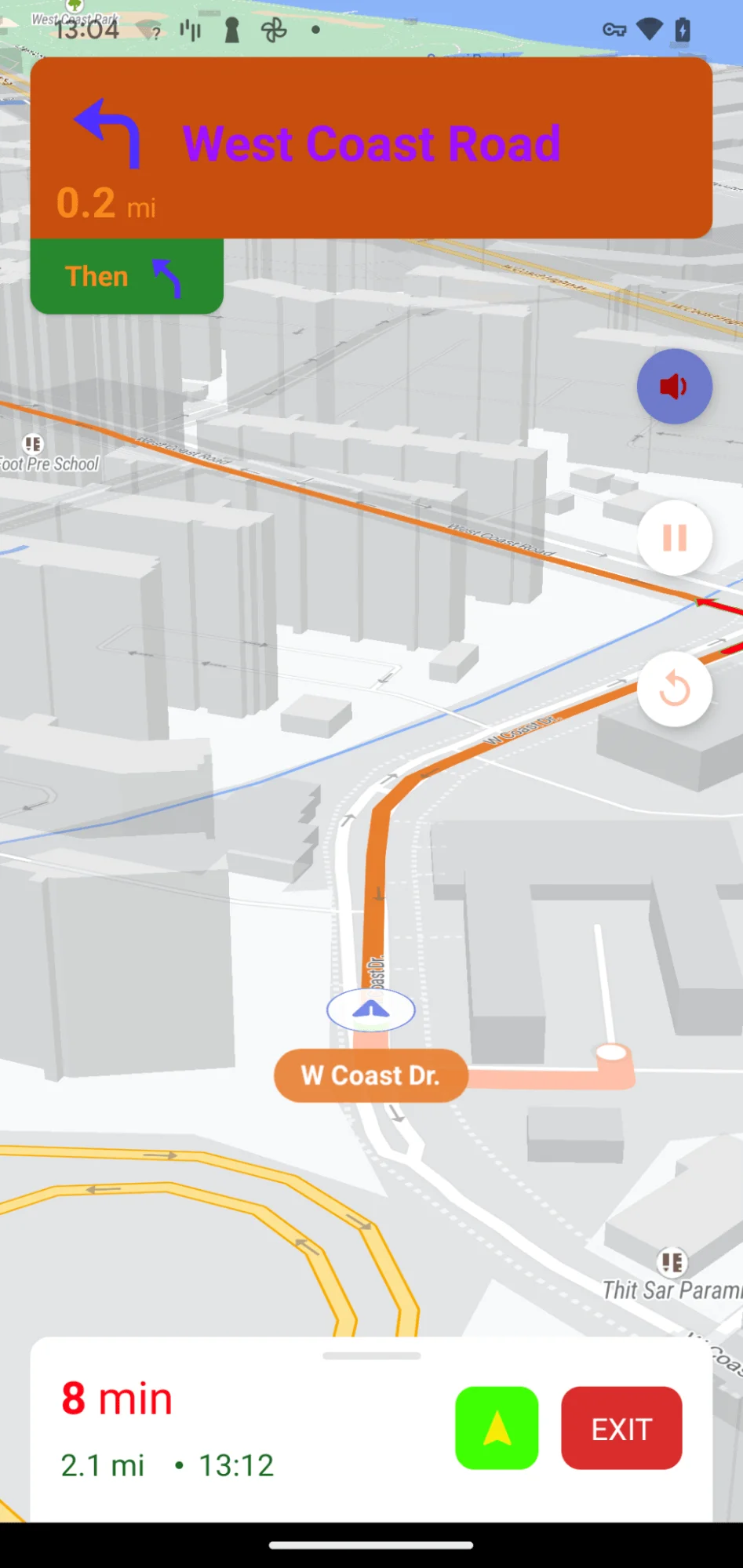 | 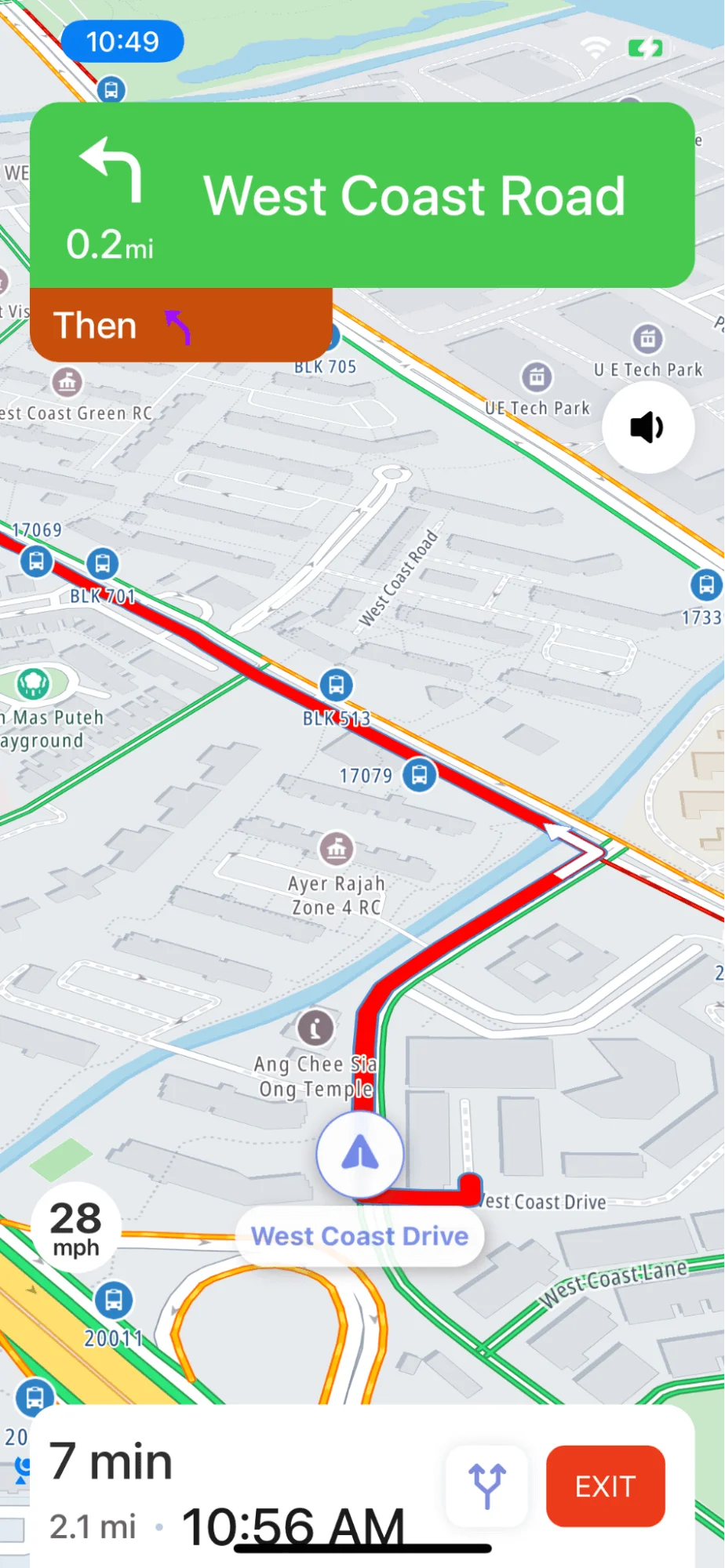 |
| --- | --- |
| **Android snapshot** | **iOS snapshot** |
For all code examples, refer to [Flutter Navigation Code Example](https://github.com/nextbillion-ai/nb-navigation-flutter)
**styles.xml** in android project [view source](https://github.com/nextbillion-ai/nb-navigation-flutter/blob/main/example/android/app/src/main/res/values/styles.xml)
```xml
```
AppDelegate.swift in iOS project [view source](https://github.com/nextbillion-ai/nb-navigation-flutter/blob/main/example/ios/Runner/AppDelegate.swift)
```swift
import UIKit
import Flutter
import nb_navigation_flutter
@UIApplicationMain
@objc class AppDelegate: FlutterAppDelegate, UINavigationControllerDelegate {
override func application(
_ application: UIApplication,
didFinishLaunchingWithOptions launchOptions: [UIApplication.LaunchOptionsKey: Any]?
) -> Bool {
GeneratedPluginRegistrant.register(with: self)
customStyle()
let controller : FlutterViewController = window?.rootViewController as! FlutterViewController
window = UIWindow(frame: UIScreen.main.bounds)
var navigationController = UINavigationController.init(rootViewController: controller)
window?.rootViewController = navigationController
navigationController.delegate = self
window?.makeKeyAndVisible()
return super.application(application, didFinishLaunchingWithOptions: launchOptions)
}
func customStyle() {
NavStyleManager.customDayStyle = CustomDayStyle()
NavStyleManager.customNightStyle = CustomNightStyle()
}
func navigationController(_ navigationController: UINavigationController, willShow viewController: UIViewController, animated: Bool) {
navigationController.navigationBar.isHidden = viewController.isKind(of: FlutterViewController.self)
}
}
```
**CustomStyle.swift** [view source](https://github.com/nextbillion-ai/nb-navigation-flutter/blob/main/example/ios/Runner/CustomStyle.swift)
```swift
//
// CustomStyle.swift
// Runner
//
//
import Foundation
import NbmapNavigation
class CustomDayStyle: DayStyle {
required init() {
super.init()
mapStyleURL = URL(string: "https://api.nextbillion.io/tt/style/1/style/22.2.1-9?map=2/basic_street-light")!
}
override func apply() {
super.apply()
ArrivalTimeLabel.appearance().font = UIFont.systemFont(ofSize: 18, weight: .medium).adjustedFont
ArrivalTimeLabel.appearance().normalTextColor = .defaultPrimaryText
BottomBannerContentView.appearance().backgroundColor = #colorLiteral(red: 1, green: 1, blue: 1, alpha: 1)
BottomBannerView.appearance().backgroundColor = #colorLiteral(red: 1, green: 1, blue: 1, alpha: 1)
Button.appearance().textColor = .defaultPrimaryText
CancelButton.appearance().backgroundColor = #colorLiteral(red: 0.9254902005, green: 0.2352941185, blue: 0.1019607857, alpha: 1)
CancelButton.appearance().textFont = UIFont.systemFont(ofSize: 16, weight: .regular).adjustedFont
CancelButton.appearance().textColor = #colorLiteral(red: 0.9842069745, green: 0.9843751788, blue: 0.9841964841, alpha: 1)
OverviewButton.appearance().borderColor = #colorLiteral(red: 0.94117647, green: 0.95294118, blue: 1, alpha: 1)
OverviewButton.appearance().tintColor = #colorLiteral(red: 0.2566259801, green: 0.3436664343, blue: 0.8086165786, alpha: 0.6812137831)
DismissButton.appearance().backgroundColor = #colorLiteral(red: 1, green: 1, blue: 1, alpha: 1)
DismissButton.appearance().textColor = #colorLiteral(red: 0.09803921569, green: 0.09803921569, blue: 0.09803921569, alpha: 1)
DismissButton.appearance().textFont = UIFont.systemFont(ofSize: 20, weight: .medium).adjustedFont
DistanceLabel.appearance().unitFont = UIFont.systemFont(ofSize: 14, weight: .medium).adjustedFont
DistanceLabel.appearance().valueFont = UIFont.systemFont(ofSize: 22, weight: .medium).adjustedFont
DistanceLabel.appearance(whenContainedInInstancesOf: [InstructionsBannerView.self]).unitTextColor = #colorLiteral(red: 0.980392158, green: 0.980392158, blue: 0.980392158, alpha: 1)
DistanceLabel.appearance(whenContainedInInstancesOf: [InstructionsBannerView.self]).valueTextColor = #colorLiteral(red: 0.980392158, green: 0.980392158, blue: 0.980392158, alpha: 1)
DistanceLabel.appearance(whenContainedInInstancesOf: [StepInstructionsView.self]).unitTextColor = #colorLiteral(red: 0.3999999762, green: 0.3999999762, blue: 0.3999999762, alpha: 1)
DistanceLabel.appearance(whenContainedInInstancesOf: [StepInstructionsView.self]).valueTextColor = #colorLiteral(red: 0.3999999762, green: 0.3999999762, blue: 0.3999999762, alpha: 1)
DistanceRemainingLabel.appearance().font = UIFont.systemFont(ofSize: 18, weight: .medium).adjustedFont
DistanceRemainingLabel.appearance().normalTextColor = #colorLiteral(red: 0.3999999762, green: 0.3999999762, blue: 0.3999999762, alpha: 1)
EndOfRouteButton.appearance().textColor = .darkGray
EndOfRouteButton.appearance().textFont = .systemFont(ofSize: 15)
EndOfRouteContentView.appearance().backgroundColor = .white
EndOfRouteStaticLabel.appearance().normalFont = .systemFont(ofSize: 14.0)
EndOfRouteStaticLabel.appearance().normalTextColor = #colorLiteral(red: 0.217173934, green: 0.3645851612, blue: 0.489295125, alpha: 1)
EndOfRouteTitleLabel.appearance().normalFont = .systemFont(ofSize: 36.0)
EndOfRouteTitleLabel.appearance().normalTextColor = UIColor.black
FloatingButton.appearance().backgroundColor = #colorLiteral(red: 1, green: 1, blue: 1, alpha: 1)
FloatingButton.appearance().tintColor = tintColor
GenericRouteShield.appearance().backgroundColor = UIColor.clear
InstructionsBannerContentView.appearance().backgroundColor = #colorLiteral(red: 1, green: 1, blue: 1, alpha: 1)
InstructionsBannerView.appearance().backgroundColor = #colorLiteral(red: 0.9254902005, green: 0.2352941185, blue: 0.1019607857, alpha: 1)
LaneView.appearance().primaryColor = .defaultLaneArrowPrimary
LaneView.appearance().secondaryColor = .defaultLaneArrowSecondary
LanesView.appearance().backgroundColor = #colorLiteral(red: 0.1522715986, green: 0.5290428996, blue: 0.1787364483, alpha: 1)
LineView.appearance().lineColor = #colorLiteral(red: 0, green: 0, blue: 0, alpha: 0.1)
ManeuverView.appearance().backgroundColor = .clear
ManeuverView.appearance(whenContainedInInstancesOf: [InstructionsBannerView.self]).primaryColor = .defaultTurnArrowPrimary
ManeuverView.appearance(whenContainedInInstancesOf: [InstructionsBannerView.self]).secondaryColor = .defaultTurnArrowSecondary
ManeuverView.appearance(whenContainedInInstancesOf: [NextBannerView.self]).primaryColor = .defaultTurnArrowPrimary
ManeuverView.appearance(whenContainedInInstancesOf: [NextBannerView.self]).secondaryColor = .defaultTurnArrowSecondary
ManeuverView.appearance(whenContainedInInstancesOf: [StepInstructionsView.self]).primaryColor = #colorLiteral(red: 0.2392157018, green: 0.2392157018, blue: 0.2392157018, alpha: 1) //.defaultTurnArrowPrimary
ManeuverView.appearance(whenContainedInInstancesOf: [StepInstructionsView.self]).secondaryColor = .defaultTurnArrowSecondary
NavigationMapView.appearance().maneuverArrowColor = .defaultManeuverArrow
NavigationMapView.appearance().maneuverArrowStrokeColor = .defaultManeuverArrowStroke
NavigationMapView.appearance().routeAlternateColor = .defaultAlternateLine
NavigationMapView.appearance().routeCasingColor = .defaultRouteCasing
NavigationMapView.appearance().trafficHeavyColor = .trafficHeavy
NavigationMapView.appearance().trafficLowColor = .trafficLow
NavigationMapView.appearance().trafficModerateColor = .trafficModerate
NavigationMapView.appearance().trafficSevereColor = .trafficSevere
NavigationMapView.appearance().trafficUnknownColor = #colorLiteral(red: 0.6196078431, green: 0.06274509804, blue: 1, alpha: 1)
NavigationView.appearance().backgroundColor = #colorLiteral(red: 0.764706, green: 0.752941, blue: 0.733333, alpha: 1)
NextBannerView.appearance().backgroundColor = #colorLiteral(red: 0.6196078431, green: 0.06274509804, blue: 1, alpha: 1)
NextInstructionLabel.appearance().font = UIFont.systemFont(ofSize: 20, weight: .medium).adjustedFont
NextInstructionLabel.appearance().normalTextColor = #colorLiteral(red: 1, green: 1, blue: 1, alpha: 1)
PrimaryLabel.appearance().normalFont = UIFont.systemFont(ofSize: 30, weight: .medium).adjustedFont
PrimaryLabel.appearance(whenContainedInInstancesOf: [InstructionsBannerView.self]).normalTextColor = #colorLiteral(red: 1, green: 1, blue: 1, alpha: 1)
PrimaryLabel.appearance(whenContainedInInstancesOf: [StepInstructionsView.self]).normalTextColor = #colorLiteral(red: 0.09803921569, green: 0.09803921569, blue: 0.09803921569, alpha: 1)
PrimaryLabel.appearance(whenContainedInInstancesOf: [StepInstructionsView.self]).normalFont = UIFont.systemFont(ofSize: 15, weight: .medium).adjustedFont
ProgressBar.appearance().barColor = #colorLiteral(red: 0.149, green: 0.239, blue: 0.341, alpha: 1)
ReportButton.appearance().backgroundColor = #colorLiteral(red: 1, green: 1, blue: 1, alpha: 1)
ReportButton.appearance().textColor = tintColor!
ReportButton.appearance().textFont = UIFont.systemFont(ofSize: 15, weight: .medium).adjustedFont
ResumeButton.appearance().backgroundColor = #colorLiteral(red: 0.4609908462, green: 0.5315783024, blue: 0.9125307202, alpha: 1)
ResumeButton.appearance().tintColor = #colorLiteral(red: 1, green: 1, blue: 1, alpha: 1)
SecondaryLabel.appearance().normalFont = UIFont.systemFont(ofSize: 26, weight: .medium).adjustedFont
SecondaryLabel.appearance(whenContainedInInstancesOf: [InstructionsBannerView.self]).normalTextColor = #colorLiteral(red: 0.2156862745, green: 0.2156862745, blue: 0.2156862745, alpha: 1)
SecondaryLabel.appearance(whenContainedInInstancesOf: [StepInstructionsView.self]).normalTextColor = #colorLiteral(red: 0.2156862745, green: 0.2156862745, blue: 0.2156862745, alpha: 1)
SeparatorView.appearance().backgroundColor = #colorLiteral(red: 0.737254902, green: 0.7960784314, blue: 0.8705882353, alpha: 1)
StatusView.appearance().backgroundColor = UIColor.black.withAlphaComponent(2.0/3.0)
StepInstructionsView.appearance().backgroundColor = #colorLiteral(red: 1, green: 1, blue: 1, alpha: 1)
StepListIndicatorView.appearance().gradientColors = [#colorLiteral(red: 0.431372549, green: 0.431372549, blue: 0.431372549, alpha: 1), #colorLiteral(red: 0.6274509804, green: 0.6274509804, blue: 0.6274509804, alpha: 1), #colorLiteral(red: 0.431372549, green: 0.431372549, blue: 0.431372549, alpha: 1)]
StepTableViewCell.appearance().backgroundColor = #colorLiteral(red: 0.9675388083, green: 0.9675388083, blue: 0.9675388083, alpha: 1)
StepsBackgroundView.appearance().backgroundColor = #colorLiteral(red: 1, green: 1, blue: 1, alpha: 1)
TimeRemainingLabel.appearance().font = UIFont.systemFont(ofSize: 28, weight: .medium).adjustedFont
TimeRemainingLabel.appearance().normalTextColor = .defaultPrimaryText
TimeRemainingLabel.appearance().trafficHeavyColor = #colorLiteral(red:0.91, green:0.20, blue:0.25, alpha:1.0)
TimeRemainingLabel.appearance().trafficLowColor = #colorLiteral(red: 0.4666666687, green: 0.7647058964, blue: 0.2666666806, alpha: 1)
TimeRemainingLabel.appearance().trafficModerateColor = #colorLiteral(red:0.95, green:0.65, blue:0.31, alpha:1.0)
TimeRemainingLabel.appearance().trafficSevereColor = #colorLiteral(red: 0.7705719471, green: 0.1753477752, blue: 0.1177056804, alpha: 1)
TimeRemainingLabel.appearance().trafficUnknownColor = .defaultPrimaryText
// UserPuckCourseView.appearance().puckColor = #colorLiteral(red: 0.4609908462, green: 0.5315783024, blue: 0.9125307202, alpha: 1)
WayNameLabel.appearance().normalFont = UIFont.systemFont(ofSize:20, weight: .medium).adjustedFont
WayNameLabel.appearance().normalTextColor = #colorLiteral(red: 0.968627451, green: 0.968627451, blue: 0.968627451, alpha: 1)
WayNameView.appearance().backgroundColor = UIColor.defaultRouteLayer.withAlphaComponent(0.85)
WayNameView.appearance().borderColor = UIColor.defaultRouteCasing.withAlphaComponent(0.8)
SpeedView.appearance().textColor = UIColor.defaultPrimaryText
SpeedView.appearance().signBackColor = #colorLiteral(red: 1, green: 1, blue: 1, alpha: 1)
}
}
class CustomNightStyle: NightStyle {
required init() {
super.init()
mapStyleURL = URL(string: "https://api.nextbillion.io/tt/style/1/style/22.2.1-9?map=2/basic_street-dark")!
}
override func apply() {
super.apply()
NavigationMapView.appearance().trafficUnknownColor = UIColor.green
}
}
```
**CustomNavigationStyle** [view source](https://github.com/nextbillion-ai/nb-navigation-flutter/blob/main/example/lib/custom_navigation_style.dart)
```dart
import 'package:flutter/foundation.dart';
import 'package:flutter/material.dart';
import 'package:nb_navigation_flutter/nb_navigation_flutter.dart';
class CustomNavigationStyle extends StatefulWidget {
static const String title = "Customize Navigation Style";
const CustomNavigationStyle({super.key});
@override
CustomNavigationStyleState createState() => CustomNavigationStyleState();
}
class CustomNavigationStyleState extends State {
NextbillionMapController? controller;
List routes = [];
late NavNextBillionMap navNextBillionMap;
LatLng origin = const LatLng(1.312533169133601, 103.75986708439264);
LatLng dest = const LatLng(1.310473772283314, 103.77982271935586);
void _onMapCreated(NextbillionMapController controller) {
this.controller = controller;
}
Future _onStyleLoaded() async {
if (controller != null) {
var routeLineStyle = const RouteLineProperties(
routeDefaultColor: Color(0xFFE97F2F),
routeScale: 1.0,
alternativeRouteScale: 1.0,
routeShieldColor: Color(0xFF54E910),
durationSymbolPrimaryBackgroundColor: Color(0xFFE97F2F));
navNextBillionMap = await NavNextBillionMap.create(controller!,
routeLineProperties: routeLineStyle);
}
}
@override
void initState() {
super.initState();
}
@override
Widget build(BuildContext context) {
return Scaffold(
appBar: AppBar(
title: const Text(CustomNavigationStyle.title),
),
body: Stack(
children: [
NBMap(
onMapCreated: _onMapCreated,
initialCameraPosition: CameraPosition(
target: LatLng(origin.latitude, 103.76986708439264),
zoom: 13.0,
),
onStyleLoadedCallback: _onStyleLoaded,
),
_buttonWidget(),
],
),
);
}
void _fetchRoute() async {
RouteRequestParams requestParams = RouteRequestParams(
origin: origin,
destination: dest,
// waypoints: [Coordinate(latitude: wayP2.latitude, longitude: wayP2.longitude)],
// overview: ValidOverview.simplified,
// avoid: [SupportedAvoid.toll, SupportedAvoid.ferry],
// option: SupportedOption.flexible,
// truckSize: [200, 200, 600],
// truckWeight: 100,
unit: SupportedUnits.imperial,
mode: ValidModes.car,
);
DirectionsRouteResponse routeResponse =
await NBNavigation.fetchRoute(requestParams);
if (routeResponse.directionsRoutes.isNotEmpty) {
setState(() {
routes = routeResponse.directionsRoutes;
});
drawRoutes(routes);
} else if (routeResponse.message != null) {
if (kDebugMode) {
print(
"====error====${routeResponse.message}===${routeResponse.errorCode}");
}
}
}
void _startNavigation() {
if (routes.isEmpty) return;
NavigationLauncherConfig config =
NavigationLauncherConfig(route: routes.first, routes: routes);
config.locationLayerRenderMode = LocationLayerRenderMode.gps;
config.shouldSimulateRoute = true;
config.themeMode = NavigationThemeMode.system;
config.useCustomNavigationStyle = true;
NBNavigation.startNavigation(config);
}
Future drawRoutes(List routes) async {
navNextBillionMap.clearRoute();
navNextBillionMap.drawRoute(routes);
}
@override
void dispose() {
super.dispose();
}
_buttonWidget() {
return Positioned(
bottom: 60,
child: Padding(
padding: const EdgeInsets.only(left: 8, top: 18.0),
child: Row(
children: [
ElevatedButton(
style: ButtonStyle(
backgroundColor: WidgetStateProperty.all(Colors.blueAccent),
),
onPressed: () {
_fetchRoute();
},
child: const Text("Fetch Route"),
),
const Padding(padding: EdgeInsets.only(left: 8)),
ElevatedButton(
style: ButtonStyle(
backgroundColor: WidgetStateProperty.all(
routes.isEmpty ? Colors.grey : Colors.blueAccent),
enableFeedback: routes.isNotEmpty),
onPressed: () {
_startNavigation();
},
child: const Text("Start Navigation"),
),
],
),
),
);
}
}
```
## Code summary
The above code snippet demonstrates how to customize the navigation style for turn-by-turn navigation. The app uses the **nb_maps_flutter** and **nb_navigation_flutter** packages for map rendering, route drawing, and navigation-related functionality.
### Customize Navigation Style:
- iOS: Import **nb_navigation_flutter** in the AppDelegate of your iOS project, customize the navigation view appearance using **customDayStyle** and **customNightStyle**
- Android: Add Custom style named **CustomNavigationViewLight** and **CustomNavigationViewDark** in your android project styles.xml with parent = "NavigationViewLight" or parent = "NavigationViewDark"
- Use customize navigation style by setting **useCustomNavigationStyle** to TRUE in NavigationLauncherConfig when startNavigation
### Draw Route Line:
- The **NBMap** widget from the nb_maps_flutter package is used to display the map.
- When the "Fetch Route" button is pressed, the _fetchRoute function is called. It sends a route request to the navigation service **(NBNavigation.fetchRoute)** with the specified origin and destination coordinates. The response contains a list of DirectionsRoute objects representing different possible routes from the origin to the destination.
- The drawRoutes function is used to draw the fetched routes on the map using the **NavNextBillionMap** controller.
Customize Route Line Style:
- The **_onStyleLoaded** function is called when the map style is loaded. It initializes a **RouteLineProperties** object to customize the appearance of the route line.
- The **NavNextBillionMap** controller is created with the specified routeLineStyle object, which customizes attributes like the route color, route scale, alternative route scale, route shield color, and duration symbol background color.
### Supported Route Line Style Attributes:
The RouteLineProperties class provides the following supported route line style attributes:
- **routeDefaultColor**: The default color of the main route line.
- **routeScale**: The scaling factor applied to the width of the main route line.
- **alternativeRouteScale**: The scaling factor applied to the width of alternative route lines.
- **routeShieldColor**: The color of the route shield, which is displayed on the map for certain types of routes.
- **durationSymbolPrimaryBackgroundColor**: The background color of the duration symbol displayed along the route line.
- **alternativeRouteDefaultColor**: The default color of alternative route lines.
- **originMarkerName**: The asset image name of the route origin marker.
- **destinationMarkerName**: The asset image name of the route destination marker.
- **durationSymbolPrimaryBackgroundColor**: The background color of the primary route's duration symbol.
- **durationSymbolAlternativeBackgroundColor**: The background color of the alternative route's duration symbol.
- **durationSymbolPrimaryTextStyle**: The text style for the primary route's duration symbol.
- **durationSymbolAlternativeTextStyle**: The text style for alternative route's duration symbols.
### Start Navigation:
- The "Start Navigation" button is used to initiate turn-by-turn navigation using the selected route.
- When the button is pressed, the _startNavigation function is called. It launches the navigation using **NBNavigation.startNavigation** with the first route from the list.
Please note that some parts of the code (e.g., fetchRoute and startNavigation) rely on external services or APIs provided by the **nb_navigation_flutter** package, which are not fully visible from the code snippet. These services handle the actual route fetching and navigation functionality. Also, ensure that you have the required permissions and API keys set up to use the mapping and navigation services properly.