# Load NavigationView in Fragment
How to use NavigationView to navigate in Fragment?
- Add NavigationView in Fragment
- In order for your app to correctly call the MapView's lifecycle methods, you must override the following lifecycle methods in the Fragment that contains the **NavigationView** and call the respective **NavigationView** method. The following lifecycle methods must be overridden and include the matching **NavigationView** method.
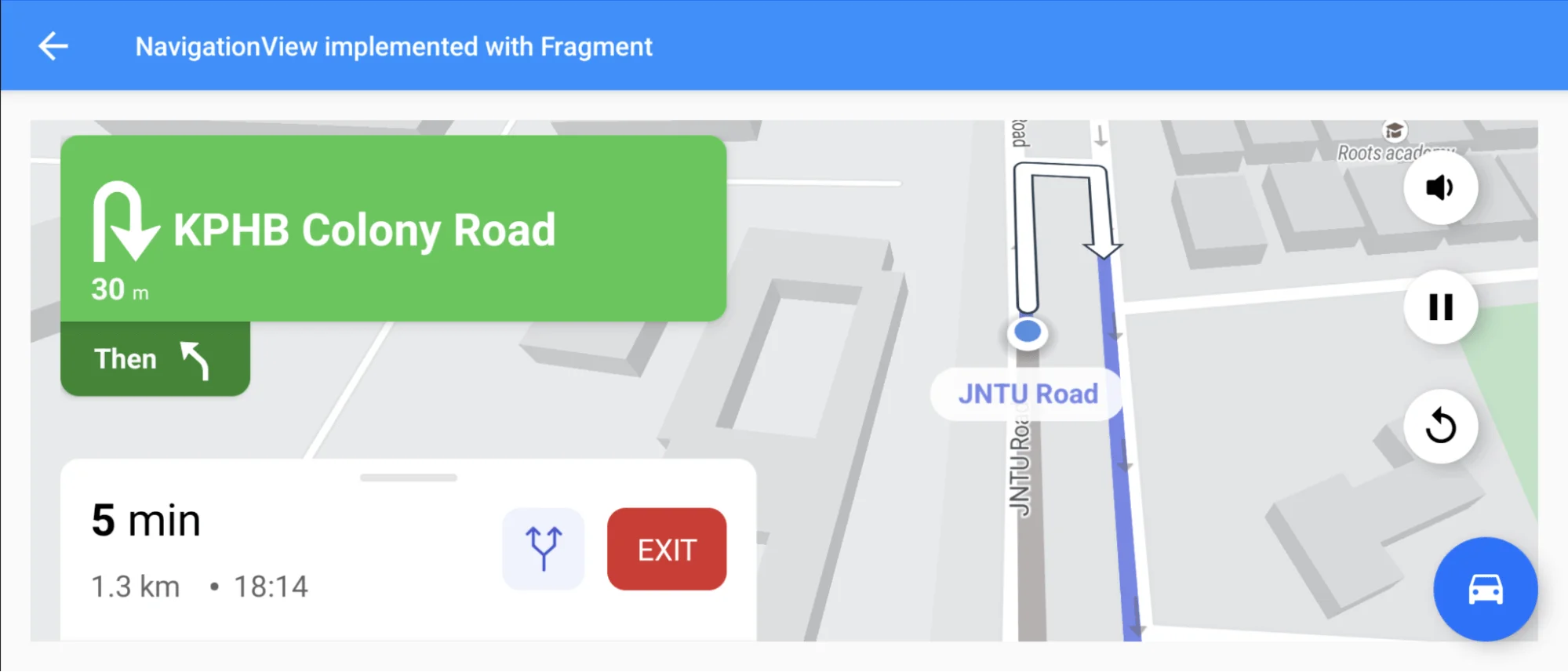
For all code examples, refer to [Navigation Code Examples](https://github.com/nextbillion-ai/nb-navigation-android-demo)
```java
@Override
public void onStart() {
super.onStart();
navigationView.onStart();
}
@Override
public void onResume() {
super.onResume();
navigationView.onResume();
}
@Override
public void onSaveInstanceState(@NonNull Bundle outState) {
navigationView.onSaveInstanceState(outState);
super.onSaveInstanceState(outState);
}
@Override
public void onViewStateRestored(@Nullable Bundle savedInstanceState) {
super.onViewStateRestored(savedInstanceState);
if (savedInstanceState != null) {
navigationView.onRestoreInstanceState(savedInstanceState);
}
}
@Override
public void onPause() {
super.onPause();
navigationView.onPause();
}
@Override
public void onStop() {
super.onStop();
navigationView.onStop();
}
@Override
public void onLowMemory() {
super.onLowMemory();
navigationView.onLowMemory();
}
@Override
public void onDestroyView() {
super.onDestroyView();
navigationView.onDestroy();
}
```
**activity_fragment_navigation.xml [view source](https://github.com/nextbillion-ai/nb-navigation-android-demo/blob/main/app/src/main/res/layout/activity_fragment_navigation.xml)**
```xml
```
**navigation_view_fragment_layout.xml [view source](https://github.com/nextbillion-ai/nb-navigation-android-demo/blob/main/app/src/main/res/layout/navigation_view_fragment_layout.xml)**
```xml
```
**FragmentNavigationActivity [view source](https://github.com/nextbillion-ai/nb-navigation-android-demo/blob/main/app/src/main/java/ai/nextbillion/navigation/demo/activity/FragmentNavigationActivity.java)**
```java
public class FragmentNavigationActivity extends AppCompatActivity {
@Override
protected void onCreate(Bundle savedInstanceState) {
super.onCreate(savedInstanceState);
setContentView(R.layout.activity_fragment_navigation);
initializeNavigationViewFragment(savedInstanceState);
}
private void initializeNavigationViewFragment(@Nullable Bundle savedInstanceState) {
FragmentManager fragmentManager = getSupportFragmentManager();
if (savedInstanceState == null) {
FragmentTransaction transaction = fragmentManager.beginTransaction();
transaction.disallowAddToBackStack();
transaction.add(R.id.navigation_fragment_frame, new NavigationFragment()).commit();
}
}
}
```
**NavigationFragment [view source](https://github.com/nextbillion-ai/nb-navigation-android-demo/blob/main/app/src/main/java/ai/nextbillion/navigation/demo/activity/fragment/NavigationFragment.java)**
```java
public class NavigationFragment extends Fragment implements OnNavigationReadyCallback, NavigationListener {
private static final double ORIGIN_LONGITUDE = -77.04012393951416;
private static final double ORIGIN_LATITUDE = 38.9111117447887;
private static final double DESTINATION_LONGITUDE = -77.03847169876099;
private static final double DESTINATION_LATITUDE = 38.91113678979344;
private NavigationView navigationView;
private DirectionsRoute directionsRoute;
@Nullable
@Override
public View onCreateView(@NonNull LayoutInflater inflater, @Nullable ViewGroup container,
@Nullable Bundle savedInstanceState) {
return inflater.inflate(R.layout.navigation_view_fragment_layout, container, false);
}
@Override
public void onViewCreated(@NonNull View view, @Nullable Bundle savedInstanceState) {
super.onViewCreated(view, savedInstanceState);
navigationView = view.findViewById(R.id.navigation_view_fragment);
navigationView.onCreate(savedInstanceState);
navigationView.initialize(this);
}
@Override
public void onStart() {
super.onStart();
navigationView.onStart();
}
@Override
public void onResume() {
super.onResume();
navigationView.onResume();
}
@Override
public void onSaveInstanceState(@NonNull Bundle outState) {
navigationView.onSaveInstanceState(outState);
super.onSaveInstanceState(outState);
}
@Override
public void onViewStateRestored(@Nullable Bundle savedInstanceState) {
super.onViewStateRestored(savedInstanceState);
if (savedInstanceState != null) {
navigationView.onRestoreInstanceState(savedInstanceState);
}
}
@Override
public void onPause() {
super.onPause();
navigationView.onPause();
}
@Override
public void onStop() {
super.onStop();
navigationView.onStop();
}
@Override
public void onLowMemory() {
super.onLowMemory();
navigationView.onLowMemory();
}
@Override
public void onDestroyView() {
super.onDestroyView();
navigationView.onDestroy();
}
@Override
public void onNavigationReady(boolean isRunning) {
Point origin = Point.fromLngLat(ORIGIN_LONGITUDE, ORIGIN_LATITUDE);
Point destination = Point.fromLngLat(DESTINATION_LONGITUDE, DESTINATION_LATITUDE);
fetchRoute(origin, destination);
}
@Override
public void onCancelNavigation() {
navigationView.stopNavigation();
stopNavigation();
}
@Override
public void onNavigationFinished() {
// no-op
}
@Override
public void onNavigationRunning() {
// no-op
}
private void fetchRoute(Point origin, Point destination) {
Point origin1 = Point.fromLngLat(78.39382912963629, 17.49361551715865);
Point destination1 = Point.fromLngLat(78.39086260646582, 17.484744887695726);
NBNavigation.fetchRoute(origin1, destination1, new Callback() {
@Override
public void onResponse(@NonNull Call call, @NonNull Response response) {
//start navigation with the route we just fetched.
if (response.body() != null && !response.body().routes().isEmpty()) {
directionsRoute = response.body().routes().get(0);
startNavigation();
}
}
@Override
public void onFailure(@NonNull Call call, @NonNull Throwable t) {
}
});
}
private void startNavigation() {
if (directionsRoute == null) {
return;
}
NavViewConfig options = NavViewConfig.builder()
.route(directionsRoute)
.shouldSimulateRoute(true)
.navigationListener(NavigationFragment.this)
.build();
navigationView.startNavigation(options);
}
private void stopNavigation() {
}
}
```
### Code Highlights
This code example shows how to display the map view and start navigation in a fragment. Different from activity, in fragment to keep the map working normally, the following methods must be overridden:
- onStart()
- onResume()
- onSaveInstanceState()
- onViewStateRestored()
- onPause()
- onStop()
- onLowMemory()
- onDestroyView()
### Code summary
The **NavigationFragment** class extends Fragment and implements the **OnNavigationReadyCallback** and **NavigationListener** interfaces. It uses the NextbillionMap library to display a map and navigate between two points.
The class has the following members:
- **ORIGIN_LONGITUDE**: The longitude of the origin point.
- **ORIGIN_LATITUDE**: The latitude of the origin point.
- **DESTINATION_LONGITUDE**: The longitude of the destination point.
- **DESTINATION_LATITUDE**: The latitude of the destination point.
- **navigationView**: A NavigationView object that displays the map.
- **directionsRoute**: A DirectionsRoute object that represents the route between the origin and destination points.
The class implements the following methods:
- **onCreateView()**: This method is called when the fragment is created. It inflates the layout for the fragment and initializes the NavigationView object.
- **onViewCreated()**: This method is called after the fragment's view has been created. It sets the NavigationView object's OnNavigationReadyCallback and NavigationListener interfaces to the NavigationFragment class.
- **onStart()**: This method is called when the fragment starts. It calls the onStart() method of the NavigationView object.
- **onResume()**: This method is called when the fragment resumes. It calls the onResume() method of the NavigationView object.
- **onSaveInstanceState()**: This method is called when the fragment is saved to the savedInstanceState. It calls the onSaveInstanceState() method of the NavigationView object.
- **onViewStateRestored()**: This method is called when the fragment's state is restored from the savedInstanceState. It calls the onViewStateRestored() method of the NavigationView object.
- **onPause()**: This method is called when the fragment pauses. It calls the onPause() method of the NavigationView object.
- **onStop()**: This method is called when the fragment stops. It calls the onStop() method of the NavigationView object.
- **onLowMemory()**: This method is called when the device is low on memory. It calls the onLowMemory() method of the NavigationView object.
- **onDestroyView()**: This method is called when the fragment's view is destroyed. It calls the onDestroyView() method of the NavigationView object.
- **onNavigationReady()**: This method is called when the NavigationView object is ready. It fetches the route between the origin and destination points and starts navigation.
- **onCancelNavigation()**: This method is called when the user cancels navigation. It stops navigation.
- **onNavigationFinished()**: This method is called when navigation is finished.
- **onNavigationRunning()**: This method is called when navigation is running.
- **fetchRoute()**: This method fetches the route between the origin and destination points.
- **startNavigation()**: This method starts navigation with the route that was fetched.
- **stopNavigation()**: This method stops navigation.