# Fetch routes and Draw route lines on a map
This example shows how to fetch routes using RouteFetcher and draw route lines on the map view
- How to initialize a mapView and bind it to the activity lifecycle
- How to fetch routes using `RouteFetcher`
- Draw a route line using `navMap.drawRoute(route)`
- Config to show or hide route duration symbol using `navMap.showRouteDurationSymbol(boolean)`
- How to Frame Map Camera using the given route
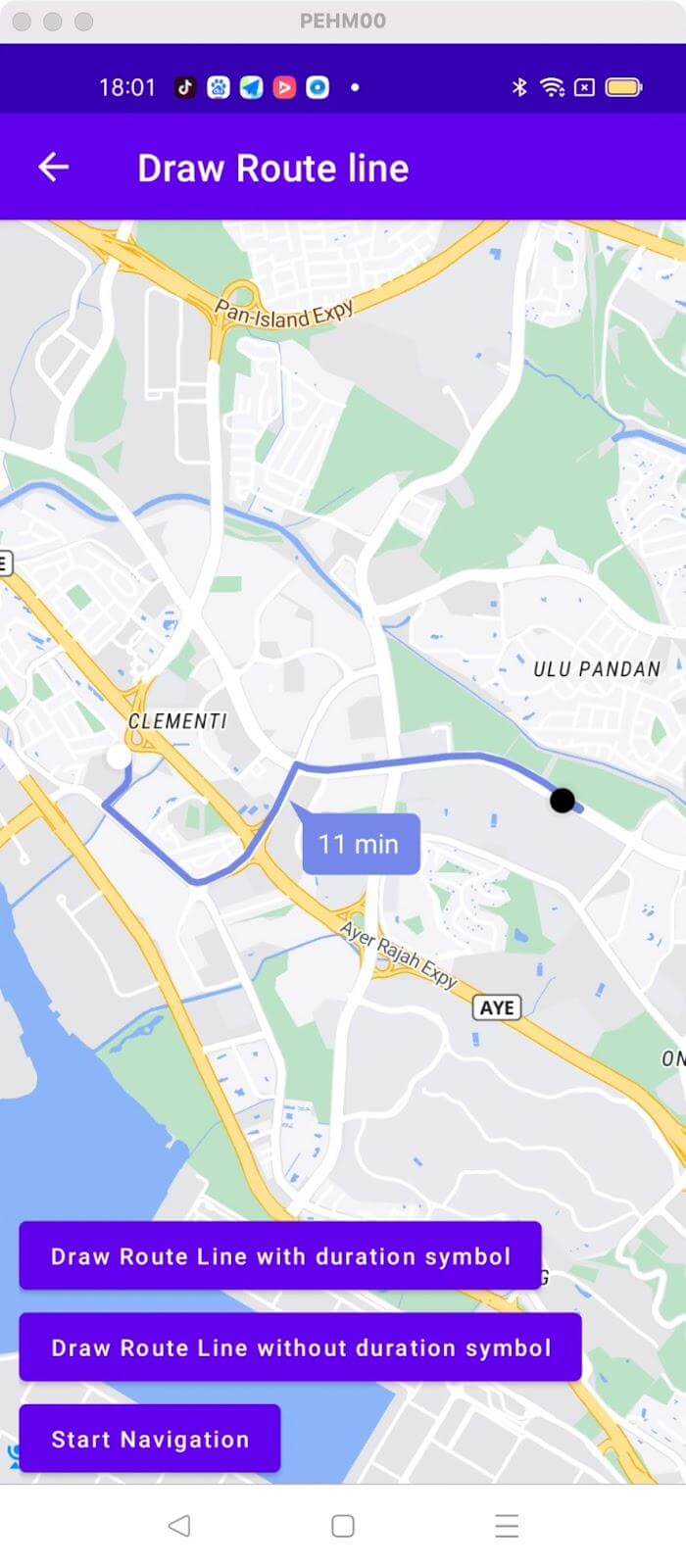
For all code examples, refer to [Navigation Code Examples](https://github.com/nextbillion-ai/nb-navigation-android-demo)
**activity_draw_route_line.xml [view source](https://github.com/nextbillion-ai/nb-navigation-android-demo/blob/main/app/src/main/res/layout/activity_draw_route_line.xml)**
```xml
```
**DrawRouteLineActivity [view source](https://github.com/nextbillion-ai/nb-navigation-android-demo/blob/main/app/src/main/java/ai/nextbillion/navigation/demo/activity/DrawRouteLineActivity.java)**
```java
package ai.nextbillion.navigation.demo.activity;
import android.os.Bundle;
import android.view.View;
import android.widget.Button;
import android.widget.ProgressBar;
import java.util.List;
import ai.nextbillion.kits.directions.models.DirectionsResponse;
import ai.nextbillion.kits.directions.models.DirectionsRoute;
import ai.nextbillion.kits.directions.models.RouteRequestParams;
import ai.nextbillion.kits.geojson.Point;
import ai.nextbillion.maps.camera.CameraUpdate;
import ai.nextbillion.maps.camera.CameraUpdateFactory;
import ai.nextbillion.maps.core.MapView;
import ai.nextbillion.maps.core.NextbillionMap;
import ai.nextbillion.maps.core.OnMapReadyCallback;
import ai.nextbillion.maps.geometry.LatLng;
import ai.nextbillion.maps.location.modes.RenderMode;
import ai.nextbillion.navigation.core.routefetcher.RouteFetcher;
import ai.nextbillion.navigation.demo.R;
import ai.nextbillion.navigation.demo.utils.CameraAnimateUtils;
import ai.nextbillion.navigation.ui.NavLauncherConfig;
import ai.nextbillion.navigation.ui.NavigationLauncher;
import ai.nextbillion.navigation.ui.camera.CameraUpdateMode;
import ai.nextbillion.navigation.ui.camera.NavigationCameraUpdate;
import ai.nextbillion.navigation.ui.map.NavNextbillionMap;
import androidx.annotation.NonNull;
import androidx.appcompat.app.AppCompatActivity;
import retrofit2.Call;
import retrofit2.Callback;
import retrofit2.Response;
public class DrawRouteLineActivity extends AppCompatActivity implements OnMapReadyCallback, View.OnClickListener {
private static final double DEFAULT_CAMERA_ZOOM = 14;
private Point origin = Point.fromLngLat(103.75986708439264, 1.312533169133601);
private Point destination = Point.fromLngLat(103.77982271935586, 1.310473772283314);
private MapView mapView;
private NavNextbillionMap navMap;
private Button fetchRoute;
private Button fetchRouteWithoutDuration;
private Button startNav;
private DirectionsRoute directionsRoute;
private List directionsRoutes;
private ProgressBar progress;
boolean showRouteDurationSymbol = true;
@Override
protected void onCreate(Bundle savedInstanceState) {
super.onCreate(savedInstanceState);
setContentView(R.layout.activity_draw_route_line);
mapView = findViewById(R.id.mapView);
mapView.onCreate(savedInstanceState);
mapView.getMapAsync(this);
fetchRoute = findViewById(R.id.fetchRoute);
fetchRouteWithoutDuration = findViewById(R.id.hideRouteDuration);
startNav = findViewById(R.id.startNav);
progress = findViewById(R.id.progress);
fetchRoute.setOnClickListener(this);
startNav.setOnClickListener(this);
fetchRouteWithoutDuration.setOnClickListener(this);
fetchRouteWithoutDuration.setEnabled(false);
startNav.setEnabled(false);
fetchRoute.setEnabled(false);
}
@Override
public void onMapReady(@NonNull NextbillionMap nextbillionMap) {
nextbillionMap.getStyle(style -> {
navMap = new NavNextbillionMap(mapView, nextbillionMap);
CameraUpdate cameraUpdate = CameraUpdateFactory.newLatLngZoom(new LatLng(origin.latitude(),origin.longitude()), DEFAULT_CAMERA_ZOOM);
NavigationCameraUpdate navigationCameraUpdate = new NavigationCameraUpdate(cameraUpdate);
navigationCameraUpdate.setMode(CameraUpdateMode.OVERRIDE);
navMap.retrieveCamera().update(navigationCameraUpdate, 1000);
fetchRoute.setEnabled(true);
fetchRouteWithoutDuration.setEnabled(true);
});
}
@Override
public void onClick(View view) {
if (view.getId() == R.id.fetchRoute) {
showRouteDurationSymbol = true;
fetchRoute();
} else if (view.getId() == R.id.hideRouteDuration) {
showRouteDurationSymbol = false;
fetchRoute();
} else if (view.getId() == R.id.startNav) {
NavLauncherConfig.Builder configBuilder = NavLauncherConfig.builder(directionsRoute);
configBuilder.locationLayerRenderMode(RenderMode.GPS);
configBuilder.shouldSimulateRoute(true);
NavigationLauncher.startNavigation(DrawRouteLineActivity.this, configBuilder.build());
}
}
private void fetchRoute() {
progress.setVisibility(View.VISIBLE);
RouteRequestParams.Builder builder = RouteRequestParams.builder()
.origin(origin)
.destination(destination)
.language("en")
.departureTime((int) (System.currentTimeMillis()/1000));
RouteFetcher.getRoute(builder.build(), new Callback() {
@Override
public void onResponse(Call call, Response response) {
progress.setVisibility(View.GONE);
//start navigation with the route we just fetched.
if (response.body() != null && !response.body().routes().isEmpty()) {
directionsRoute = response.body().routes().get(0);
directionsRoutes = response.body().routes();
drawRouteLine();
startNav.setEnabled(true);
}
}
@Override
public void onFailure(Call call, Throwable t) {
progress.setVisibility(View.GONE);
}
});
}
private void drawRouteLine() {
navMap.removeRoute();
navMap.clearMarkers();
navMap.showRouteDurationSymbol(showRouteDurationSymbol);
navMap.drawRoute(directionsRoute);
frameCameraToRoute();
}
private void frameCameraToRoute() {
int[] padding = CameraAnimateUtils.createPadding(this);
CameraAnimateUtils.frameCameraToBounds(navMap, directionsRoutes, padding);
}
@Override
protected void onStart() {
super.onStart();
mapView.onStart();
}
@Override
protected void onResume() {
super.onResume();
mapView.onResume();
}
@Override
protected void onPause() {
super.onPause();
mapView.onPause();
}
@Override
public void onLowMemory() {
super.onLowMemory();
mapView.onLowMemory();
}
@Override
protected void onStop() {
super.onStop();
mapView.onStop();
}
@Override
protected void onDestroy() {
mapView.onDestroy();
super.onDestroy();
}
@Override
protected void onSaveInstanceState(@NonNull Bundle outState) {
super.onSaveInstanceState(outState);
mapView.onSaveInstanceState(outState);
}
}
```
### Code Highlights
This Code example includes How to display a MapView and draw a route line on the map using `NavNextbillionMap` and start navigation with drawn route using `NavigationLauncher`
In particular, this example code shows the code logic of displaying or hiding route duration symbol via `navMap.showRouteDurationSymbol()` function. We could customize the logic based on needs.
### Code summary
#### Map Initialization:
- The `onMapReady()` method is called when the map is ready to be used.
- The `NavNextbillionMap` class is used to create a navigation-enabled map by passing the _MapView_ and _NextbillionMap_ instances.
- The camera position is set to the origin point with a default zoom level using `CameraUpdateFactory.newLatLngZoom()` and `NavigationCameraUpdate`.
### Fetch route with RouteFetcher
- Constructs a _RouteRequestParams_ object with the _origin_, _destination_, _language_, and _departure time_.
- The `RouteFetcher.getRoute()` method is used to fetch the route using the `RouteRequestParams`.
### Draw route with/without duration symbol
- The route is drawn on the map using `navMap.drawRoute()`
- The camera is framed to fit the route using frameCameraToRoute()
- To show or hide the duration symbol using `navMap.showRouteDurationSymbol(true/false)`
- To clear the drawn route and markers using `navMap.removeRoute()` `navMap.clearMarkers()`
### Start Navigation
- Creates a `NavLauncherConfig.Builder` and configures the navigation settings, including the _location_ _layer_ _render_ _mode_ and whether to _simulate_ the route.
- The `NavigationLauncher.startNavigation()` method is called to start the navigation activity with the configured NavLauncherConfig.