# Customize the NavNextbillionMap style at runtime
This example shows how to change the NavNextbillionMap style after the map is already loaded. In the following code example:
- A list of the available map-style strings is provided in the code
- A floating button is provided on the screen, each time user clicks on the button, the index will be changed and the map style will be updated accordingly
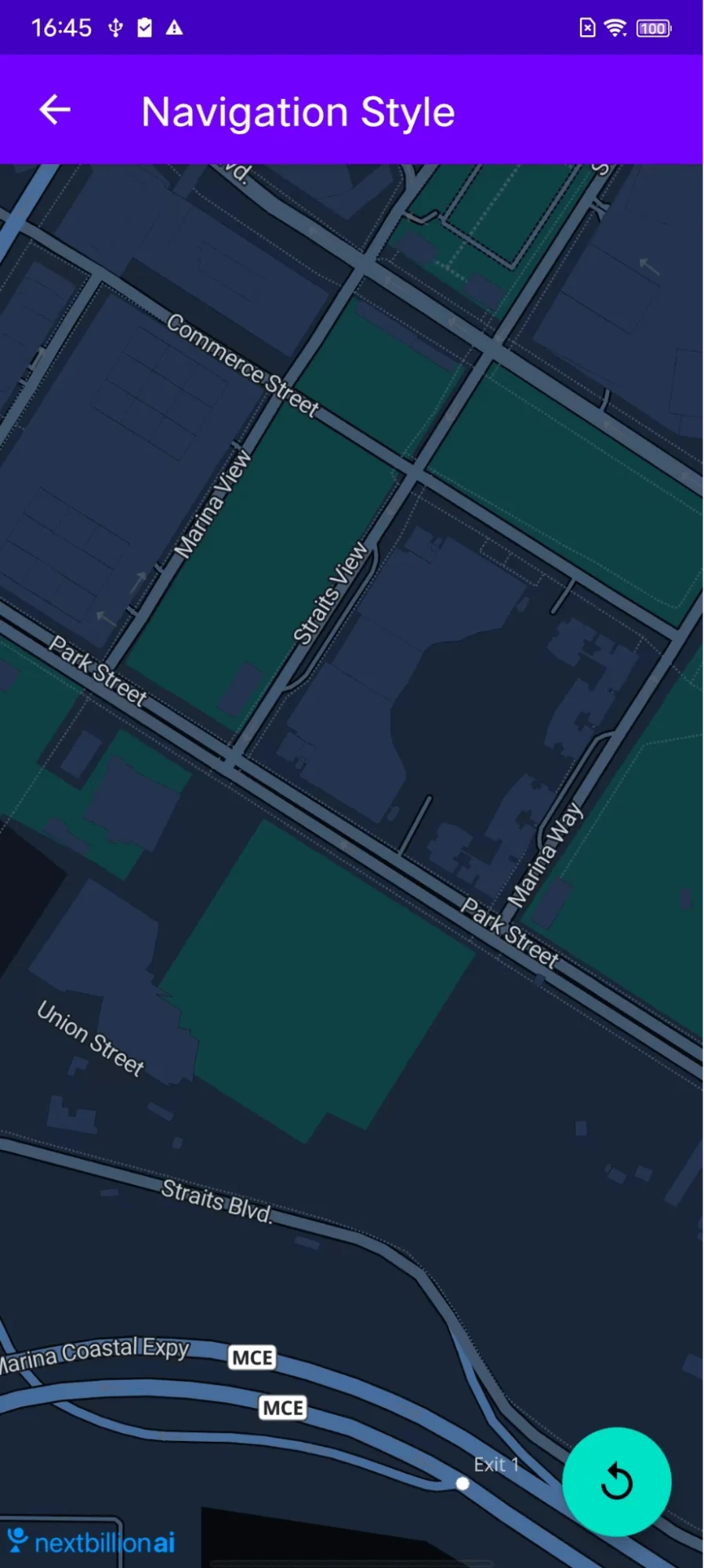
For all code examples, refer to [Navigation Code Examples](https://github.com/nextbillion-ai/nb-navigation-android-demo)
**activity_custom_navigation_style.xml [view source](https://github.com/nextbillion-ai/nb-navigation-android-demo/blob/main/app/src/main/res/layout/activity_custom_navigation_style.xml)**
```xml
```
**CustomNavigationStyleActivity [view source](https://github.com/nextbillion-ai/nb-navigation-android-demo/blob/main/app/src/main/java/ai/nextbillion/navigation/demo/activity/CustomNavigationStyleActivity.java)**
```java
package ai.nextbillion.navigation.demo.activity;
import android.location.Location;
import android.os.Bundle;
import ai.nextbillion.kits.geojson.Point;
import ai.nextbillion.maps.Nextbillion;
import ai.nextbillion.maps.camera.CameraUpdate;
import ai.nextbillion.maps.camera.CameraUpdateFactory;
import ai.nextbillion.maps.core.MapView;
import ai.nextbillion.maps.core.NextbillionMap;
import ai.nextbillion.maps.core.OnMapReadyCallback;
import ai.nextbillion.maps.core.Style;
import ai.nextbillion.maps.geometry.LatLng;
import ai.nextbillion.maps.location.modes.RenderMode;
import ai.nextbillion.navigation.demo.R;
import ai.nextbillion.navigation.ui.camera.CameraUpdateMode;
import ai.nextbillion.navigation.ui.camera.NavigationCameraUpdate;
import ai.nextbillion.navigation.ui.map.NavNextbillionMap;
import androidx.annotation.NonNull;
import androidx.annotation.Nullable;
import androidx.appcompat.app.AppCompatActivity;
import com.google.android.material.floatingactionbutton.FloatingActionButton;
import java.util.ArrayList;
/***
* This example shows how to change the map style of NavNextbillionMap dynamically
* You can also use style from other sources if available
*/
public class CustomNavigationStyleActivity extends AppCompatActivity implements OnMapReadyCallback {
private static final int CAMERA_ANIMATION_DURATION = 1000;
private static final int DEFAULT_CAMERA_ZOOM = 16;
private MapView mapView;
private FloatingActionButton floatingActionButton;
private NavNextbillionMap nbMap;
// a fake point in Singapore
private final Point fakePoint = Point.fromLngLat(103.852408, 1.276411);
private ArrayList styleList = new ArrayList<>();
private int floatingButtonClickCount = 0;
@Override
protected void onCreate(@Nullable Bundle savedInstanceState) {
super.onCreate(savedInstanceState);
setContentView(R.layout.activity_custom_navigation_style);
setUpStyleList();
setUpFloatingActionButton();
mapView = findViewById(R.id.mapView_customize_style);
mapView.onCreate(savedInstanceState);
mapView.getMapAsync(this);
}
// a set of map styles provided by NextBillion.ai
private void setUpStyleList() {
styleList.add("https://api.nextbillion.io/maps/streets/style.json");
styleList.add("https://api.nextbillion.io/maps/hybrid/style.json");
styleList.add("https://api.nextbillion.io/maps/dark/style.json");
}
// here we use a counter to decide which map style should be set to the map
private void setUpFloatingActionButton() {
floatingActionButton = findViewById(R.id.fab);
floatingActionButton.setOnClickListener(view -> {
floatingButtonClickCount = (floatingButtonClickCount + 1) % styleList.size();
nbMap.retrieveMap().setStyle(new Style.Builder().fromUri(styleList.get(floatingButtonClickCount)));
});
}
@Override
public void onMapReady(@NonNull NextbillionMap nextbillionMap) {
nextbillionMap.setStyle(new Style.Builder().fromUri(styleList.get(floatingButtonClickCount)));
nextbillionMap.getStyle(style -> {
nbMap = new NavNextbillionMap(mapView, nextbillionMap);
nbMap.updateLocationLayerRenderMode(RenderMode.COMPASS);
animateCamera();
});
}
private void animateCamera() {
CameraUpdate cameraUpdate = CameraUpdateFactory.newLatLngZoom(new LatLng(fakePoint.latitude(), fakePoint.longitude()), DEFAULT_CAMERA_ZOOM);
NavigationCameraUpdate navigationCameraUpdate = new NavigationCameraUpdate(cameraUpdate);
navigationCameraUpdate.setMode(CameraUpdateMode.OVERRIDE);
nbMap.retrieveCamera().update(navigationCameraUpdate, CAMERA_ANIMATION_DURATION);
}
@Override
public void onStart() {
super.onStart();
mapView.onStart();
}
@Override
public void onResume() {
super.onResume();
mapView.onResume();
}
@Override
public void onLowMemory() {
super.onLowMemory();
mapView.onLowMemory();
}
@Override
public void onPause() {
super.onPause();
mapView.onPause();
}
@Override
public void onStop() {
super.onStop();
mapView.onStop();
}
@Override
protected void onDestroy() {
super.onDestroy();
mapView.onDestroy();
}
}
```
### Code Highlights
The key of update map style is MapView’s **setStyle()** method:
```java
nbMap.retrieveMap().setStyle(new Style.Builder().fromUri(styleList.get(floatingButtonClickCount)));
```
### Code summary
This example provides an Android activity that shows how to change the style of a **NavNextbillionMap** after the map is already loaded. The activity has the following features:
- A list of available map styles is provided in the code.
- A floating button is provided on the screen. Each time the user clicks on the button, the index of the map style in the list is changed and the map style is updated accordingly.
The activity works as follows:
- The activity creates a list of available map styles.
- The activity creates a floating button and sets an **onClick** listener for the button.
- The activity creates a **NavNextbillionMap** and sets the map style to the first style in the list.
- The activity adds the **NavNextbillionMap** to the view hierarchy.
- The activity sets the **onClick** listener for the floating button to a function that changes the map style.
The function (anonymous function inside **floatingActionButton.setOnClickListener()**) that changes the map style works as follows:
- The function gets the current index of the map style in the list.
- The function increments the current index by 1.
- The function checks if the current index is greater than or equal to the length of the list.
- If the current index is greater than or equal to the length of the list, the function sets the current index to 0.
- The function gets the map style at the current index in the list.
- The function sets the map style of the **NavNextbillionMap** to the map style that was retrieved.