# Customize Bottom ETA Panel
### Customize styling of the bottom ETA panel
This example shows:
- How to customize the styling of the Navigation bottom ETA panel
- navViewPrimaryText
- navViewSecondaryText
- navigationViewRouteOverviewDrawable
- navViewRouteOverviewBackground
- How to config custom navigation style using `NavLauncherConfig.Builder`
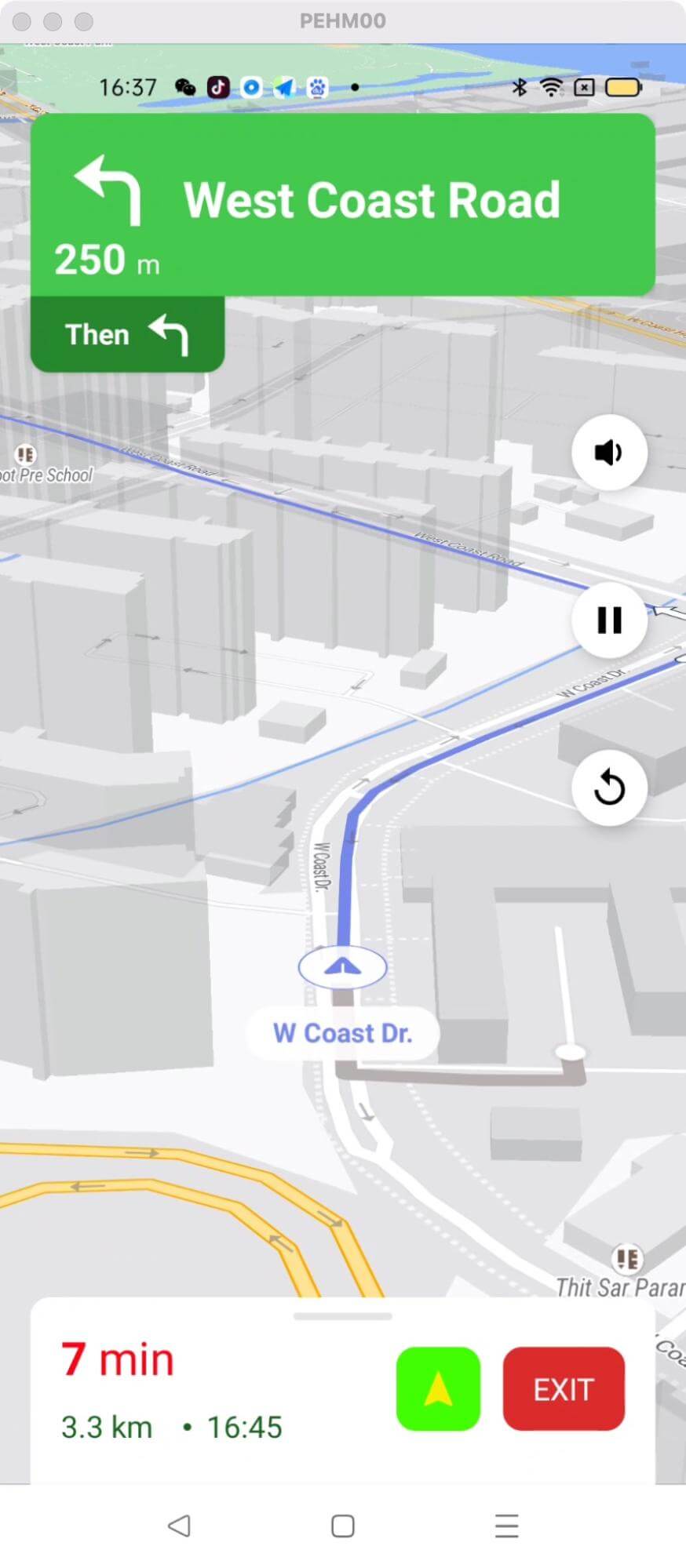
For all code examples, refer to [Navigation Code Examples](https://github.com/nextbillion-ai/nb-navigation-android-demo)
**activity_custom_bottom_etapanel_style.xml [view source](https://github.com/nextbillion-ai/nb-navigation-android-demo/blob/main/app/src/main/res/layout/activity_custom_bottom_etapanel_style.xml)**
```xml
```
**themes.xml [view source](https://github.com/nextbillion-ai/nb-navigation-android-demo/blob/main/app/src/main/res/values/themes.xml)**
By default, the SDK requires a light and a dark theme, so we need to create two new Styles with the name we prefer, we use **Theme.CustomNavBottomETAPanel** and T**heme.CustomNavBottomETAPanelDark** in this case, and specify the parent as NavigationViewLight and NavigationViewDark respectively.
```xml
```
**CustomBottomETAPanelStyleActivity [view source](https://github.com/nextbillion-ai/nb-navigation-android-demo/blob/main/app/src/main/java/ai/nextbillion/navigation/demo/activity/CustomBottomETAPanelStyleActivity.java)**
```java
package ai.nextbillion.navigation.demo.activity;
import android.os.Bundle;
import android.view.View;
import android.widget.Button;
import android.widget.ProgressBar;
import android.widget.TextView;
import ai.nextbillion.kits.directions.models.DirectionsResponse;
import ai.nextbillion.kits.directions.models.DirectionsRoute;
import ai.nextbillion.kits.geojson.Point;
import ai.nextbillion.maps.location.modes.RenderMode;
import ai.nextbillion.navigation.demo.R;
import ai.nextbillion.navigation.ui.NBNavigation;
import ai.nextbillion.navigation.ui.NavLauncherConfig;
import ai.nextbillion.navigation.ui.NavigationLauncher;
import androidx.annotation.NonNull;
import androidx.appcompat.app.AppCompatActivity;
import retrofit2.Call;
import retrofit2.Callback;
import retrofit2.Response;
public class CustomBottomETAPanelStyleActivity extends AppCompatActivity implements View.OnClickListener {
private Button fetchRoute;
private Button startNav;
private TextView routeGeometry;
private DirectionsRoute directionsRoute;
private ProgressBar progress;
@Override
protected void onCreate(Bundle savedInstanceState) {
super.onCreate(savedInstanceState);
setContentView(R.layout.activity_custom_bottom_etapanel_style);
fetchRoute = findViewById(R.id.fetchRoute);
startNav = findViewById(R.id.startNav);
routeGeometry = findViewById(R.id.routeGeometry);
progress = findViewById(R.id.progress);
fetchRoute.setOnClickListener(this);
startNav.setOnClickListener(this);
startNav.setEnabled(false);
}
@Override
public void onClick(View view) {
if (view.getId() == R.id.fetchRoute) {
progress.setVisibility(View.VISIBLE);
Point origin = Point.fromLngLat(103.75986708439264, 1.312533169133601);
Point destination = Point.fromLngLat(103.77982271935586, 1.310473772283314);
NBNavigation.fetchRoute(origin, destination, new Callback() {
@Override
public void onResponse(@NonNull Call call, @NonNull Response response) {
progress.setVisibility(View.GONE);
//start navigation with the route we just fetched.
if (response.body() != null && !response.body().routes().isEmpty()) {
directionsRoute = response.body().routes().get(0);
routeGeometry.setText(String.format("Route Geometry: %s", directionsRoute.geometry()));
startNav.setEnabled(true);
}
}
@Override
public void onFailure(@NonNull Call call, @NonNull Throwable t) {
progress.setVisibility(View.GONE);
}
});
} else if (view.getId() == R.id.startNav) {
NavLauncherConfig.Builder configBuilder = NavLauncherConfig.builder(directionsRoute);
configBuilder.locationLayerRenderMode(RenderMode.GPS);
configBuilder.shouldSimulateRoute(true);
configBuilder.lightThemeResId(R.style.Theme_CustomNavBottomETAPanel);
configBuilder.darkThemeResId(R.style.Theme_CustomNavBottomETAPanelDark);
NavigationLauncher.startNavigation(CustomBottomETAPanelStyleActivity.this, configBuilder.build());
}
}
}
```
### Code Highlights
The key to customizing the panel is to modify the values in corresponding styles in theme.xml and then pass the style to **NavLauncherConfig**:
```java
NavLauncherConfig.Builder configBuilder = NavLauncherConfig.builder(directionsRoute);
configBuilder.locationLayerRenderMode(RenderMode.GPS);
configBuilder.shouldSimulateRoute(true);
configBuilder.lightThemeResId(R.style.Theme_CustomNavBottomETAPanel);
configBuilder.darkThemeResId(R.style.Theme_CustomNavBottomETAPanelDark);
NavigationLauncher.startNavigation(CustomBottomETAPanelStyleActivity.this, configBuilder.build());
```
The key part of the code is the definition of the theme styles **Theme_CustomNavBottomETAPanel** based on `NavigationViewLight` and **Theme_CustomNavBottomETAPanelDark** based on `NavigationViewDark` These styles are used to customize the appearance of the navigation bottom ETA panel in the navigation view.
### Code summary
Definition of **Theme.CustomNavBottomETAPanel:**
- It is a custom style that extends the NavigationViewLight style. It allows customization of the navigation bottom ETA panel appearance.
- The following items are defined within this style:
- **navViewPrimaryText**: defines the color for the primary text in the navigation view. (e.g: the time remaining)
- **navViewSecondaryText**: defines the color for the secondary text in the navigation view. (e.g: the distance remaining)
- **navigationViewRouteOverviewDrawable**: sets the drawable resource for the route overview icon in the navigation view.
- **navViewRouteOverviewBackground**: defines the background color for the route overview section in the navigation view.
The **Theme.Theme_CustomNavBottomETAPanelDark** style is similar to the previous style but is based on NavigationViewDark.
`configBuilder.lightThemeResId(R.style.Theme_CustomNavBottomETAPanel)` sets the light theme for the navigation UI, using the **Theme_CustomNavBottomETAPanel** style defined earlier. This style determines the appearance of the bottom ETA panel in the navigation view.
`configBuilder.darkThemeResId(R.style.Theme_CustomNavBottomETAPanelDark)` sets the dark theme for the navigation UI, using the **Theme_CustomNavBottomETAPanelDark** style defined earlier. This style is applied when the device's dark mode is enabled.
Besides, the action after clicking the fetch route button shows how to fetch a route using `NBNavigation.fetchRoute(origin, destination, new Callback() { ... });` The origin and destination points are passed as parameters, along with a callback to handle the response asynchronously.