# MapView Polyline
This example shows how to add PolyLines in MapView
- Add Polyline from a set of Latlng
- Set Polyline stroke
- Set polyline colour
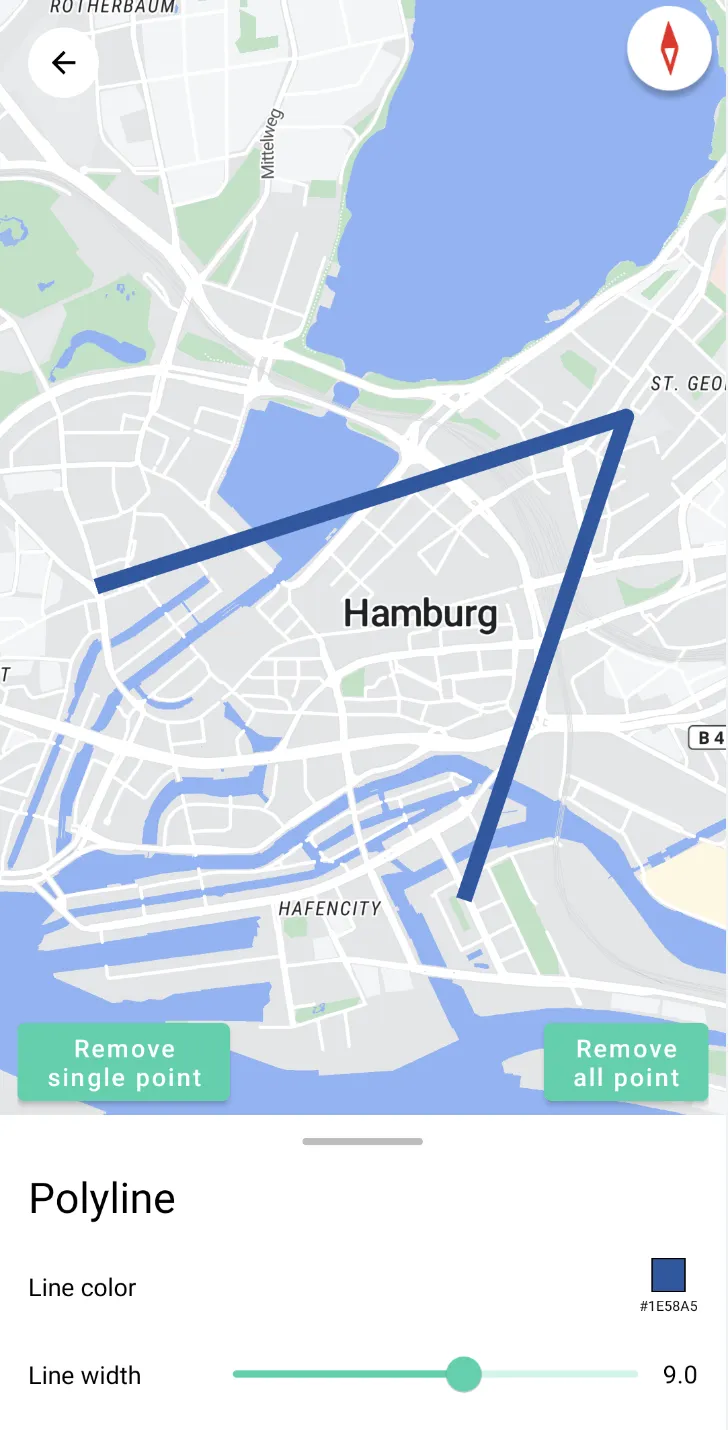
For all code examples, refer to [Android Maps SDK Code Examples](https://github.com/nextbillion-ai/nb-maps-android-demo)
**activity_polyline.xml** [view source](https://github.com/nextbillion-ai/nb-maps-android-demo/blob/main/app/src/main/res/layout/activity_polyline.xml)
```xml
```
**PolylineActivity** [view source](https://github.com/nextbillion-ai/nb-maps-android-demo/blob/main/app/src/main/java/ai/nextbillion/PolylineActivity.kt)
```java
class PolylineActivity : AppCompatActivity() {
private lateinit var mMap: NextbillionMap;
private lateinit var binding: ActivityPolylineBinding;
private lateinit var bottomSheetBehavior: BottomSheetBehavior<*>;
private var points: MutableList = mutableListOf();
private var polyline: Polyline? = null;
private var originMarker: Marker? = null;
private var lineColor = "#1E58A5";
private var lineWidth = 5f;
override fun onCreate(savedInstanceState: Bundle?) {
super.onCreate(savedInstanceState)
binding = ActivityPolylineBinding.inflate(LayoutInflater.from(this))
setContentView(binding.root)
binding.mapView.getMapAsync { map: NextbillionMap -> onMapSync(map) }
initBottomSheet()
binding.ivBack.setOnClickListener {
finish()
}
}
private fun onMapSync(map: NextbillionMap) {
showSnackBar()
mMap = map
mMap.addOnMapLongClickListener {
applyPolyline(it)
false
}
map.setStyle( Style.Builder().fromUri(StyleConstants.LIGHT))
}
private fun showSnackBar() {
val snackBar = Snackbar.make(binding.root,getString(R.string.snack_long_press),Snackbar.LENGTH_LONG)
snackBar.setTextColor(Color.WHITE)
snackBar.view.setBackgroundColor(Color.BLACK)
snackBar.show()
}
private fun applyPolyline(latLng: LatLng) {
points.add(latLng)
if (points.size < 2) {
originMarker = mMap.addMarker(latLng)
} else {
originMarker?.let {
mMap.removeMarker(it)
originMarker = null
}
recreatePoleLine()
}
updateFloatButtonStatus()
}
private fun removeSingleLine() {
if (points.size <= 2) {
removeAllPolyline()
return
} else {
points.removeLast()
recreatePoleLine()
}
}
private fun recreatePoleLine() {
polyline?.let {
mMap.removePolyline(it)
}
polyline = mMap.addPolyline(points, lineColor)
polyline?.width = lineWidth
animateBound(1f)
}
private fun removeAllPolyline() {
points.clear()
mMap.clear()
polyline = null
updateFloatButtonStatus()
}
private fun updateFloatButtonStatus() {
if (points.size < 2) {
bottomSheetBehavior.isHideable = true
bottomSheetBehavior.state = BottomSheetBehavior.STATE_HIDDEN
binding.removeSingleLine.visibility = View.GONE
binding.removeAllLine.visibility = View.GONE
} else {
bottomSheetBehavior.isHideable = false
bottomSheetBehavior.state = BottomSheetBehavior.STATE_EXPANDED
bottomSheetBehavior.peekHeight = dpToPx(this, 60.0)
binding.removeSingleLine.visibility = View.VISIBLE
binding.removeAllLine.visibility = View.VISIBLE
}
}
private fun initBottomSheet() {
binding.removeSingleLine.setOnClickListener {
removeSingleLine()
}
binding.removeAllLine.setOnClickListener {
removeAllPolyline()
}
binding.lineColor.setTitle(getString(R.string.lineColor))
binding.lineColor.initColor(lineColor)
binding.lineColor.setOnColorChangedListener(object : ColorSelectorView.OnColorChangedListener {
override fun onColorChanged(color: String) {
lineColor = color
polyline?.color = Color.parseColor(color)
}
})
binding.lineWidth.setTitle(getString(R.string.lineWidth))
binding.lineWidth.initSeekBar(5f, 1f, 15f, "", 1f)
binding.lineWidth.setOnSliderChangedListener(object : SliderBarView.OnSliderChangedListener {
override fun onSliderChanged(value: Float) {
lineWidth = value
polyline?.width = value
}
})
bottomSheetBehavior = BottomSheetBehavior.from(binding.bottomSheet)
bottomSheetBehavior.state = BottomSheetBehavior.STATE_HIDDEN
bottomSheetBehavior.addBottomSheetCallback(object :
BottomSheetBehavior.BottomSheetCallback() {
override fun onStateChanged(bottomSheet: View, newState: Int) {}
override fun onSlide(bottomSheet: View, slideOffset: Float) {
animateBound(slideOffset)
}
})
}
private fun animateBound(slideOffset: Float) {
if (points.size < 2) {
return
}
val bounds = LatLngBounds.Builder().includes(points).build()
animateCameraBox(bounds, createPadding(this, slideOffset))
}
private fun animateCameraBox(
bounds: LatLngBounds,
padding: IntArray
) {
val position = mMap.getCameraForLatLngBounds(bounds, padding)
position?.let {
val cameraUpdate = CameraUpdateFactory.newCameraPosition(position)
mMap.animateCamera(cameraUpdate)
}
}
private fun createPadding(context: Context, cameraBoundFactor: Float): IntArray {
val horPadding = dpToPx(context, 50.0)
val topPadding = dpToPx(context, 50.0)
val bottomPadding = (dpToPx(context, 260.0) * cameraBoundFactor).toInt()
return intArrayOf(horPadding, topPadding, horPadding, bottomPadding)
}
///////////////////////////////////////////////////////////////////////////
// Lifecycle
///////////////////////////////////////////////////////////////////////////
override fun onStart() {
super.onStart()
binding.mapView.onStart()
}
override fun onResume() {
super.onResume()
binding.mapView.onResume()
}
override fun onPause() {
super.onPause()
binding.mapView.onPause()
}
override fun onStop() {
super.onStop()
binding.mapView.onStop()
}
override fun onSaveInstanceState(outState: Bundle) {
super.onSaveInstanceState(outState)
binding.mapView.onSaveInstanceState(outState)
}
override fun onDestroy() {
super.onDestroy()
binding.mapView.onDestroy()
}
override fun onLowMemory() {
super.onLowMemory()
binding.mapView.onLowMemory()
}
fun dpToPx(context: Context, dp: Double): Int {
val scale = context.resources.displayMetrics.density
return (dp * scale + 0.5f).toInt()
}
}
```
- **applyPolyline(latLng: LatLng)**
- This method is used to apply a polyline on the map.
- It takes a **LatLng** object as a parameter, representing a point on the polyline.
- First, the point is added to the points list.
- If the size of the points list is less than 2, it means there are not enough points to draw a polyline, so a marker is added to the map.
- If the size of the points list is greater than or equal to 2, it means there are enough points to draw a **polyline**, so the previous **polyline** is removed and a new one is created.
- Finally, the updateFloatButtonStatus method is called to update the status of the floating button.
- **removeSingleLine**
- This method is used to remove the last added point, thereby deleting the last segment of the polyline.
- If the size of the points list is less than or equal to 2, it means there are not enough points to draw a polyline, so the **removeAllPolyline** method is called to remove all polylines and return.
- If the size of the points list is greater than 2, the last point is removed, and a new polyline is created.
- Finally, the updateFloatButtonStatus method is called to update the status of the floating button.
- **recreatePolyline**
- This method is used to recreate the polyline.
- First, the previous polyline (if it exists) is removed.
- A new polyline is created based on the points in the points list and assigned to the polyline variable.
- The color of the polyline is set to the color specified by the **lineColor** variable.
- The width of the polyline is set to the width specified by the **lineWidth** variable.
- The animateBound method is called to fit the polyline's position.
- **removeAllPolyline**
- This method is used to remove all polylines.
- The points list is cleared.
- All markers and polylines on the map are cleared.
- The polyline variable is set to null.
- The updateFloatButtonStatus method is called to update the status of the floating button.
- **animateBound**
- This method is used to adjust the map's display area based on the position of the polyline.
- If the size of the points list is less than 2, it means there are not enough points to draw a polyline, so it returns directly.
- A LatLngBounds object is created based on the points in the points list.
- The animateCameraBox method is called to animate the map's display area.
- **animateCameraBox**
- This method is used to animate the map's display area to include the specified boundary range.
- A CameraPosition object is created based on the boundary range and padding.
- If the CameraPosition object is not null, a CameraUpdate object is created, and the animateCamera method is used to animate the map's display area.
The code also includes various lifecycle methods **(onStart, onResume, onPause, onStop, onSaveInstanceState, onDestroy, onLowMemory)** that should be implemented when using the MapView to properly manage its lifecycle and handle configuration changes.
Note: The code uses the Nextbillion Maps SDK, which provides map-related functionalities. It also utilizes the LatLng class to represent geography.