# MapView Markers
This example shows how to Add markers in bulk
- Add markers in bulk to MapView
- Click MapView to Add a marker with clicked point
- position(point)
- title(title)
- snippet(snippet);
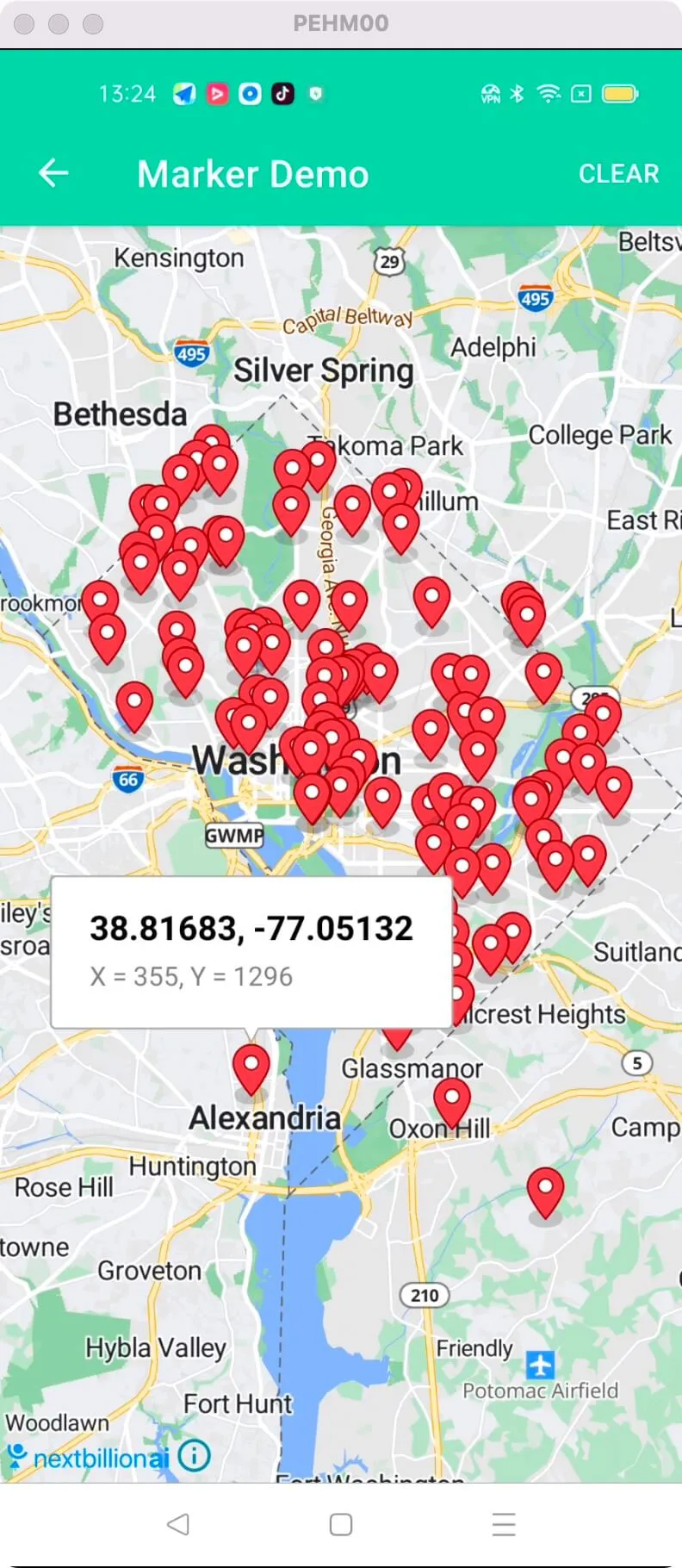
For all code examples, refer to [Android Maps SDK Code Examples](https://github.com/nextbillion-ai/nb-maps-android-demo)
activity_marker.xml [view source](https://github.com/nextbillion-ai/nb-maps-android-demo/blob/main/app/src/main/res/layout/activity_marker.xml)
```xml
```
MarkersActivity [view source](https://github.com/nextbillion-ai/nb-maps-android-demo/blob/main/app/src/main/java/ai/nextbillion/MarkerActivity.java)
```java
package ai.nextbillion;
import android.app.ProgressDialog;
import android.graphics.PointF;
import android.os.AsyncTask;
import android.os.Bundle;
import android.view.Menu;
import android.view.MenuItem;
import java.io.IOException;
import java.lang.ref.WeakReference;
import java.text.DecimalFormat;
import java.util.ArrayList;
import java.util.List;
import java.util.Random;
import ai.nextbillion.maps.annotations.MarkerOptions;
import ai.nextbillion.maps.core.MapView;
import ai.nextbillion.maps.core.NextbillionMap;
import ai.nextbillion.maps.geometry.LatLng;
import ai.nextbillion.utils.GeoParseUtil;
import androidx.appcompat.app.AppCompatActivity;
/**
* Test activity showcasing adding a large amount of Markers.
*/
public class MarkersActivity extends AppCompatActivity {
private NextbillionMap nextbillionMap;
private MapView mapView;
private List locations;
private ProgressDialog progressDialog;
private static final DecimalFormat LAT_LON_FORMATTER = new DecimalFormat("#.#####");
List markerOptionsList = new ArrayList<>();
@Override
protected void onCreate(Bundle savedInstanceState) {
super.onCreate(savedInstanceState);
setContentView(R.layout.activity_marker);
mapView = findViewById(R.id.mapView);
mapView.onCreate(savedInstanceState);
mapView.getMapAsync(this::initMap);
}
private void initMap(NextbillionMap nextbillionMap) {
this.nextbillionMap = nextbillionMap;
nextbillionMap.setStyle(StyleConstants.NBMAP_STREETS);
if (locations == null) {
progressDialog = ProgressDialog.show(this, "Loading", "Fetching markers", false);
new LoadLocationTask(this, 100).execute();
} else {
showMarkers(100);
}
nextbillionMap.addOnMapLongClickListener(point -> {
addMarker(point);
return false;
});
nextbillionMap.addOnMapClickListener(point -> {
addMarker(point);
return false;
});
}
@Override
public boolean onCreateOptionsMenu(Menu menu) {
getMenuInflater().inflate(R.menu.menu_press_for_marker, menu);
return true;
}
private void addMarker(LatLng point) {
final PointF pixel = nextbillionMap.getProjection().toScreenLocation(point);
String title = LAT_LON_FORMATTER.format(point.getLatitude()) + ", "
+ LAT_LON_FORMATTER.format(point.getLongitude());
String snippet = "X = " + (int) pixel.x + ", Y = " + (int) pixel.y;
MarkerOptions marker = new MarkerOptions()
.position(point)
.title(title)
.snippet(snippet);
markerOptionsList.add(marker);
nextbillionMap.addMarker(marker);
}
private void onLatLngListLoaded(List latLngs, int amount) {
progressDialog.hide();
locations = latLngs;
showMarkers(amount);
}
private void showMarkers(int amount) {
if (nextbillionMap == null || locations == null || mapView.isDestroyed()) {
return;
}
nextbillionMap.clear();
if (locations.size() < amount) {
amount = locations.size();
}
showGlMarkers(amount);
}
private void showGlMarkers(int amount) {
DecimalFormat formatter = new DecimalFormat("#.#####");
Random random = new Random();
int randomIndex;
for (int i = 0; i < amount; i++) {
randomIndex = random.nextInt(locations.size());
LatLng latLng = locations.get(randomIndex);
markerOptionsList.add(new MarkerOptions()
.position(latLng)
.title(String.valueOf(i))
.snippet(formatter.format(latLng.getLatitude()) + ", " + formatter.format(latLng.getLongitude())));
}
nextbillionMap.addMarkers(markerOptionsList);
}
private void resetMap() {
if (nextbillionMap == null) {
return;
}
markerOptionsList.clear();
nextbillionMap.removeAnnotations();
}
@Override
protected void onStart() {
super.onStart();
mapView.onStart();
}
@Override
protected void onResume() {
super.onResume();
mapView.onResume();
}
@Override
protected void onPause() {
super.onPause();
mapView.onPause();
}
@Override
protected void onStop() {
super.onStop();
mapView.onStop();
}
@Override
protected void onSaveInstanceState(Bundle outState) {
super.onSaveInstanceState(outState);
mapView.onSaveInstanceState(outState);
}
@Override
protected void onDestroy() {
super.onDestroy();
if (progressDialog != null) {
progressDialog.dismiss();
}
mapView.onDestroy();
}
@Override
public void onLowMemory() {
super.onLowMemory();
mapView.onLowMemory();
}
private static class LoadLocationTask extends AsyncTask> {
private WeakReference activity;
private int amount;
private LoadLocationTask(MarkersActivity activity, int amount) {
this.amount = amount;
this.activity = new WeakReference<>(activity);
}
@Override
protected List doInBackground(Void... params) {
MarkersActivity activity = this.activity.get();
if (activity != null) {
String json = null;
try {
json = GeoParseUtil.loadStringFromAssets(activity.getApplicationContext(), "points.geojson");
} catch (IOException exception) {
}
if (json != null) {
return GeoParseUtil.parseGeoJsonCoordinates(json);
}
}
return null;
}
@Override
protected void onPostExecute(List locations) {
super.onPostExecute(locations);
MarkersActivity activity = this.activity.get();
if (activity != null) {
activity.onLatLngListLoaded(locations, amount);
}
}
}
@Override
public boolean onOptionsItemSelected(MenuItem item) {
switch (item.getItemId()) {
case R.id.menuItemReset:
resetMap();
return true;
default:
return super.onOptionsItemSelected(item);
}
}
}
```
The given code is an Android activity that demonstrates different functionalities related to working with markers on a map using the Nextbillion Maps SDK. The activity allows users to add markers in bulk, add markers by clicking on the map, and reset the map.
initMapView:
- The **onCreate** method initializes the MapView by setting the content view and obtaining a reference to it using findViewById. Then, the **mapView.onCreate(savedInstanceState)** method is called to initialize the MapView and pass the saved instance state.
add markers in bulk to **MapView**:
- The **showGlMarkers** method is responsible for adding markers in bulk to the NextbillionMap.
- Generates random indexes and retrieves corresponding **LatLng** **coordinates** from the locations list.
- Creates a **MarkerOptions** object for each coordinate, including a title and snippet, and adds them to the markerOptionsList.
- Finally, the **nextbillionMap.addMarkers(markerOptionsList)** method is called to add all the markers to the map.
click MapView to add a marker:
- The addOnMapLongClickListener and addOnMapClickListener methods are used to listen for long click and click events on the map, respectively. When a long click or click occurs, the addMarker method is called with the clicked LatLng point.
- The method converts the LatLng to a PointF using nextbillionMap.getProjection().toScreenLocation(point).
- It creates a MarkerOptions object with the position, title, and snippet based on the clicked point and adds it to both the markerOptionsList and the nextbillionMap using **nextbillionMap.addMarker(marker)**.
Overall, the code demonstrates how to initialize the MapView, add markers in bulk to the NextbillionMap, and add markers by clicking on the map.