# Custom Location Pulsing Symbol
This example shows how to Custom Location Pulsing Style
- Location Permissions Handling
- Tracking current location automatically when Map ready
- Custom location pulsing style
- pulseColor
- pulseSingleDuration
- Enable/Disable pulsing
- pulseMaxRadius
- pulseAlpha
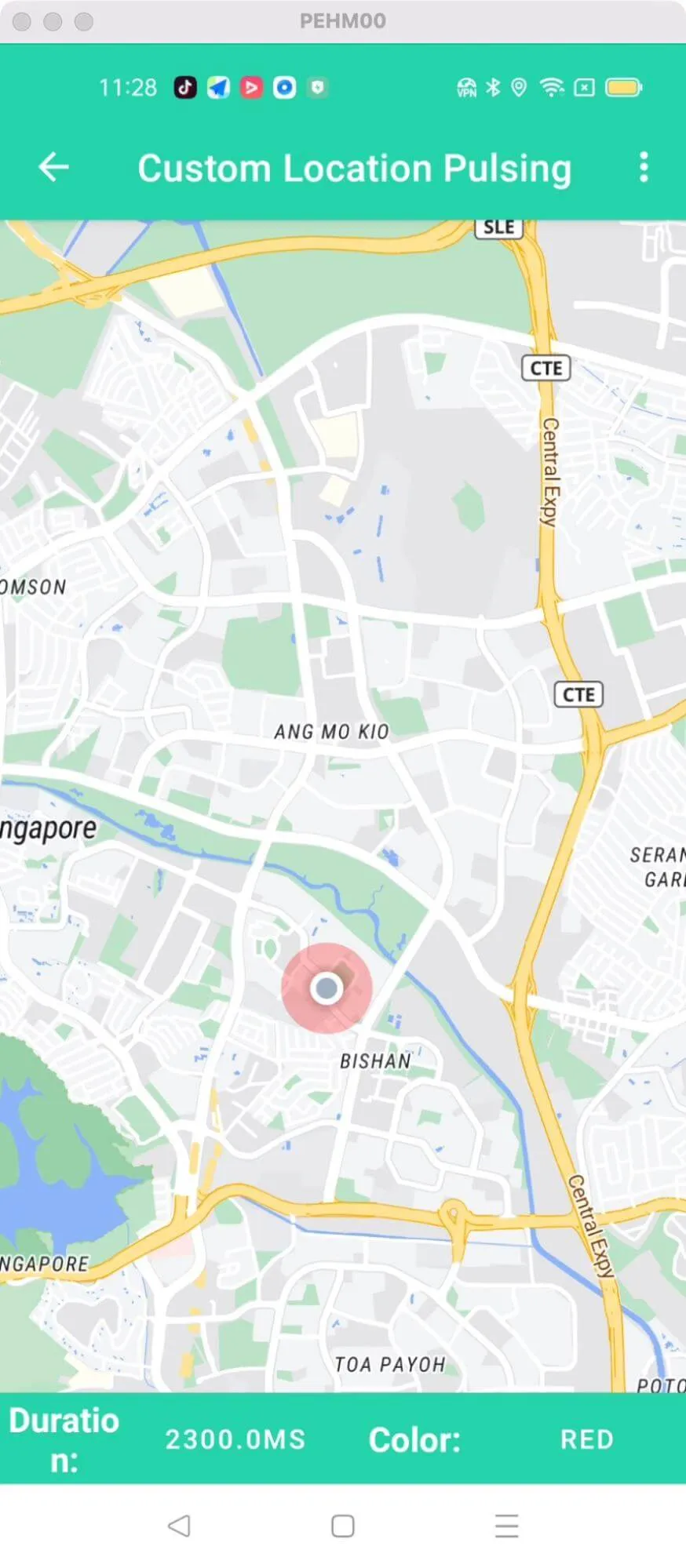
For all code examples, refer to [Android Maps SDK Code Examples](https://github.com/nextbillion-ai/nb-maps-android-demo)
**activity_customized_location_pulsing_circle.xml** [view source](https://github.com/nextbillion-ai/nb-maps-android-demo/blob/main/app/src/main/res/layout/activity_customized_location_pulsing_circle.xml)
```xml
```
CustomizedLocationPulsingCircleActivity view source
```java
package ai.nextbillion;
import android.annotation.SuppressLint;
import android.graphics.Color;
import android.location.Location;
import android.os.Bundle;
import android.view.Menu;
import android.view.MenuItem;
import android.view.animation.DecelerateInterpolator;
import android.view.animation.Interpolator;
import android.widget.ArrayAdapter;
import android.widget.Button;
import android.widget.Toast;
import java.util.ArrayList;
import java.util.List;
import ai.nextbillion.maps.camera.CameraUpdateFactory;
import ai.nextbillion.maps.core.MapView;
import ai.nextbillion.maps.core.NextbillionMap;
import ai.nextbillion.maps.core.OnMapReadyCallback;
import ai.nextbillion.maps.core.Style;
import ai.nextbillion.maps.location.LocationComponent;
import ai.nextbillion.maps.location.LocationComponentActivationOptions;
import ai.nextbillion.maps.location.LocationComponentOptions;
import ai.nextbillion.maps.location.engine.LocationEngineRequest;
import ai.nextbillion.maps.location.modes.CameraMode;
import ai.nextbillion.maps.location.permissions.PermissionsListener;
import ai.nextbillion.maps.location.permissions.PermissionsManager;
import androidx.annotation.NonNull;
import androidx.appcompat.app.AppCompatActivity;
import androidx.appcompat.widget.ListPopupWindow;
/**
* This activity shows how to customize the LocationComponent's pulsing circle.
*/
public class CustomizedLocationPulsingCircleActivity extends AppCompatActivity implements OnMapReadyCallback {
//region
// Adjust these variables to customize the example's pulsing circle UI
private static final float DEFAULT_LOCATION_CIRCLE_PULSE_DURATION_MS = 2300;
private static final float SECOND_LOCATION_CIRCLE_PULSE_DURATION_MS = 800;
private static final float THIRD_LOCATION_CIRCLE_PULSE_DURATION_MS = 8000;
private static final float DEFAULT_LOCATION_CIRCLE_PULSE_RADIUS = 35;
private static final float DEFAULT_LOCATION_CIRCLE_PULSE_ALPHA = .55f;
private static final Interpolator DEFAULT_LOCATION_CIRCLE_INTERPOLATOR_PULSE_MODE
= new DecelerateInterpolator();
private static final boolean DEFAULT_LOCATION_CIRCLE_PULSE_FADE_MODE = true;
//endregion
//region
private static int LOCATION_CIRCLE_PULSE_COLOR;
private static float LOCATION_CIRCLE_PULSE_DURATION = DEFAULT_LOCATION_CIRCLE_PULSE_DURATION_MS;
private static final String SAVED_STATE_LOCATION = "saved_state_location";
private static final String SAVED_STATE_LOCATION_CIRCLE_PULSE_COLOR = "saved_state_color";
private static final String SAVED_STATE_LOCATION_CIRCLE_PULSE_DURATION = "saved_state_duration";
private static final String LAYER_BELOW_ID = "waterway-label";
private Location lastLocation;
private MapView mapView;
private Button pulsingCircleDurationButton;
private Button pulsingCircleColorButton;
private PermissionsManager permissionsManager;
private LocationComponent locationComponent;
private NextbillionMap nextbillionMap;
private float currentPulseDuration;
//endregion
@Override
protected void onCreate(Bundle savedInstanceState) {
super.onCreate(savedInstanceState);
setContentView(R.layout.activity_customized_location_pulsing_circle);
LOCATION_CIRCLE_PULSE_COLOR = Color.BLUE;
mapView = findViewById(R.id.mapView);
if (savedInstanceState != null) {
lastLocation = savedInstanceState.getParcelable(SAVED_STATE_LOCATION);
LOCATION_CIRCLE_PULSE_COLOR = savedInstanceState.getInt(SAVED_STATE_LOCATION_CIRCLE_PULSE_COLOR);
LOCATION_CIRCLE_PULSE_DURATION = savedInstanceState.getFloat(SAVED_STATE_LOCATION_CIRCLE_PULSE_DURATION);
}
pulsingCircleDurationButton = findViewById(R.id.button_location_circle_duration);
pulsingCircleDurationButton.setText(String.format("%sms",
String.valueOf(LOCATION_CIRCLE_PULSE_DURATION)));
pulsingCircleDurationButton.setOnClickListener(v -> {
if (locationComponent == null) {
return;
}
showDurationListDialog();
});
pulsingCircleColorButton = findViewById(R.id.button_location_circle_color);
pulsingCircleColorButton.setOnClickListener(v -> {
if (locationComponent == null) {
return;
}
showColorListDialog();
});
mapView.onCreate(savedInstanceState);
checkPermissions();
}
@SuppressLint("MissingPermission")
@Override
public void onMapReady(@NonNull NextbillionMap nextbillionMap) {
this.nextbillionMap = nextbillionMap;
nextbillionMap.animateCamera(CameraUpdateFactory.zoomBy(13));
nextbillionMap.setStyle(StyleConstants.LIGHT, style -> {
locationComponent = nextbillionMap.getLocationComponent();
LocationComponentOptions locationComponentOptions =
buildLocationComponentOptions(
LOCATION_CIRCLE_PULSE_COLOR,
LOCATION_CIRCLE_PULSE_DURATION)
.pulseEnabled(true)
.build();
LocationComponentActivationOptions locationComponentActivationOptions =
buildLocationComponentActivationOptions(style,locationComponentOptions);
locationComponent.activateLocationComponent(locationComponentActivationOptions);
locationComponent.setLocationComponentEnabled(true);
locationComponent.setCameraMode(CameraMode.TRACKING);
locationComponent.forceLocationUpdate(lastLocation);
});
}
private LocationComponentOptions.Builder buildLocationComponentOptions(int pulsingCircleColor,
float pulsingCircleDuration
) {
currentPulseDuration = pulsingCircleDuration;
return LocationComponentOptions.builder(this)
.layerBelow(LAYER_BELOW_ID)
.pulseFadeEnabled(DEFAULT_LOCATION_CIRCLE_PULSE_FADE_MODE)
.pulseInterpolator(DEFAULT_LOCATION_CIRCLE_INTERPOLATOR_PULSE_MODE)
.pulseColor(pulsingCircleColor)
.pulseAlpha(DEFAULT_LOCATION_CIRCLE_PULSE_ALPHA)
.pulseSingleDuration(pulsingCircleDuration)
.pulseMaxRadius(DEFAULT_LOCATION_CIRCLE_PULSE_RADIUS);
}
@SuppressLint("MissingPermission")
private void setNewLocationComponentOptions(float newPulsingDuration,
int newPulsingColor) {
nextbillionMap.getStyle(style -> locationComponent.applyStyle(
buildLocationComponentOptions(
newPulsingColor,
newPulsingDuration)
.pulseEnabled(true)
.build()));
}
private LocationComponentActivationOptions buildLocationComponentActivationOptions(
@NonNull Style style,
@NonNull LocationComponentOptions locationComponentOptions) {
return LocationComponentActivationOptions
.builder(this, style)
.locationComponentOptions(locationComponentOptions)
.useDefaultLocationEngine(true)
.locationEngineRequest(new LocationEngineRequest.Builder(750)
.setFastestInterval(750)
.setPriority(LocationEngineRequest.PRIORITY_HIGH_ACCURACY)
.build())
.build();
}
@Override
public boolean onCreateOptionsMenu(Menu menu) {
getMenuInflater().inflate(R.menu.menu_pulsing_location_mode, menu);
return true;
}
@SuppressLint("MissingPermission")
@Override
public boolean onOptionsItemSelected(MenuItem item) {
if (locationComponent == null) {
return super.onOptionsItemSelected(item);
}
int id = item.getItemId();
if (id == R.id.action_component_disable) {
locationComponent.setLocationComponentEnabled(false);
return true;
} else if (id == R.id.action_component_enabled) {
locationComponent.setLocationComponentEnabled(true);
return true;
} else if (id == R.id.action_stop_pulsing) {
locationComponent.applyStyle(LocationComponentOptions.builder(
CustomizedLocationPulsingCircleActivity.this)
.pulseEnabled(false)
.build());
return true;
} else if (id == R.id.action_start_pulsing) {
locationComponent.applyStyle(buildLocationComponentOptions(
LOCATION_CIRCLE_PULSE_COLOR,
LOCATION_CIRCLE_PULSE_DURATION)
.pulseEnabled(true)
.build());
return true;
}
return super.onOptionsItemSelected(item);
}
private void checkPermissions() {
if (PermissionsManager.areLocationPermissionsGranted(this)) {
mapView.getMapAsync(this);
} else {
permissionsManager = new PermissionsManager(new PermissionsListener() {
@Override
public void onExplanationNeeded(List permissionsToExplain) {
Toast.makeText(CustomizedLocationPulsingCircleActivity.this, "You need to accept location permissions.",
Toast.LENGTH_SHORT).show();
}
@Override
public void onPermissionResult(boolean granted) {
if (granted) {
mapView.getMapAsync(CustomizedLocationPulsingCircleActivity.this);
} else {
finish();
}
}
});
permissionsManager.requestLocationPermissions(this);
}
}
private void showDurationListDialog() {
List modes = new ArrayList<>();
modes.add(String.format("%sms", String.valueOf(DEFAULT_LOCATION_CIRCLE_PULSE_DURATION_MS)));
modes.add(String.format("%sms", String.valueOf(SECOND_LOCATION_CIRCLE_PULSE_DURATION_MS)));
modes.add(String.format("%sms", String.valueOf(THIRD_LOCATION_CIRCLE_PULSE_DURATION_MS)));
ArrayAdapter profileAdapter = new ArrayAdapter<>(this,
android.R.layout.simple_list_item_1, modes);
ListPopupWindow listPopup = new ListPopupWindow(this);
listPopup.setAdapter(profileAdapter);
listPopup.setAnchorView(pulsingCircleDurationButton);
listPopup.setOnItemClickListener((parent, itemView, position, id) -> {
String selectedMode = modes.get(position);
pulsingCircleDurationButton.setText(selectedMode);
if (selectedMode.contentEquals(String.format("%sms",
String.valueOf(DEFAULT_LOCATION_CIRCLE_PULSE_DURATION_MS)))) {
LOCATION_CIRCLE_PULSE_DURATION = DEFAULT_LOCATION_CIRCLE_PULSE_DURATION_MS;
setNewLocationComponentOptions(DEFAULT_LOCATION_CIRCLE_PULSE_DURATION_MS, LOCATION_CIRCLE_PULSE_COLOR);
} else if (selectedMode.contentEquals(String.format("%sms",
String.valueOf(SECOND_LOCATION_CIRCLE_PULSE_DURATION_MS)))) {
LOCATION_CIRCLE_PULSE_DURATION = SECOND_LOCATION_CIRCLE_PULSE_DURATION_MS;
setNewLocationComponentOptions(SECOND_LOCATION_CIRCLE_PULSE_DURATION_MS, LOCATION_CIRCLE_PULSE_COLOR);
} else if (selectedMode.contentEquals(String.format("%sms",
String.valueOf(THIRD_LOCATION_CIRCLE_PULSE_DURATION_MS)))) {
LOCATION_CIRCLE_PULSE_DURATION = THIRD_LOCATION_CIRCLE_PULSE_DURATION_MS;
setNewLocationComponentOptions(THIRD_LOCATION_CIRCLE_PULSE_DURATION_MS, LOCATION_CIRCLE_PULSE_COLOR);
}
listPopup.dismiss();
});
listPopup.show();
}
private void showColorListDialog() {
List trackingTypes = new ArrayList<>();
trackingTypes.add("Blue");
trackingTypes.add("Red");
trackingTypes.add("Green");
trackingTypes.add("Gray");
ArrayAdapter profileAdapter = new ArrayAdapter<>(this,
android.R.layout.simple_list_item_1, trackingTypes);
ListPopupWindow listPopup = new ListPopupWindow(this);
listPopup.setAdapter(profileAdapter);
listPopup.setAnchorView(pulsingCircleColorButton);
listPopup.setOnItemClickListener((parent, itemView, position, id) -> {
String selectedTrackingType = trackingTypes.get(position);
pulsingCircleColorButton.setText(selectedTrackingType);
if (selectedTrackingType.contentEquals("Blue")) {
LOCATION_CIRCLE_PULSE_COLOR = Color.BLUE;
setNewLocationComponentOptions(currentPulseDuration, Color.BLUE);
} else if (selectedTrackingType.contentEquals("Red")) {
LOCATION_CIRCLE_PULSE_COLOR = Color.RED;
setNewLocationComponentOptions(currentPulseDuration, Color.RED);
} else if (selectedTrackingType.contentEquals("Green")) {
LOCATION_CIRCLE_PULSE_COLOR = Color.GREEN;
setNewLocationComponentOptions(currentPulseDuration, Color.GREEN);
} else if (selectedTrackingType.contentEquals("Gray")) {
LOCATION_CIRCLE_PULSE_COLOR = Color.parseColor("#4a4a4a");
setNewLocationComponentOptions(currentPulseDuration, Color.parseColor("#4a4a4a"));
}
listPopup.dismiss();
});
listPopup.show();
}
@Override
public void onRequestPermissionsResult(int requestCode, @NonNull String[] permissions, @NonNull int[] grantResults) {
super.onRequestPermissionsResult(requestCode, permissions, grantResults);
permissionsManager.onRequestPermissionsResult(requestCode, permissions, grantResults);
}
@Override
protected void onStart() {
super.onStart();
mapView.onStart();
}
@Override
protected void onResume() {
super.onResume();
mapView.onResume();
}
@Override
protected void onPause() {
super.onPause();
mapView.onPause();
}
@Override
protected void onStop() {
super.onStop();
mapView.onStop();
}
@SuppressLint("MissingPermission")
@Override
protected void onSaveInstanceState(Bundle outState) {
super.onSaveInstanceState(outState);
mapView.onSaveInstanceState(outState);
if (locationComponent != null) {
outState.putParcelable(SAVED_STATE_LOCATION, locationComponent.getLastKnownLocation());
outState.putInt(SAVED_STATE_LOCATION_CIRCLE_PULSE_COLOR, LOCATION_CIRCLE_PULSE_COLOR);
outState.putFloat(SAVED_STATE_LOCATION_CIRCLE_PULSE_DURATION, LOCATION_CIRCLE_PULSE_DURATION);
}
}
@Override
protected void onDestroy() {
super.onDestroy();
mapView.onDestroy();
}
@Override
public void onLowMemory() {
super.onLowMemory();
mapView.onLowMemory();
}
}
```
The given code is an Android activity that demonstrates how to customize the pulsing circle of the location component on a map. The activity allows the user to change the duration and color of the pulsing circle.
initMapView:
- The **onCreate** method initializes the mapView by finding the view from the layout file and calling onCreate on it.
- The **onMapReady** method is implemented to handle the map when it is ready for use.
- The mapView is initialized by calling **getMapAsync** and passing the activity itself as the callback.
handle Location Permissions:
- The **checkPermissions** method checks if location permissions are granted. If permissions are granted, it calls **getMapAsync** to initialize the map.
- If permissions are not granted, it creates a **PermissionsManager** and requests location permissions.
- The **PermissionsListener** interface is implemented to handle the result of the permission request.
track the current location automatically when the map is ready:
- The **onMapReady** method is called when the map is ready.
- It sets the map style using the **setStyle** method, passing the desired style and a callback for when the style is loaded.
- The **locationComponent** is obtained from the nextbillionMap object, and location component options are built.
- The location component is **activated** and **enabled**, and the camera mode is set to **tracking**.
- The last known location is forced to update if available.
customize the location pulsing style:
- The buildLocationComponentOptions method is used to build the options for the location component.
- It takes the pulsing circle color and duration as parameters and sets the desired properties for the location component options.
- The **setNewLocationComponentOptions** method is called to update the location component options with new pulsing duration and color.
- The following properties are adjusted to customize the example's pulsing circle UI:
- **DEFAULT_LOCATION_CIRCLE_PULSE_DURATION_MS**: The default duration in milliseconds for the pulsing circle animation.
- **SECOND_LOCATION_CIRCLE_PULSE_DURATION_MS**: The duration in milliseconds for the second pulsing circle animation.
- **THIRD_LOCATION_CIRCLE_PULSE_DURATION_MS**: The duration in milliseconds for the third pulsing circle animation.
- **DEFAULT_LOCATION_CIRCLE_PULSE_RADIUS**: The default radius of the pulsing circle.
- **DEFAULT_LOCATION_CIRCLE_PULSE_ALPHA**: The default alpha value of the pulsing circle.
- **DEFAULT_LOCATION_CIRCLE_INTERPOLATOR_PULSE_MODE**: The default interpolator for the pulsing circle animation.
- **DEFAULT_LOCATION_CIRCLE_PULSE_FADE_MODE**: The default fade mode for the pulsing circle animation.
The **color**, **duration** and other properties of the **pulsing circle** can be changed by interacting with buttons and dialog menus in the activity. The **onOptionsItemSelected** method handles the button clicks and updates the location component accordingly.