# custom InfoWindow
This example shows how to Add a Marker with a Custom Info Window
- Add a Custom view Marker with CustomMarkerOptions
- Custom the info widow of the marker using mMap.setInfoWindowAdapter
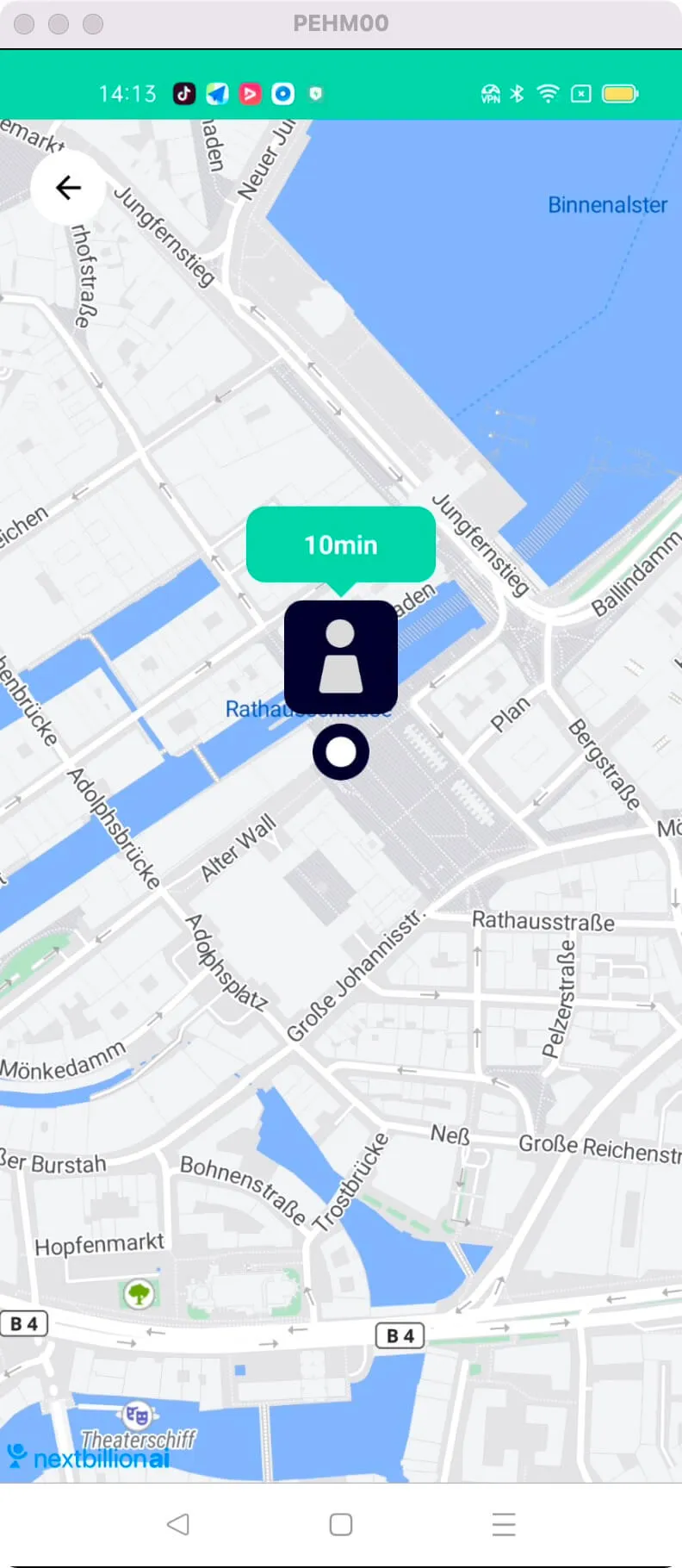
For all code examples, refer to [Android Maps SDK Code Examples](https://github.com/nextbillion-ai/nb-maps-android-demo)
**activity_animate_markers.xml** [view source](https://github.com/nextbillion-ai/nb-maps-android-demo/blob/main/app/src/main/res/layout/activity_animate_markers.xml)
```xml
```
**CustomInfoWindowActivity** [view source](https://github.com/nextbillion-ai/nb-maps-android-demo/blob/main/app/src/main/java/ai/nextbillion/CustomInfoWindowActivity.java)
```java
package ai.nextbillion;
import android.graphics.Bitmap;
import android.graphics.Color;
import android.os.Bundle;
import android.os.Parcel;
import android.os.Parcelable;
import android.view.LayoutInflater;
import android.view.View;
import android.widget.ImageView;
import android.widget.TextView;
import ai.nextbillion.maps.annotations.BaseMarkerOptions;
import ai.nextbillion.maps.annotations.Icon;
import ai.nextbillion.maps.annotations.IconFactory;
import ai.nextbillion.maps.annotations.Marker;
import ai.nextbillion.maps.core.MapView;
import ai.nextbillion.maps.core.NextbillionMap;
import ai.nextbillion.maps.core.OnMapReadyCallback;
import ai.nextbillion.maps.core.Style;
import ai.nextbillion.maps.geometry.LatLng;
import ai.nextbillion.utils.SymbolGenerator;
import androidx.annotation.NonNull;
import androidx.annotation.Nullable;
import androidx.appcompat.app.AppCompatActivity;
public class CustomInfoWindowActivity extends AppCompatActivity implements OnMapReadyCallback {
private MapView mapView;
private NextbillionMap mMap;
private ImageView ivBack;
@Override
protected void onCreate(Bundle savedInstanceState) {
super.onCreate(savedInstanceState);
setContentView(R.layout.activity_animate_markers);
ivBack = findViewById(R.id.iv_back);
mapView = findViewById(R.id.map_view);
mapView.onCreate(savedInstanceState);
mapView.getMapAsync(this);
ivBack.setOnClickListener(v -> finish());
}
@Override
public void onMapReady(@NonNull NextbillionMap nextbillionMap) {
mMap = nextbillionMap;
mMap.getStyle(new Style.OnStyleLoaded() {
@Override
public void onStyleLoaded(@NonNull Style style) {
customiseInfoWindow();
addMarker();
}
});
}
///////////////////////////////////////////////////////////////////////////
//
///////////////////////////////////////////////////////////////////////////
private Bitmap generateTextIcon() {
// View view = LayoutInflater.from(this).inflate(R.layout.text_marker_layout, mapView, false);
View view = LayoutInflater.from(this).inflate(R.layout.custom_marker_layout, mapView, false);
return SymbolGenerator.generate(view);
}
private void addMarker() {
Bitmap iconBitmap = generateTextIcon();
Icon icon = IconFactory.getInstance(this).fromBitmap(iconBitmap);
mMap.addMarker(new CustomMarkerOptions().icon(icon).position(new LatLng(53.55095026373886, 9.992248999933745)));
}
///////////////////////////////////////////////////////////////////////////
// Customise InfoWindow
///////////////////////////////////////////////////////////////////////////
private void customiseInfoWindow() {
mMap.setInfoWindowAdapter(new NextbillionMap.InfoWindowAdapter() {
@Nullable
@Override
public View getInfoWindow(@NonNull Marker marker) {
String title = marker.getTitle();
if (marker instanceof CustomMarker) {
View infoWidow = LayoutInflater.from(CustomInfoWindowActivity.this).inflate(R.layout.custom_info_window, mapView, false);
TextView infoText = infoWidow.findViewById(R.id.info_text);
// int color = ((CustomMarker) marker).getInfoWindowColor();
// TextView textView = defaultTextView(title);
// textView.setBackgroundColor(color);
return infoWidow;
}
return defaultTextView(title);
}
});
}
private TextView defaultTextView(String text) {
TextView textView = new TextView(this);
int sixteenDp = (int) getResources().getDimension(R.dimen.attr_margin);
textView.setText(text);
textView.setTextColor(Color.WHITE);
textView.setPadding(sixteenDp, sixteenDp, sixteenDp, sixteenDp);
return textView;
}
static class CustomMarker extends Marker {
private final int infoWindowColor;
public CustomMarker(BaseMarkerOptions baseMarkerOptions, int color) {
super(baseMarkerOptions);
infoWindowColor = color;
}
public int getInfoWindowColor() {
return infoWindowColor;
}
}
static class CustomMarkerOptions extends BaseMarkerOptions {
private int color;
public CustomMarkerOptions() {
}
public CustomMarkerOptions infoWindowColor(int color) {
this.color = color;
return this;
}
@Override
public CustomMarkerOptions getThis() {
return this;
}
@Override
public CustomMarker getMarker() {
return new CustomMarker(this, color);
}
private CustomMarkerOptions(Parcel in) {
position((LatLng) in.readParcelable(LatLng.class.getClassLoader()));
snippet(in.readString());
String iconId = in.readString();
Bitmap iconBitmap = in.readParcelable(Bitmap.class.getClassLoader());
Icon icon = IconFactory.recreate(iconId, iconBitmap);
icon(icon);
title(in.readString());
infoWindowColor(in.readInt());
}
public static final Parcelable.Creator CREATOR
= new Parcelable.Creator() {
public CustomMarkerOptions createFromParcel(Parcel in) {
return new CustomMarkerOptions(in);
}
public CustomMarkerOptions[] newArray(int size) {
return new CustomMarkerOptions[size];
}
};
@Override
public int describeContents() {
return 0;
}
@Override
public void writeToParcel(Parcel out, int flags) {
out.writeParcelable(position, flags);
out.writeString(snippet);
out.writeString(icon.getId());
out.writeParcelable(icon.getBitmap(), flags);
out.writeString(title);
out.writeInt(color);
}
}
///////////////////////////////////////////////////////////////////////////
// Lifecycle
///////////////////////////////////////////////////////////////////////////
@Override
protected void onStart() {
super.onStart();
mapView.onStart();
}
@Override
protected void onResume() {
super.onResume();
mapView.onResume();
}
@Override
protected void onPause() {
super.onPause();
mapView.onPause();
}
@Override
protected void onStop() {
super.onStop();
mapView.onStop();
}
@Override
protected void onSaveInstanceState(@NonNull Bundle outState) {
super.onSaveInstanceState(outState);
mapView.onSaveInstanceState(outState);
}
@Override
protected void onDestroy() {
super.onDestroy();
mapView.onDestroy();
}
@Override
public void onLowMemory() {
super.onLowMemory();
mapView.onLowMemory();
}
}
```
The given code is an Android activity that demonstrates how to initialize a MapView and add a marker with a custom info window.
Initializing the MapView:
- The MapView is instantiated and initialized in the **onCreate()** method using **findViewById()**.
- The map is asynchronously loaded using **getMapAsync()** and the initialization of the map is done in the callback.
Adding a Marker with a Custom Info Window:
- The **addMarker** method is responsible for adding a marker to the map.
- First, a custom icon for the marker is generated using the generateTextIcon method.
- Then, an instance of the Icon is created from the generated bitmap icon.
- Finally, the mMap object (NextbillionMap) adds a marker with the custom icon and specified position.
Customizing the Info Window:
- The **customiseInfoWindow** method is used to customize the info window appearance.
- It sets an info window adapter for the map using **mMap.setInfoWindowAdapter**.
- In the adapter's **getInfoWindow** method, a custom info window view is inflated and returned if the marker is an instance of **CustomMarker**.
- Otherwise, a default text view with the marker's title is returned.
The code also includes various **lifecycle** methods **(onStart, onResume, onPause, onStop, onSaveInstanceState, onDestroy, onLowMemory)** that should be implemented when using the MapView to properly manage its lifecycle and handle configuration changes.
The code includes additional classes **(CustomMarker, CustomMarkerOptions)** for creating custom markers with custom properties, such as info window color. These classes extend the base marker classes provided by the Nextbillion Maps SDK.