# Basic Location Tracking
This example shows how to Track the Current Location Manually
- Location Permissions Handling
- Tracking current location automatically when Map ready
- Add CameraTracking Change Listener to update tracking status
- Click Location Tracking Button to track the current location
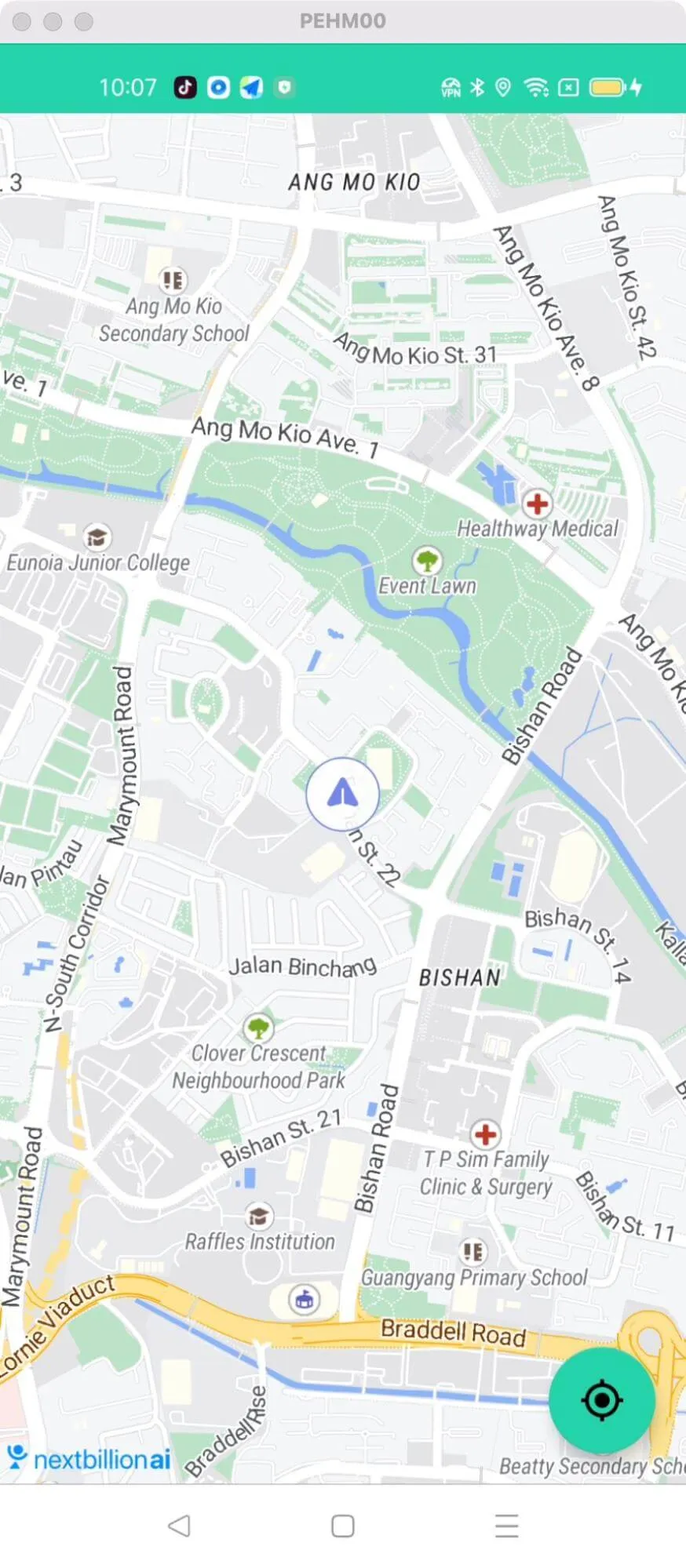
For all code examples, refer to [Android Maps SDK Code Examples](https://github.com/nextbillion-ai/nb-maps-android-demo)
**activity_basic_location_tracking.xml** [view source](https://github.com/nextbillion-ai/nb-maps-android-demo/blob/main/app/src/main/res/layout/activity_basic_location_tracking.xml)
```xml
```
**BasicLocationTrackingActivity** [view source](https://github.com/nextbillion-ai/nb-maps-android-demo/blob/main/app/src/main/java/ai/nextbillion/BasicLocationTrackingActivity.java)
```java
package ai.nextbillion;
import android.annotation.SuppressLint;
import android.os.Bundle;
import android.widget.Toast;
import com.google.android.material.floatingactionbutton.FloatingActionButton;
import java.util.List;
import ai.nextbillion.maps.camera.CameraPosition;
import ai.nextbillion.maps.camera.CameraUpdateFactory;
import ai.nextbillion.maps.core.MapView;
import ai.nextbillion.maps.core.NextbillionMap;
import ai.nextbillion.maps.core.OnMapReadyCallback;
import ai.nextbillion.maps.core.Style;
import ai.nextbillion.maps.geometry.LatLng;
import ai.nextbillion.maps.location.LocationComponent;
import ai.nextbillion.maps.location.LocationComponentActivationOptions;
import ai.nextbillion.maps.location.LocationComponentOptions;
import ai.nextbillion.maps.location.OnCameraTrackingChangedListener;
import ai.nextbillion.maps.location.modes.CameraMode;
import ai.nextbillion.maps.location.modes.RenderMode;
import ai.nextbillion.maps.location.permissions.PermissionsListener;
import ai.nextbillion.maps.location.permissions.PermissionsManager;
import androidx.annotation.NonNull;
import androidx.appcompat.app.AppCompatActivity;
public class BasicLocationTrackingActivity extends AppCompatActivity implements OnMapReadyCallback {
private MapView mapView;
private NextbillionMap nextbillionMap;
private PermissionsManager permissionsManager;
FloatingActionButton trackLocation;
@Override
protected void onCreate(Bundle savedInstanceState) {
super.onCreate(savedInstanceState);
setContentView(R.layout.activity_basic_location_tracking);
mapView = findViewById(R.id.mapView);
trackLocation = findViewById(R.id.trackLocation);
trackLocation.setOnClickListener(v -> {
if (nextbillionMap != null) {
trackLocation.setImageResource(R.drawable.ic_my_location);
trackLocation();
}
});
mapView.onCreate(savedInstanceState);
if (PermissionsManager.areLocationPermissionsGranted(this)) {
mapView.getMapAsync(this);
} else {
permissionsManager = new PermissionsManager(new PermissionsListener() {
@Override
public void onExplanationNeeded(List permissionsToExplain) {
Toast.makeText(BasicLocationTrackingActivity.this, "You need to accept location permissions.",
Toast.LENGTH_SHORT).show();
}
@Override
public void onPermissionResult(boolean granted) {
if (granted) {
mapView.getMapAsync(BasicLocationTrackingActivity.this);
} else {
finish();
}
}
});
permissionsManager.requestLocationPermissions(this);
}
}
@SuppressLint("MissingPermission")
private void trackLocation() {
if (nextbillionMap == null) {
return;
}
LocationComponent locationComponent = nextbillionMap.getLocationComponent();
LocationComponentOptions locationComponentOptions = locationComponent.getLocationComponentOptions();
locationComponent.applyStyle(locationComponentOptions.toBuilder()
.pulseEnabled(true)
.build());
locationComponent.setLocationComponentEnabled(true);
locationComponent.setRenderMode(RenderMode.GPS);
locationComponent.setCameraMode(CameraMode.TRACKING);
}
@Override
public void onRequestPermissionsResult(int requestCode, @NonNull String[] permissions, @NonNull int[] grantResults) {
super.onRequestPermissionsResult(requestCode, permissions, grantResults);
permissionsManager.onRequestPermissionsResult(requestCode, permissions, grantResults);
}
@Override
public void onMapReady(@NonNull NextbillionMap nextbillionMap) {
this.nextbillionMap = nextbillionMap;
CameraPosition cameraPosition = new CameraPosition.Builder()
.target(new LatLng(22.70418008712976, 78.66264025041812))
.zoom(14)
.tilt(30)
.tilt(0)
.build();
nextbillionMap.moveCamera(CameraUpdateFactory.newCameraPosition(cameraPosition));
nextbillionMap.setStyle(new Style.Builder().fromUri(StyleConstants.LIGHT), this::activateLocationComponent);
trackLocation.setImageResource(R.drawable.ic_my_location);
}
@SuppressLint("MissingPermission")
private void activateLocationComponent(@NonNull Style style) {
LocationComponent locationComponent = nextbillionMap.getLocationComponent();
locationComponent.activateLocationComponent(
LocationComponentActivationOptions
.builder(this, style)
.useDefaultLocationEngine(true)
.locationComponentOptions(LocationComponentOptions.builder(this)
.pulseEnabled(true)
.build())
.build());
locationComponent.setLocationComponentEnabled(true);
locationComponent.setRenderMode(RenderMode.GPS);
locationComponent.setCameraMode(CameraMode.TRACKING);
locationComponent.addOnCameraTrackingChangedListener(new OnCameraTrackingChangedListener() {
@Override
public void onCameraTrackingDismissed() {
trackLocation.setImageResource(R.drawable.icon_location_searching);
}
@Override
public void onCameraTrackingChanged(int i) {
}
});
locationComponent.addOnLocationClickListener(
() -> Toast.makeText(this, "Location clicked", Toast.LENGTH_SHORT).show());
locationComponent.addOnLocationLongClickListener(
() -> Toast.makeText(this, "Location long clicked", Toast.LENGTH_SHORT).show());
}
@Override
protected void onStart() {
super.onStart();
mapView.onStart();
}
@Override
protected void onResume() {
super.onResume();
mapView.onResume();
}
@Override
protected void onPause() {
super.onPause();
mapView.onPause();
}
@Override
protected void onStop() {
super.onStop();
mapView.onStop();
}
@Override
protected void onSaveInstanceState(Bundle outState) {
super.onSaveInstanceState(outState);
mapView.onSaveInstanceState(outState);
}
@Override
protected void onDestroy() {
super.onDestroy();
mapView.onDestroy();
}
@Override
public void onLowMemory() {
super.onLowMemory();
mapView.onLowMemory();
}
}
```
This code example demonstrates basic location-tracking functionality using the **Nextbillion map library**. It handles location permissions, tracks the current location automatically when the map is ready, adds a camera tracking change listener to update the tracking status, and allows the user to click a button to track their current location.
Location Permissions Handling:
- The code checks if **location permissions** are granted using **PermissionsManager.areLocationPermissionsGranted(this)**.
- If permissions are granted, the map is asynchronously loaded using **mapView.getMapAsync(this)**.
- If permissions are not granted, a PermissionsManager instance is created and used to request location permissions. The result of the permission request is handled in the **onPermissionResult** method.
Tracking Current Location Automatically when Map Ready:
- The **onMapReady** method is called when the map is ready.
- The **nextbillionMap** instance is assigned.
- A **CameraPosition** is created to set the initial camera position of the map.
- The map style is set using a **Style.Builder** and the **activateLocationComponent** method are called to activate the **location component**.
Add CameraTracking Change Listener to Update Tracking Status:
- The **activateLocationComponent** method is called when the location component is activated.
- The **OnCameraTrackingChangedListener** is added to the location component to listen for changes in camera tracking status.
- When tracking is dismissed, the tracking button's image is updated.
- The **addOnLocationClickListener** and **addOnLocationLongClickListener** methods are used to listen for location clicks and long clicks.
Click Location Tracking Button to Track Current Location:
- The trackLocation button's click listener is implemented.
- When clicked, the button image is updated, and the trackLocation method is called.
- In the trackLocation method, the location component is retrieved from the **nextbillionMap** and configured.
- The location component's **style** is updated to **enable pulsing**.
- The location component is enabled, and the **CameraMode** is set to **TRACKING**.
Additional notes:
- The code includes lifecycle methods **(onStart, onResume, onPause, onStop, onSaveInstanceState, onDestroy, onLowMemory)** to manage the **lifecycle** of the MapView.
- The code uses Nextbillion map library classes and methods for map-related operations.
- The code includes resource IDs for icons and handles their display and click events.
- The code demonstrates how to handle location permissions using the **PermissionsManager** class.